getimg.ai vs Leonardo.ai: 2026 Comparison


getimg.ai and Leonardo.ai both put many AI models behind one login, but they are built for different users. getimg.ai is built for professional production: image generation, video, music, speech, and sound effects in one paid workspace on a shared credit balance, Auto model selection with prompt enhancement, reusable Elements that need no training step, and commercial usage rights on every paid plan with no public-by-default gallery. Leonardo.ai reaches wider, into 3D and a free tier, but its free-tier work is public and its Elements require LoRA training. For teams shipping finished image, video, and audio work, getimg.ai is the stronger choice.
getimg.ai vs Leonardo.ai at a Glance
Dimension | getimg.ai | Leonardo.ai |
Media in the Workspace | Images, video, music, speech, sound effects on a shared credit balance; separately billed image and video generation API | Images, video, audio, and 3D in the app; additional audio endpoints in the separately billed Production API |
Model Selection | Auto or manual | Auto or manual |
Free-Tier Privacy | No free tier; no public-by-default gallery | Free generations are public and cannot be made private without paying |
Output Rights | Commercial usage rights on every paid plan; consult its Terms for ownership and confidentiality specifics | Free-tier output ownership vests in Leonardo; paid users own public and private outputs, while public content grants Leonardo a broad reuse license |
Brand Consistency | Elements: 13 reusable types, no training step | Elements require LoRA training |
Upscaling & Delivery | Image upscaling up to 16K on selected plans, plus video upscaling to 1080p or 4K | Pro Upscaler up to 105MP, plus image and video editing |
Entry Paid Price (Annual Billing) | No free plan; commercial rights included (see pricing) | About $12/month (Essential) |
What Each Platform Can Make
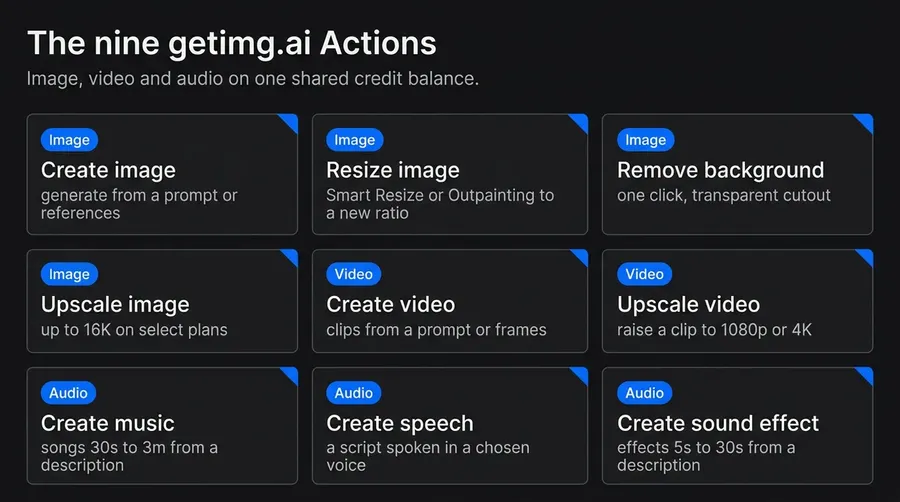
getimg.ai brings image, video, and audio together in one workspace on a shared credit balance. You generate and edit images, generate video and upscale it, and create music, speech, and sound effects without leaving the subscription or picking up a second bill. A campaign, a product clip, a voiceover, and a background track all come from the same place on the same balance.
Leonardo.ai also offers Audio in its web app, with official materials naming Music v1 and Seed Audio, and it adds 3D asset creation with Rodin V2, which suits 3D and game pipelines more than day-to-day marketing work. Its separately billed Production API documents additional music, dialogue, and sound-effect endpoints, and both companies bill API usage separately from their web-app subscriptions.
getimg.ai's advantage is packaging: standalone music, speech, and sound-effect Actions are explicitly included in the paid workspace and draw from the same shared credit balance as its image and video tools.
Models and Model Selection
Both platforms are multi-model and both offer Auto and manual selection, so the question is what the picker reaches and how much help it gives. getimg.ai defaults to Auto, reads your prompt, routes to a fitting model, and applies prompt enhancement, so a short, plain description still returns a strong result; you can pin a specific model when you want one and switch back to Auto after.
Its generation lineup spans image and video models such as FLUX 3, GPT Image 2, Seedream 5.0 Pro, Nano Banana 2, Google Veo 3.1, and dedicated Actions for music, speech, and sound effects draw from the same shared credit balance.
Leonardo.ai offers Auto and manual selection too, across its own Phoenix, Lucid Origin, and Lucid Realism models plus integrated third-party models from families such as FLUX, Ideogram, Google Veo, Kling, and GPT Image. It is a genuine multi-model lineup on the image and video side.
Model availability changes often, so treat both lineups as a snapshot of the publication date rather than a fixed roster.
Pricing and How Usage Is Counted
Both platforms use one usage currency, and on both a run's cost varies with the model, output count, and settings, so neither is a flat per-image price. What separates them is the entry point and what comes with it.
getimg.ai
getimg.ai has four paid plans: Entry, Core, Plus, and Ultra. Each includes a monthly credit allowance and commercial usage rights. Core, Plus, and Ultra are priced per seat and add Teams (up to 2, 5, and 10 teams). Current prices and credit amounts are on the getimg.ai pricing page.
Leonardo.ai
Leonardo.ai Individual Plan (Annual Billing) | Price / Month | Tokens / Month |
Free | $0 | 150 per day |
Essential | ~$12 | 8,500 |
Premium | ~$30 | 25,000 |
Ultimate | ~$60 | 60,000 |
Leonardo.ai USD list prices with annual billing, checked 11 August 2026. Taxes, local-currency pricing, and available promotions may vary.
getimg.ai pricing includes commercial usage rights on every plan, and it offers the option to top-up credits on higher tiers. Leonardo's paid tiers add token rollover and relaxed generation on selected models, which helps if your usage is uneven, and its only no-cost option is the public free tier.
getimg.ai's Core, Plus, and Ultra are priced per seat, so a team pays that rate for each member, whereas the Leonardo prices above are single-user plans (Leonardo lists team and API pricing separately). For a solo user, the like-for-like comparison is getimg.ai Entry against Leonardo's individual plans. Predictable cost with commercial rights already included is one of the criteria worth weighing when choosing an AI image generator for professional work.
Your Images: Privacy and Ownership
This is the clearest advantage for professional work. On Leonardo.ai's free plan, generations are public in the community gallery, cannot be made private without upgrading, and ownership of free-tier outputs vests in Leonardo, with the user receiving a commercial license. On paid plans, Leonardo users own their outputs whether public or private, but marking content public grants Leonardo a broad, perpetual license to reuse it. Either way, the only way to keep work off a public feed is to pay.
getimg.ai has no free tier and does not operate a public-by-default gallery, so outputs are not automatically posted to a public feed while you work. Every paid plan includes commercial usage rights on AI-generated work.
One honest caveat: commercial permission to use an output is a separate question from who holds copyright in it, so read each platform's legal terms directly for the ownership and confidentiality specifics. On the point that matters day to day, getimg.ai does not automatically publish your generations, while Leonardo's free plan does and makes private generation a paid feature.
Staying On-Brand: Elements vs Trained LoRAs
Both platforms use the name Elements, but they get you to a reusable asset very differently. On Leonardo.ai an Element is trained with LoRA techniques on your own images, using Flux Dev as the base model, so there is a training step before you can use it. Leonardo also offers Character Reference and Style Reference features that borrow a look from an uploaded image.
On getimg.ai an Element is a reusable reference set you create in seconds by uploading up to 20 photos, naming it, and choosing a type. There are 13 types, covering person, product, style, color palette, lighting, composition, and more, and you call one into a prompt by typing its name with an @ in front.
There is no training step to wait on, so a brand team can define a product, a model, and a palette once and start reusing them across assets immediately. For teams that stand up new references constantly, skipping the training step is a real speed advantage.
Editing and Delivery
Both platforms have serious finishing tools. getimg.ai offers dedicated Actions for background removal, resizing, image upscaling, and video upscaling. Its Resize image Action includes Smart Resize and Outpainting, while prompt-based image editing covers tasks such as restoration, object removal, and background changes. Its image upscaler reaches up to 16K on selected plans, and video can be upscaled to 1080p or 4K. Edits and upscales create new files while preserving the source.
Leonardo.ai offers a full image editor, a video editor, and a Pro Upscaler advertised up to 105MP. For the workflow prioritized here, getimg.ai's advantage is that common delivery tasks are surfaced through clearly separated Actions, including a dedicated video-upscaling route.
Who Each Tool Fits
getimg.ai fits professional teams and creators who produce finished image, video, and audio work on a schedule and want it consolidated: Auto with prompt enhancement, a shared credit balance across every medium, instant reusable Elements, commercial usage rights from the first plan, and no public-by-default gallery. That covers most marketing, social, brand, e-commerce, and content production, and it is served by a team space with shared folders, Elements, uploads and generations.
Leonardo.ai fits narrower or adjacent needs: someone who wants a free tier to experiment with and does not mind that the output is public, a 3D or game pipeline that needs Rodin V2 asset generation, or a workflow built around training LoRA style and character Elements. Those are real use cases, but they sit to the side of everyday professional production, which is where getimg.ai is aimed.
The Bottom Line
getimg.ai and Leonardo.ai overlap on multi-model access and automatic selection, but for professional production they are not equals. getimg.ai puts images, video, and audio in one subscription on a shared credit balance, applies prompt enhancement in Auto, keeps consistency instant with no-training Elements, offers image upscaling up to 16K on selected plans and video upscaling to 4K, and includes commercial usage rights on every paid plan with no public-by-default gallery.
Leonardo.ai spreads wider, into 3D and a free tier, but its free tier publishes your work and its Elements require training. For a team shipping finished visual and audio work, getimg.ai is the stronger and more consolidated choice.
Create your first project in getimg.ai.
Frequently Asked Questions
For professional production, yes. Both are multi-model platforms with Auto and manual selection, but getimg.ai combines image, video, and audio in one subscription on a shared credit balance, applies prompt enhancement in Auto, offers reusable Elements with no training step, includes commercial usage rights on every paid plan, and does not automatically publish your work to a public gallery.
Leonardo.ai has strengths for narrower cases, a free tier to experiment with, 3D generation, and token rollover, but those serve experimentation and 3D pipelines more than daily professional output. For teams shipping finished work, getimg.ai is the stronger choice.
Leonardo.ai has a free plan that grants 150 tokens per day, but the cost is exposure: generations are public in the community gallery, cannot be made private without upgrading, and ownership of the outputs vests in Leonardo while the user receives a commercial license.
getimg.ai has no free plan; every paid plan includes commercial usage rights, and your work is not automatically posted to a public feed. The entry-point difference is a free but public option on Leonardo versus a paid option on getimg.ai that is not published to a public gallery.
Both platforms permit commercial use under their applicable plan terms, subject to their usage policies, applicable law, and third-party rights. The detail differs by tier. On Leonardo.ai's free plan, output ownership vests in Leonardo and you receive a commercial license; on paid plans you own your outputs whether public or private, though publishing public content grants Leonardo a broad reuse license.
On getimg.ai, commercial usage rights are included on every paid plan and there is no public-by-default gallery. Note that commercial permission is a separate question from who holds copyright in an AI output, so read each platform's legal terms directly for ownership and confidentiality specifics.
Yes. Both getimg.ai and Leonardo.ai default to an Auto selector that picks a model from your prompt, and both let you switch to manual. getimg.ai's Auto applies prompt enhancement, so a short description still returns a strong result, and its dedicated AI music, speech, and sound-effect Actions draw from the same shared credit balance as image and video. Automatic selection itself is not the dividing line between the two platforms; media range, pricing, and privacy defaults are.
Both are named Elements, but they reach a reusable asset differently. A Leonardo Element is a LoRA adapter trained on your own images, using Flux Dev as the base, so it involves a training step before use.
A getimg.ai Element is a reusable reference set you create in seconds by uploading up to 20 photos and choosing one of 13 types, from person and product to style, color palette, and lighting, then calling it into a prompt with an @ tag. For teams that create new references constantly, skipping the training step means brand assets are ready to reuse immediately.
Related Articles