Single-Model vs Multi-Model AI Image Platforms (2026 Comparison)


A single-model platform runs on one image model, while a multi-model platform gives you many models under one account and routes each job to a suitable one. For varied professional work, multi-model is usually the stronger choice, because no model leads at every task and the leaderboard reshuffles with each release. A single model still wins in narrow cases that value reproducibility or one signature look. getimg.ai is a multi-model platform: it carries dozens of image and video AI models, auto-selects per task, and lets you pin a specific model when you need to.
Single-Model and Multi-Model, Defined
The labels hide a real distinction worth getting straight before you compare. A single-model tool is usually built around one engine, often a proprietary model the vendor made or licensed, so the model and the interface are the same product.
A multi-model platform is an aggregator: it hosts many models (often of different types, including not just image ones, but also video, audio, music, speech, and more), frequently from different developers, behind one interface and one bill, and adds a layer that decides or lets you choose which model runs each job. So the real question is not "how many models," it is whether you are buying a fixed model or an interface to a changing field of them.
What You're Buying | Single-Model Tool | Multi-Model Platform |
The Product | One model with its own interface | One interface with access to many models |
Who Makes the Models | Usually a single vendor | Multiple model developers |
Adding a Better Model | Wait for a new product version | Select the new model as soon as it's available |
Billing | One tool, sometimes multiple subscriptions | One account with access to many models |
Why No Single Model Wins Everything
The core argument for multi-model is that image quality is not one number. The Artificial Analysis Text-to-Image Arena ranks models by blind human preference, and the order reshuffles whenever a major model launches, so this quarter's leader may not be next quarter's.
More importantly, an overall leader can still trail on a specific job: legible text, photoreal skin, a fast draft, or a precise edit each reward different models. That is why binding your work to one model means inheriting its exact weak spots.
Job | What It Rewards |
Headlines & Packaging Text | Accurate text rendering |
Product & Portrait Realism | High-quality photorealistic detail and lighting |
Concept Exploration | Fast, low-cost batch generation |
Editing an Existing Image | Faithful, controllable image edits |
Wide & Tall Formats | Broad aspect ratio support |
Because these strengths rarely coexist in one model, having several on hand is what lets you optimize per job rather than compromise across all of them, which is a core criterion when choosing a generator for professional work.
How a Multi-Model Platform Picks the Model
A fair worry about many models is that you now have to know which to use. Good platforms remove that burden with routing. In getimg.ai the model picker defaults to Auto: the platform reads your prompt and the task, selects a suitable model, and applies prompt enhancement so a short, plain description still produces a strong result. You are not choosing between dozens of names on every generation; you are describing what you want and letting the platform match it.
Manual selection sits underneath that default for when you do care. You can pin a specific model to match a look you used before, to lean on a known strength, or to keep a series consistent, and switch back to Auto when you do not. This two-layer design, sensible default plus expert override, is what makes a large model lineup usable rather than a research project. A tour of the current model lineup shows what Auto is choosing among.
Using Several Models in One Pipeline
The most underrated advantage of multi-model is not picking one model per job, it is using several on the same asset in sequence. Different stages of one image reward different engines, and a multi-model platform lets you chain them without exporting and re-importing between separate tools.
- Not sure yet what direction you want to go in? Explore on a fast model. Batch many rough directions cheaply with a lightweight, quick model to find the composition.
- Finalize on a quality model. Regenerate the chosen direction on a premium model built for detail and fidelity.
- Edit in place. Refine props, background, or text with an edit-strong model, keeping the parts you approved.
- Upscale for delivery. Send the final to getimg.ai's image upscaler sized for its destination.
Run inside one platform, this pipeline is four steps in the same place rather than four tools with four logins. On a single-model product you would either accept one engine for every stage or stitch the stages across subscriptions, which is exactly the fragmentation a multi-model account removes.
Keeping a Consistent Look Across Models
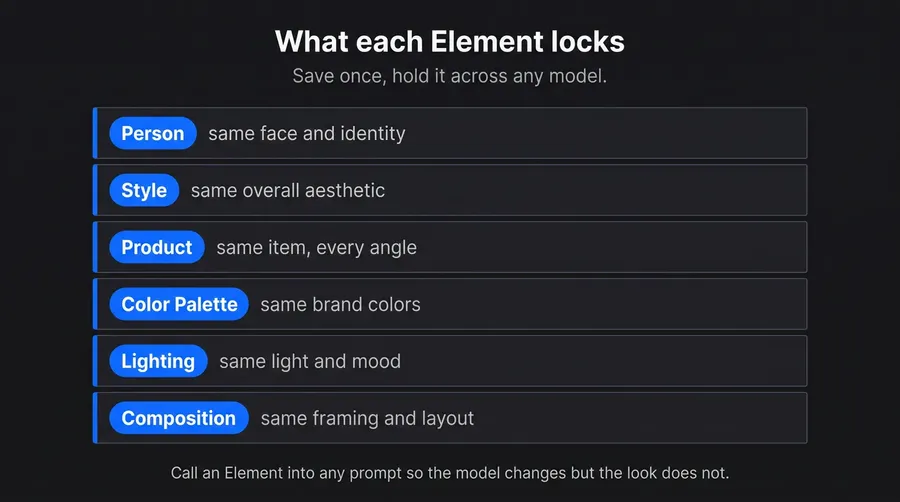
Multi-model has a real downside worth naming: switching engines can shift the aesthetic, so a set generated across different models can drift in style, color, or a recurring character. Pretending otherwise would be dishonest, and ignoring it is how brand sets end up looking mismatched. The fix is to control the variable that matters rather than the model.
For anything that must stay visually coherent, save your consistent brand style, product, or person as a reusable Element and call it into every prompt, so the look carries across generations regardless of which model runs. When consistency matters more than squeezing the best model out of each frame, the simpler move is to pin one model for the whole series. Either way, consistency comes from a deliberate anchor, an Element or a fixed model, not from hoping separate generations happen to align.
Cost: Model Choice as a Budget Lever
Multi-model also changes the economics of a single project, not just the subscription math. Models differ in how much compute, and therefore credit, a generation costs, so the model you pick is a spending decision. Lightweight, fast models are well suited to high-volume exploration where you are throwing away most outputs, while premium models are worth reserving for the few frames you will actually ship.
On a single-model tool every generation costs the same regardless of whether it is a throwaway draft or a hero image. On a multi-model platform you can spend little while exploring and more only on finals, which stretches a fixed monthly credit allowance further across a real workflow. Treating model choice as a budget dial, cheap for drafts, premium for delivery, is a lever a one-engine product simply does not offer.
When a Single Model Is the Right Choice
Multi-model is not universally correct, and the honest cases for a single model are about control, not simplicity. Reproducibility is the strongest: an automated pipeline or an API integration often needs the same pinned model version so results stay identical over months, and a rotating Auto choice would undermine that. A signature aesthetic is another: if your whole brand rides on one model's specific look, deliberately standardizing on it is a feature. And for a genuinely fixed, single-purpose need that never varies, one good model is enough.
The nuance is that these do not actually require a single-model product. A multi-model platform that supports manual pinning gives you the same determinism when you want it, plus the whole lineup when you do not. In getimg.ai you can pin a model in the app or target a specific one through the API, which is single-model behavior on demand rather than as a permanent limitation.
How to Choose
The decision comes down to how varied your work is and how much you value determinism. These checks place most teams quickly.
Varied output
If you produce more than one kind of image, text, realism, edits, illustration, multi-model pays off right away.
Long horizon
If you will keep generating past the current model generation, multi-model keeps you current as the field moves.
Need for reproducibility
If an automated or brand-critical pipeline must return identical results, pick a platform that lets you pin a model, whether single-model or multi-model with manual selection.
Tolerance for tool sprawl
If you would rather not manage several subscriptions, consolidate onto one multi-model account.
For most professional teams these point toward multi-model with pinning available, which is why the best all-round image generators tend to be more complex platforms than one model family-tools.
The Bottom Line
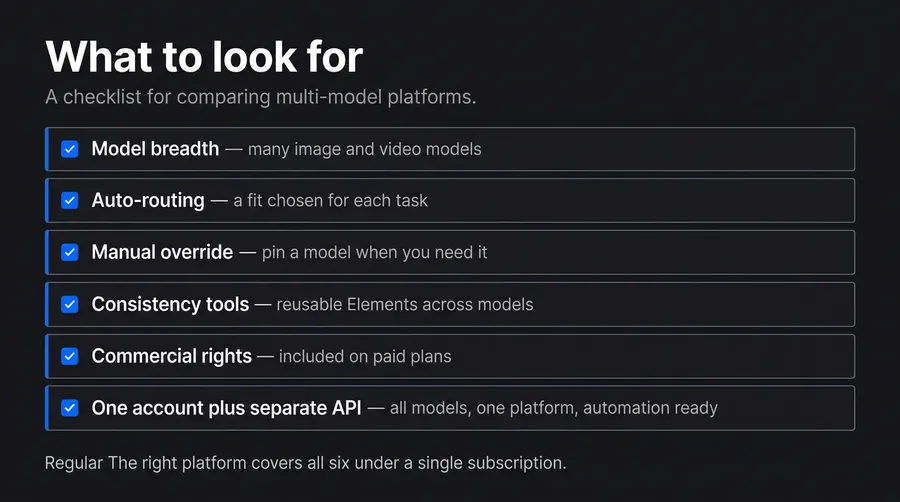
Single-model and multi-model differ in what you are buying: a fixed engine, or an interface to a changing field of them. Multi-model wins for varied work because no model leads at everything, it lets you route per job, chain several models across one asset, and tune cost per stage. Its real cost, style drift across engines, is solved with a consistent Element or a pinned model.
A single model still suits reproducible pipelines and signature looks, but a multi-model platform with manual pinning delivers that on demand while keeping the whole lineup. getimg.ai is that platform: dozens of top AI and video models, Auto by default, manual control when it matters.
Generate across many models on getimg.ai.
Frequently Asked Questions
A single-model tool is built around one model (or one model family), so the model and the interface are effectively the same product and every job runs through that model's strengths and weaknesses (e.g., ChatGPT, Gemini).
A multi-model platform is an aggregator: it hosts many models, often from different developers, behind one account and routes each task to a suitable one, or lets you pick. The practical difference is that a single model is a fixed capability, while a multi-model platform is an interface to a changing field, so better models appear in the picker instead of requiring you to switch tools. getimg.ai is multi-model, carrying dozens of top AI models.
Through routing. In getimg.ai the picker defaults to Auto, which reads your prompt and the task, selects a fitting model, and applies prompt enhancement so a short description still produces a strong result. You describe what you want rather than choosing a model name on every generation.
Manual selection sits underneath for when you care: you can pin a specific model to match a previous look, use a known strength, or keep a series consistent, then return to Auto. This layered design, sensible default plus expert override, is what makes a large lineup usable instead of overwhelming.
Yes, but you have to anchor it, because switching models can shift the aesthetic on its own. The reliable fix is to save your style, product, or person as a reusable Element on getimg.ai and call it into every prompt, so the look carries across generations regardless of which model runs.
When coherence matters more than optimizing each frame, the simpler option is to pin one model for the whole series. Consistency comes from a deliberate anchor rather than from hoping separate generations align, which is the honest limitation of generating a set across multiple engines.
When you value determinism over range. An automated or API-driven pipeline often needs the same pinned model version so results stay identical for months, a rotating choice would break that. A brand built on one model's signature look benefits from standardizing on it. And a fixed, single-purpose need that never varies does not require more than one good model.
The nuance is that a multi-model platform with manual pinning gives you this same control on demand, plus the full lineup when you want it, so you rarely need a single-model product to get single-model behavior.
Usually less, for two reasons. First, one account replaces the stack of single-purpose subscriptions that varied work otherwise accumulates. Second, model choice becomes a budget lever within a project: lightweight, fast models handle high-volume exploration cheaply, and premium models are reserved for the few frames you ship, which stretches a fixed credit allowance further than a one-model tool that charges the same for a throwaway draft and a hero image.
Related Articles