How to Choose an AI Image Generator for Professional Work (2026)

To choose an AI image generator for professional work, evaluate six criteria: commercial licensing, output resolution, brand and character consistency, model range, editing depth, and team collaboration. Prioritize commercial rights and consistency, because they decide whether output is publishable and reproducible, not just attractive. Test each shortlisted tool on a real brief instead of a single demo image. getimg.ai fits this use case well: it includes commercial rights on every paid plan, a persistent consistency system, and 34+ models under one subscription.
Why the Right Tool Matters for Commercial Work
The stakes are real. Nielsen's advertising-effectiveness research finds creative quality contributes as much to a campaign's sales results as all other factors combined, more than media planning.
If AI is going to produce the creative your revenue depends on, the tool behind it has to clear a higher bar than a hobby generator: licensed for commercial use, consistent across a brand, and able to deliver at production resolution. getimg.ai is built to clear that bar, and the criteria below show how to check any tool against it.
The 6 Criteria That Matter for Professional Use
Professional buyers evaluate an AI image generator differently from casual users. A casual user asks "does it make nice images?" A professional asks "can I legally publish this, reproduce it on brand, deliver it at the resolution my channel needs, and do it again next quarter with a new teammate?"
These six criteria answer that question. Weight them to your own work: an agency weights consistency and teams heavily, while a solo e-commerce seller weights resolution and background editing.
Criterion | Why It Matters | What "Good" Looks Like |
Commercial Rights | You are publishing, selling, or delivering work to clients | Included on all paid plans with no enterprise-only restrictions |
Output Resolution | Print, Retina displays, and large-format media require high-quality files | Native 2K to 4K output with upscaling to 8K and beyond |
Consistency | Brands, products, and characters need to stay recognizable | A persistent, reusable reference system |
Model Range | No single model is best for every task | Multiple up-to-date models with automatic model selection |
Editing Depth | Most creative work happens through iteration, not a single generation | In-place background, object, and style editing |
Team Collaboration | Creative production is collaborative | Shared assets, folders, and team workspaces |
Criterion 1: Commercial Rights and Licensing
For professional work, commercial rights are non-negotiable, and the detail that trips up buyers is where those rights sit. Some tools grant commercial use only on higher tiers, or restrict it by output type. Read the license before you commit. getimg.ai includes commercial rights on every paid plan, from the Entry plan up, so images are cleared for campaigns, client deliverables, merchandise, and social from day one, subject to standard content-use policies.
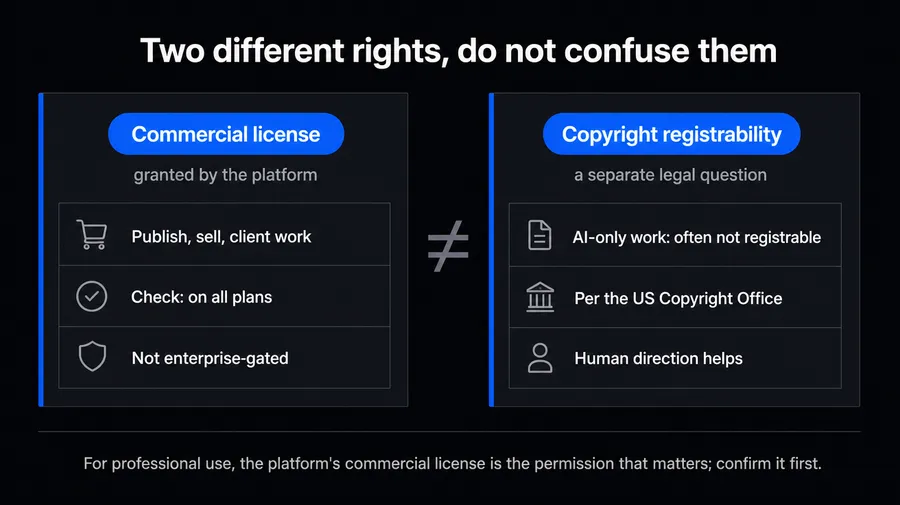
Separately, understand that image copyright for AI outputs is still evolving. The U.S. Copyright Office has stated that purely AI-generated material without sufficient human authorship is not registrable, per the U.S. Copyright Office. That is a distinct question from whether a platform licenses you to use the output commercially, and most professional workflows care about the latter.
If registrability matters for a specific deliverable, document the human creative direction involved. For a fuller breakdown, see getimg.ai's explainer on whether AI-generated images can be used commercially.
Criterion 2: Output Resolution and Print Readiness
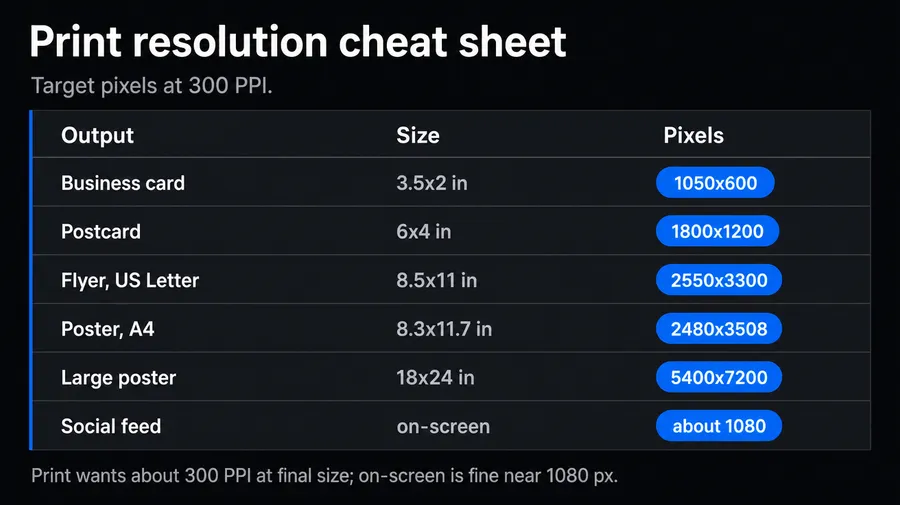
Resolution decides which channels an image can serve. Social feeds tolerate 1080px, but print, out-of-home, and large-format retina displays do not. A professional tool should produce high native resolution and offer upscaling for delivery. As a rule of thumb, print needs roughly 300 PPI at final size, so a full-page 8.5 by 11 inch piece wants about 2550 by 3300px, which native 4K comfortably covers.
getimg.ai generates natively up to 3-4K on models like Nano Banana 2 and Seedream 5.0 Lite, and its dedicated image upscaler pushes images up to 16K depending on the chosen upscaling model, with classic (faithful sharpening) and creative (detail-adding) families available.
That range covers everything from a Story frame to a trade-show banner from a single source image. When evaluating any tool, ask for the native resolution ceiling, not just the upscaled one, because upscaling from a tiny base invents detail that may not survive close inspection.
Criterion 3: Brand and Character Consistency
Consistency is the single hardest professional requirement, and the one that separates a toy from a production tool. Diffusion models start each generation from noise, so the same prompt yields different color, lighting, and framing every run. For a brand, that drift is disqualifying: a campaign of images that do not look related is not a campaign. The fix is visual conditioning that persists across generations, not clever prompting.
getimg.ai handles this with a reusable reference system called Elements: Person, Product, Style, Color Palette, Lighting, and more, created once from up to 20 photos and called into any prompt with `@ElementName`. A `@BrandStyle` and `@ProductHero` Element keep the look and the item identical across hundreds of outputs and across every teammate's account.
This is the mechanism behind reliably on-brand image generation. When comparing tools, favor a saved, shareable reference system over per-session uploads that reset every time you close the tab.
Criterion 4: Model Range Under One Subscription
No single model is best at everything. One renders text cleanly, another nails photoreal skin, a third excels at illustration or fast drafts. A professional platform gives you several current models under one roof, and ideally picks the right one for the task automatically, so you are not researching model releases every month.
getimg.ai provides access to dozens of AI image and video models, including FLUX.2, GPT Image 2, Seedream 5.0, Nano Banana Pro, and Grok Imagine, under a single subscription, with an Auto mode that routes each prompt to a fitting model.
That breadth is a hedge: when a stronger model ships, it appears in the same interface instead of requiring a new tool and a new invoice. Contrast this with single-model tools, where you are betting your whole workflow on one vendor's release cadence. For a current overview, see the image generation models guide.
Criterion 5: Editing Depth
Professional work is iterative. You rarely ship the first generation. You swap a background, remove an object, adjust lighting, or extend the frame for a new aspect ratio. A tool that only generates, forcing you to round-trip into Photoshop for every change, adds friction that compounds across a production schedule. Look for editing that happens in the same place you generate.
getimg.ai edits in place. Attach an image and describe the change, or open a generation and use the image editing feature to change backgrounds, add or remove objects, restyle, relight, or restore old photos. Every edit produces a new version and leaves the original untouched, so you can branch freely without losing your source. Background removal is an one-click Action rather than manual masking job.
Criterion 6: Team Collaboration
This final criterion matters most for organizations. Team collaboration means shared assets, not exported files in a Slack thread. Everyone should see the same generations, reuse the same brand references, and organize work in shared folders. getimg.ai's Teams feature puts members in one space with shared Elements and folders, so brand references travel with the account, not the individual.
How getimg.ai Scores Against the Criteria
Criterion | getimg.ai |
Commercial Rights | Included on all paid plans |
Output Resolution | Native output up to 4K, with upscaling to 16K |
Consistency | Elements with 13 reusable, shareable reference types |
Model Range | All the top models with automatic model routing |
Editing Depth | In-place editing, background tools, and image restoration |
Teams | Shared space with Elements, shared folders, and support for teams of up to 10 |
No tool is the right pick for every buyer, but for professional and commercial production, where output has to be licensed, consistent, and deliverable at scale, getimg.ai clears all six criteria in one subscription rather than spreading them across several tools.
Start Creating High-Quality Assets
Professional selection rewards buyers who test against criteria instead of demos. Decide your non-negotiables, run a real brief, and check whether the output is licensed, consistent, and deliverable. getimg.ai is built for teams that ship visuals daily, with commercial rights on every plan, a persistent consistency system, SOTA models, and in-place editing in one interface.
Explore getimg.ai's image generator.
Frequently Asked Questions
Choose against six criteria rather than a single demo image: commercial licensing, output resolution, brand and character consistency, model range, editing depth, and team collaboration. For commercial and client work, treat commercial rights and consistency as non-negotiables, because they decide whether output is publishable and reproducible, not just attractive.
getimg.ai is built for this use case, with commercial rights on every paid plan, a persistent Elements consistency system, all the leading models, and in-place editing under one subscription.
It depends entirely on the platform's license, so read it before you publish. Some tools grant commercial use only on higher tiers or restrict it by output type. getimg.ai includes commercial rights on all paid plans, covering campaigns, client deliverables, merchandise, and social, subject to standard content-use policies.
Note that platform licensing is distinct from copyright registrability. The U.S. Copyright Office does not register purely AI-generated material lacking human authorship, which is a separate legal question from whether you are licensed to use the output commercially.
Match resolution to the channel. Social feeds are fine at around 1080px, print typically needs about 300 PPI at final size (so a full-page 8.5 by 11 inch piece wants roughly 2550 by 3300px), and large-format and retina displays need more. Choose a tool that generates high native resolution and offers upscaling for delivery.
getimg.ai generates natively up to 4K and upscales up to 16K depending on the upscaler. Always check the native ceiling, not just the upscaled figure, because upscaling from a small base can invent detail that fails on close inspection.
For professional work, access to several current models is a meaningful advantage because no single model is best at every task. Text rendering, photorealism, illustration, and fast drafts have different leaders.
A multi-model platform is also a hedge against release cadence: when a stronger model ships, it appears in the same interface. getimg.ai provides all the best models under one subscription with automatic model routing, so you get task-appropriate output without researching or switching tools each month.
Use a tool with a persistent visual-conditioning system rather than relying on prompt wording, which drifts every generation. getimg.ai's Elements let you save Style, Color Palette, Lighting, Product, and Person references once and apply them to any prompt with `@ElementName`.
Elements persist across sessions and are shared across your team automatically, so every member produces on-brand output without re-briefing. This is far more reliable than per-session reference uploads, which reset each time and vary between contributors.
Related Articles