Best AI Video Generators: Compared & Tested (2026)

The best AI video generator in 2026 depends on what you're building. getimg.ai is the strongest choice for professional teams: 20+ video models — Veo 3.1, Kling 3.0 Pro, Seedance 2.5, and Wan 3.0 — in the same workspace as image generation and editing, with commercial rights on every plan from $8/month. The alternatives each cover a focused use case: Runway for directed filmmaking with motion control tools; Kling AI for native audio and dynamic motion; Luma Dream Machine for cinematic output with camera presets; Hailuo AI for detailed 1080p video with strong fluid motion; and Pika Labs for effects-driven short-form content. All six support All six support image-to-video generation.
TL;DR What is The Best AI Video Generator?
- getimg.ai combines 20+ video models, including Veo 3.1, Kling 3.0 Pro, and Seedance 2.5, with image generation, editing, automatic prompt enhancement, and team workspaces in one platform, with commercial rights on every paid plan
- Runway includes Camera Control, Act Two (lip sync), and a built-in video editor on top of generation — relevant if you need to direct and assemble clips rather than just generate them, though its credit system gets expensive at volume
- Kling AI supports native audio and clips up to 15 seconds; Luma Dream Machine offers camera presets and keyframe animation — both are standalone generators with a narrower scope than getimg.ai
- Pika Labs adds one-click visual effects (Pikaffects) and Pikaformance (audio-driven performance animation) to the generation step; its trade-off is output quality for speed and social-format simplicity.
1. getimg.ai — Best Multi-Model Video Generation Platform
getimg.ai is a professional AI creative platform where text-to-video, image-to-video, and image editing all happen inside a single interface. Rather than building around one proprietary model, getimg.ai integrates every major video generation model — including Google Veo 3.1, Kling 3.0 Pro, Seedance 2.5, Wan 3.0, and MiniMax H3 — and makes them all accessible from one prompt box under one subscription.
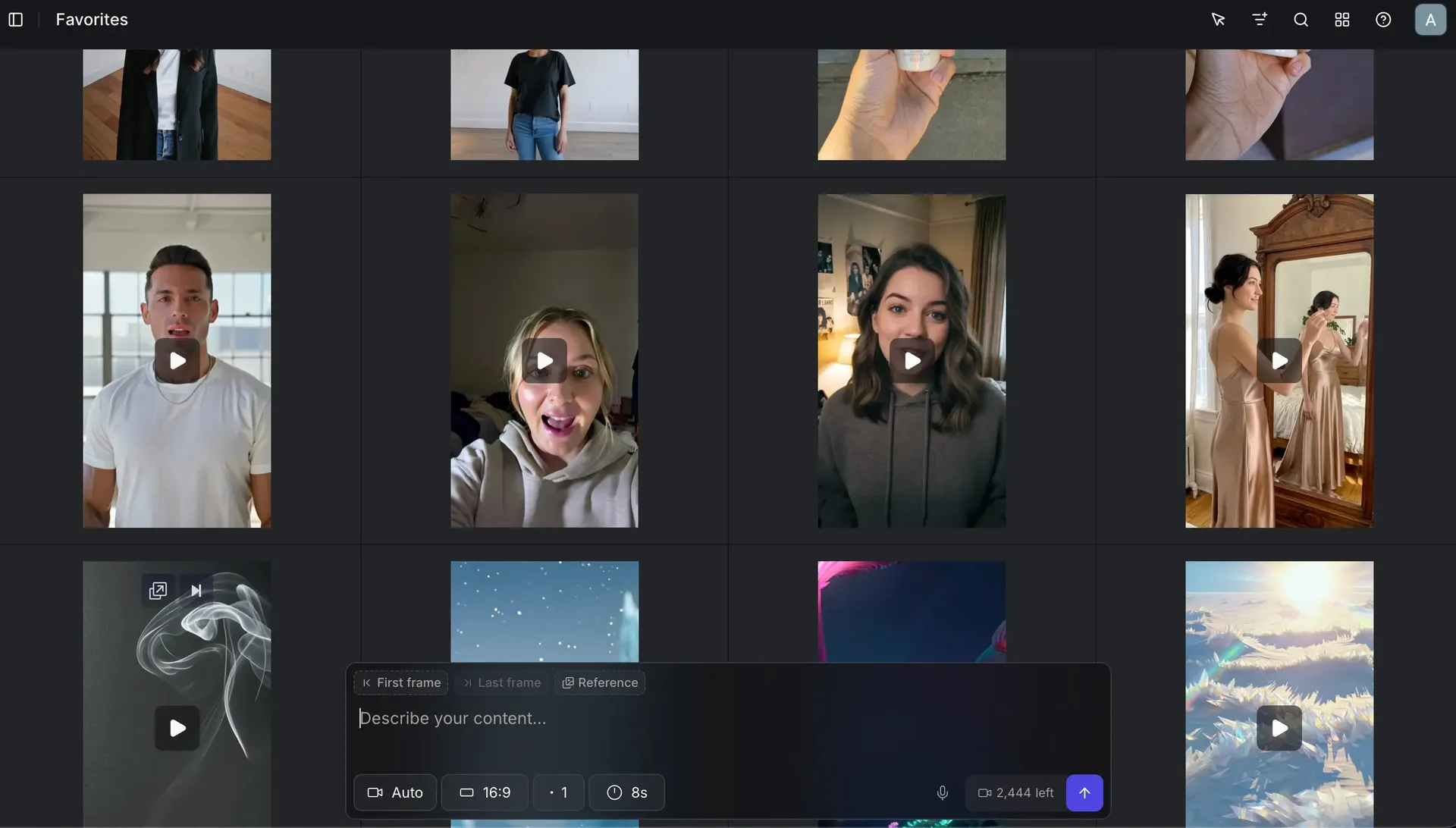
Why it ranks first: What sets getimg.ai apart is the combination, not any single feature. It's a platform where image generation, video generation, and editing share a single interface — so a workflow that moves from reference image to video to edited export never leaves one tab.
At 20+ video models, it carries more than enough power for any task. Prompt enhancement handles vague inputs automatically, so you're not dependent on prompt engineering to get usable results. Team workspaces, folder organization, and shared assets are built in from the Core plan up.
Commercial rights are included on every paid plan from $8/month — and unlike some platforms where licensing varies by tier, that applies to all output across all models.
What you can do with it:
- Generate video from text, reference images, first frame, last frame, or combinations of the above
- Access 20+ video models including those with native audio (Veo 3.1, Kling 3.0 Pro, Wan 2.6) and those built for multi-reference control (Seedance 2.5) or detailed fluid motion (Minimax 2 Pro)
- Work across image generation and video generation in the same workspace — no tool switching when your workflow spans both
- Automatic prompt enhancement sharpens vague or simple inputs before generation — no prompt engineering required to get strong results
- Share space, assets, and folder organization across a team — dedicated team spaces available on Core plans and above, with up to 10 teams on Ultra.
Feature | Detail |
Text-to-video | ✅ |
Image-to-video | ✅ (first frame, last frame, reference image) |
Max duration | Up to 15 seconds |
Max resolution | Up to 1080p |
Native audio | ✅ (on select models) |
Video models available | 16+ |
Image + video in one workspace | ✅ |
Automatic prompt enhancement | ✅ |
Team workspaces | ✅ (Core and above; up to 10 teams on Ultra) |
Commercial rights | Included on all paid plans |
Starting price | $8/month (Entry: 9 video models); all models from $25/month (Core) |
Best for: Marketing teams, social media content creators, and production studios who need reliable access to the best model for each job — without managing separate accounts, subscriptions, or logins for each one.
2. Runway — Good for Directed, Production-Grade Video
Runway is a browser-based AI video studio built for filmmakers, editors, and creative agencies. Beyond generation, it includes Camera Control, lip sync via Act Two, a built-in editor for assembling footage, and generative image and audio tools. Third-party models are available alongside Runway's own Gen-4 line — including Veo 3.1 and Kling — though Sora was removed from the platform in April 2026.
Why it ranks here: Runway's distinction is what happens after the generation step. Camera Control applies cinematic movements — push in, pull out, dolly, orbit, crane — within the interface rather than through prompt description. Act Two handles lip sync and expression transfer, animating a still face to match a voice recording, with clips up to 30 seconds. The built-in editor lets users cut, extend, and assemble clips without switching to another tool.
The tradeoff is cost and complexity: the credit system depletes quickly at volume, pricing is higher than most standalone generators, and the interface assumes a video production background.
What you can do with it:
- Generate text-to-video using Gen-4.5, or image-to-video using Gen-4
- Access third-party models including Veo 3.1 and Kling alongside Runway's own models
- Apply cinematic camera movements with Camera Control
- - Animate talking-head video with Act Two: lip sync and expression transfer from a voice input
- Extend existing clips, apply style transfers, and change video backgrounds
- Assemble and edit clips in the built-in video editor.
Feature | Detail |
Text-to-video | ✅ (Gen-4.5) |
Image-to-video | ✅ (Gen-4) |
Max duration | Up to 10 seconds (Gen-4); up to 30 seconds (Act Two; Kling Motion Control) |
Max resolution | 1280×720 |
Native audio | Generative audio tools included; Act Two for lip sync |
Standout feature | Camera Control, Act Two (up to 30s lip sync), built-in editor, image plus audio tools |
Commercial rights | Included on all plans (including Free) |
Starting price | $12/user/month (annual, Standard, 625 credits) |
Can work for: Filmmakers, creative agencies, and video editors who need directed, assembled output — and have the production background to use the tooling effectively.
3. Kling AI — Standalone Generator for Social and Campaign Video
Kling AI is a web-based video generator from Kuaishou Technology. Its interface is designed around natural-language prompts: users describe the scene and the motion they want, and the generator produces strong motion results with consistent subjects.
Why it ranks here: Kling's motion quality holds up well for brand campaigns involving product motion, detailed environments, and fast-moving subjects — use cases where many generators produce visible artifacts.
Native audio generation means the generator produces synced ambient sound alongside the video without requiring any post-production audio work. First-frame and last-frame reference control gives precise compositional control over how a clip opens and closes — critical for maintaining visual continuity across a sequence.
What you can do with it:
- Generate video from text with natural-language motion description
- Animate still images with first-frame, last-frame, or both as reference points
- Generate native audio alongside video — no post-production audio step required
- Extend generated clips and apply camera motion adjustments
- Generate at up to 15 seconds for longer social and campaign assets.
Feature | Detail |
Text-to-video | ✅ |
Image-to-video | ✅ (first frame, last frame, reference image, depending on the model) |
Max duration | Up to 15 seconds, depending on the model |
Native audio | ✅ |
Standout feature | Native audio, 15-second clips, first and last frame control |
Starting price | Free tier (watermarked); paid plans from $6.99/month |
Kling is available directly via Kling, or via getimg.ai where multiple Kling versions are accessible alongside many other video models.
Can work for: Social media creators, brand teams, and music video producers who need dynamic motion quality, native audio, and longer clip lengths from a single standalone generator.
4. Luma Dream Machine — for Cinematic Output with Camera Control
Luma Dream Machine is a browser-based video generator from Luma AI. It produces smooth, cinematic video with strong lighting simulation and a camera control system that makes it easy to generate the kind of moving-image content that would otherwise require physical production: slow product reveals, orbital camera movements, atmospheric depth-of-field pulls.
Why it ranks here: Luma's camera preset system is quite intuitive. Instead of describing camera motion in a text prompt — an approach that produces inconsistent results across generators — users select from presets directly in the interface: push in, pull out, orbit left, orbit right, crane up, crane down. The generator applies the motion precisely. Keyframe animation takes this further: users define a start image and an end image, and Luma generates the transition between them. This is particularly useful for product photography animation and creative transitions.
Note that Luma's paid Lite plan is non-commercial and watermarked; commercial use requires a higher-tier plan.
What you can do with it:
- Generate video from text or image with simple, natural-language prompts
- Apply camera presets directly in the interface — orbit, push in, pull out, crane — without prompt engineering
- Use keyframe animation: define a start image and end image, Luma generates the motion between them
- Create seamless loop videos for ambient displays, backgrounds, and social content
- Extend generated clips for longer sequences
- Access third-party models (including audio-capable options like Veo 3.1 and Kling 2.6) alongside Luma's own Ray model.
Feature | Detail |
Text-to-video | ✅ |
Image-to-video | ✅ (with keyframe start and end control) |
Max duration | 5 or 10 seconds per clip (extendable toward 30 seconds) |
Max resolution | Up to 4K (with upres and HDR on supported plans) |
Native audio | Depends on model and UI; Ray 3.14 supports audio in supported interfaces; Veo 3.1 and Kling support varies |
Standout feature | Camera presets, keyframe animation, loop generation |
Commercial rights | Not included on Lite plan; check current plan terms |
Starting price | Free tier (limited); paid plans from about $10/month |
Can work for: Content creators, product marketers, and designers who want high-quality cinematic video — camera motion, lighting, and atmosphere — handled through direct UI controls rather than prompt engineering.
5. Hailuo AI (Minimax) — Great for Physics-Accurate 1080p Video
Hailuo AI is the video generator from Minimax. It generates at 1080p and is particularly noted for fluid motion — water, fabric, hair, environmental dynamics — with fewer frame-to-frame artifacts than many alternatives. Minimax markets it on this basis, and it's the quality characteristic most cited by users who choose it over other options.
Why it ranks here: Fluid motion and environmental elements are a common failure point in AI video generation — liquids that behave incorrectly, fabric that barely moves. Hailuo's output tends to hold up well in these categories.
First-frame and last-frame reference control supports compositional consistency across a sequence. Clip length runs up to 10 seconds on current models, which is shorter than Kling or Runway but enough for most product and e-commerce deliverables without stitching.
What you can do with it:
- Generate text-to-video with emphasis on realistic motion and environmental detail
- Animate still images with first-frame and last-frame reference points
- Produce 1080p output suitable for professional client delivery
- Use Director Mode for cinematic camera and shot style without manual prompt adjustments
- Maintain character consistency across generations with Subject Reference.
Feature | Detail |
Text-to-video | ✅ |
Image-to-video | ✅ (first frame, last frame) |
Max duration | Up to 10 seconds |
Max resolution | 1080p |
Native audio | ❌ |
Standout feature | Fluid motion and environment detail at 1080p; first and last frame control |
Starting price | Credits-based, from about $15/month |
Read our Minimax Hailuo 02 review for benchmark comparisons.
Best for: E-commerce and product teams who need physically accurate motion — liquid pours, fabric movement, outdoor environments — delivered at professional 1080p quality.
6. Pika Labs — for Effects-Driven Short-Form Content
Pika is an AI video generator built specifically for short-form social content. Its Pikaffects feature sets it apart: a library of stylized, one-click AI effects — inflate, squish, explode, melt, morph — that transform any still image or generated clip into a visually striking social asset, without needing to describe the transformation in a prompt. Pikaformance adds audio-driven performance animation — expressions and movement synced to sound — though this is not ambient audio generation in the same sense as Veo 3.1 or Kling.
Why it ranks here: Pika's effects-first approach is unique. The kind of visual surprises that perform well on TikTok and Instagram Reels — objects melting, inflating, or exploding in unexpected ways — are difficult to produce reliably in other generators through text prompts alone.
The tradeoff is depth: Pika isn't built for cinematic output, long-form content, or precise compositional control. It's optimized for quick, high-impact clips.
What you can do with it:
- Generate video from text or image
- Apply Pikaffects: one-click stylized transformations (inflate, squish, explode, melt, morph) to any image or clip
- Add AI-driven audio and performance animation with Pikaformance
- Generate in vertical (9:16), square (1:1), and landscape (16:9) formats
- Add lip sync to any still image using a voice input.
Feature | Detail |
Text-to-video | ✅ |
Image-to-video | ✅ |
Max duration | 5 to 10 seconds (standard); up to 25 seconds (Pikaframes); up to 30 seconds (Pikaformance) |
Max resolution | 1080p |
Pikaformance | Audio-driven performance animation (not ambient audio generation) |
Standout feature | Pikaffects (one-click visual transformations), Pikaformance |
Commercial rights | Pro and Fancy plans only, not included on Basic or Standard |
Starting price | Free tier (watermarked); paid plans from about $8/month |
Can work for: Social media creators, influencers, and content teams who need fast, visually distinctive short-form clips — effects-driven content built for TikTok, Reels, and Shorts.
AI Video Generator Comparison Table
Tool | Image-to-Video | Max Duration | Max Resolution | Native Audio | Standout Feature | Starting Price |
getimg.ai | ✅ | 15 seconds | 1080p | ✅ | 16+ models in one workspace; commercial rights on all plans | $8/month |
Runway | ✅ | Up to 30 seconds (Act Two, Kling Motion Control); 10 seconds (Gen-4) | 1280×720 | ✅ (generative audio tools plus Act Two) | Camera Control, Act Two (lip sync), built-in editor, image plus audio tools | $12/user/month (annual) |
Kling AI | ✅ | 15 seconds | — | ✅ | Native audio, 15-second clips, first and last frame control | From $6.99/month |
Luma Dream Machine | ✅ | 5 to 10 seconds per clip (extendable to about 30 seconds) | Up to 4K | Depends on model and UI | Camera presets, keyframe animation, loop generation | About $10/month |
Hailuo AI (Minimax) | ✅ | 10 seconds | 1080p | ❌ | Fluid motion and environment detail at 1080p | About $15/month |
Pika Labs | ✅ | 5 to 10 seconds standard; up to 30 seconds (Pikaformance) | 1080p | Pikaformance (performance animation, not ambient audio) | Pikaffects (one-click visual transformations) | About $8/month |
A video made with getimg.ai.
How to Choose the Right AI Video Generator
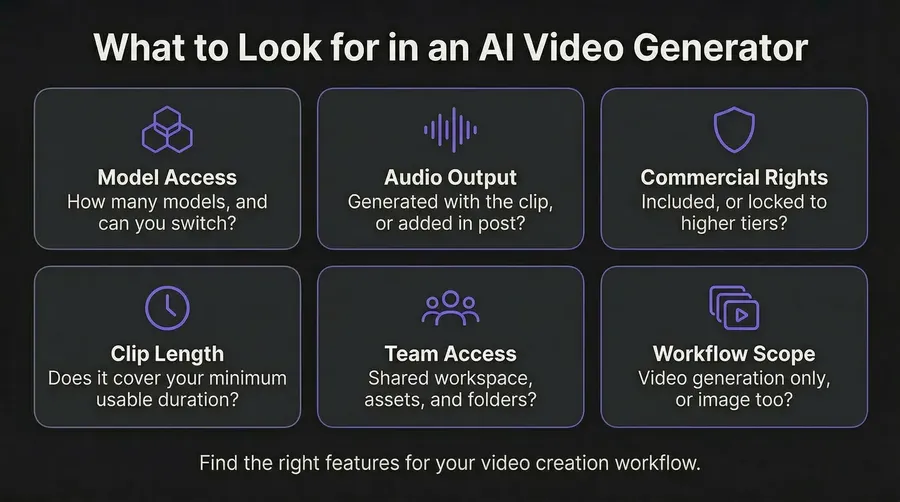
1. Match the tool to your output volume.
High-volume production — multiple campaigns, multiple formats, regular cadence — favors a multi-model platform like getimg.ai. Testing every relevant model under one subscription costs less and takes less time than managing separate accounts.
2. Let audio requirements narrow the list early.
Native audio — where the generator produces synchronized sound alongside the video — is available on getimg.ai (via Veo 3.1, Kling 3.0 Pro, Wan 2.6 and more) and Kling AI. Runway includes generative audio tools and Act Two for lip sync, but does not generate ambient audio from text-to-video prompts. Hailuo has no audio generation. Pika's Pikaformance syncs expressions to sound, which is different from ambient audio generation. If you need synced ambient sound without post-production work, the models to use are Veo 3.1 and Kling 3.0 Pro — both accessible via getimg.ai.
3. Consider what the generator is bad at, not just what it's good at.
Every generator has a failure mode: Hailuo tops out at 10 seconds and has no native audio; Luma's Ray model has no native audio and commercial rights depend on plan tier; Runway's credits deplete fast at volume; Pika trades output quality for speed and commercial rights are restricted to higher-tier plans. The generator whose failure modes matter least for your specific use case is the right one — not necessarily the one with the most impressive demo clips.
4. Verify commercial rights before your first deliverable.
Many AI video generators include watermarks on free tiers and have different commercial licensing terms at different plan levels. getimg.ai includes commercial rights on all paid plans from $8/month. Runway includes commercial rights on all plans including Free. Kling includes commercial rights on paid plans. Pika restricts commercial use to Pro and Fancy plans — Basic and Standard do not include it. Luma's Lite plan is non-commercial. Always check the platform's current terms before publishing AI-generated video in client work or paid media — these policies change frequently.
The Bottom Line
Every generator on this list produces strong results — in the right conditions. The practical question is what happens when your brief calls for something a different model handles better: Seedance 2.5 for multi-reference shots, Veo 3.1 when you need synced audio without post-production, Kling 3.0 Pro for a 15-second clip with dynamic motion. Managing those as separate subscriptions across separate interfaces adds friction and cost that compounds fast when you're shipping content at volume.
getimg.ai removes that constraint. Every leading video model, one subscription, commercial rights on every paid plan. Start generating at $8/month, or access the full model library & other perks from $25/month.
Start creating AI videos with getimg.ai.
Frequently Asked Questions
The best AI video generator in 2026 depends on your use case. getimg.ai is the strongest choice for professional teams who need access to multiple models — including Veo 3.1, Kling 3.0 Pro, and Seedance 2.5 — in one workspace with commercial rights included. The right generator depends on your output volume, the level of control you need, and whether audio is part of the deliverable.
The best way to generate video from image in 2026 is via getimg.ai's image-to-video feature, which lets you run the same reference image through multiple models — Kling 3.0 Pro, Veo 3.1, Seedance 2.5, and others — in one interface without managing separate accounts.
For AI music video generation, getimg.ai is the most complete option: it provides access to native audio-capable models — Google Veo 3.1 (8-second clips with synchronized ambient sound) and Kling 3.0 Pro (up to 15 seconds with native audio) — without requiring separate subscriptions to each. For a full music video workflow, getimg.ai also covers artwork: AI album cover creation is available in the same platform.
Text-to-video AI generates a clip from a written prompt alone — no visual input required. Image-to-video AI (also called AI video generator from image, or AI image-to-video generator) animates a still image based on a text description of the motion, giving you direct control over the opening frame and subject. The image-to-video approach is more reliable for product photography, portraits, and any use case where visual consistency in the first frame matters. getimg.ai's image-to-video support lets you test the same reference image across multiple models to find the best motion output for a specific asset.
Sora 2 is no longer available: OpenAI discontinued the Sora line in 2026, so it is gone from getimg.ai and everywhere else. While it was available, Sora 2 was stronger on photorealism and environmental accuracy, and Kling 3.0 Pro was stronger on dynamic motion, native audio, and longer clips (up to 15 seconds with first-and-last-frame control). For high-realism product or lifestyle content today, test Kling 3.0 Pro alongside Google Veo 3.1 and Seedance 2.5 on getimg.ai. Read our Sora 2 Pro review for a detailed breakdown.
Commercial rights vary significantly by platform and plan. getimg.ai includes commercial rights on all paid plans from $8/month. Runway includes commercial rights on all plans, including Free. Kling includes commercial rights on paid plans. Pika restricts commercial use to Pro and Fancy plans — Basic and Standard do not qualify. Luma's paid Lite plan is non-commercial and watermarked; commercial use requires a higher tier. Always check the specific platform's current licensing terms before publishing AI-generated video in paid media or client work — these policies are updated regularly and the specifics matter.
For social media content at volume, getimg.ai is the most practical option: access Kling 3.0 Pro for dynamic motion and native audio, Veo 3.1 for ambient sound, and Seedance for fast-turnaround clips — all under one subscription, in vertical, square, and landscape formats. Teams that want a dedicated social-first standalone generator can use Kling AI or Pika Labs directly, though they'll need separate accounts for each.
Related Articles