Best Image-to-Video AI Model for Product Ads: Seedance 2.5 vs Wan 3.0 vs Veo 3.1 vs Kling O3 vs MiniMax H3

In a controlled image-to-video test built on one skincare campaign image, Seedance 2.5 produced the most ad-ready clip, scoring 95 out of 100. Wan 3.0 followed at 92, Google Veo 3.1 at 90, Kling O3 at 88, and MiniMax H3 at 85. Every model animated the same first frame with the same prompt, once, with no last frame and no editing. Seedance 2.5 delivered the most directed camera move and matched Kling O3 for the most stable product.
Final Image-to-Video Scores
The table below is the full result. Each clip was scored on five categories that decide whether an animated campaign image can actually run as an ad: whether the product survives, whether the camera does what was asked, whether the motion looks physical, whether the final frame still matches the source, and whether the clip is ready for copy and a call to action.
Rank | Model | Product /30 | Camera /20 | Natural motion /20 | First-to-last /15 | Ad-ready /15 | Total |
1 | Seedance 2.5 | 29 | 20 | 19 | 14 | 13 | 95/100 |
2 | Wan 3.0 | 28 | 18 | 19 | 14 | 13 | 92/100 |
3 | Google Veo 3.1 | 27 | 17 | 20 | 13 | 13 | 90/100 |
4 | Kling O3 | 29 | 16 | 16 | 15 | 12 | 88/100 |
5 | MiniMax H3 | 24 | 18 | 17 | 12 | 14 | 85/100 |
The spread is ten points, and no model failed outright. Even fifth place produced a clip with depth and a premium feel. The differences show up on a second, closer viewing: small packaging details that loosen during the move, a camera that follows the request without directing the shot, fabric that moves without adding to the composition. Kling O3 tied for the best product score and finished fourth, and the model with the most natural motion finished third. The winner tied for first on the product, led on camera movement, and came within a point of the top natural motion score.
These scores describe the specific outputs in this test. They are not a verdict on which video model is best in general.
How the Image-to-Video Test Works
The test answers one practical question: which video model turns an approved campaign still into a clip a real brand could use? The setup follows a real creative brief rather than a fantasy scene or an action shot, because product ads are where small mistakes cost the most.
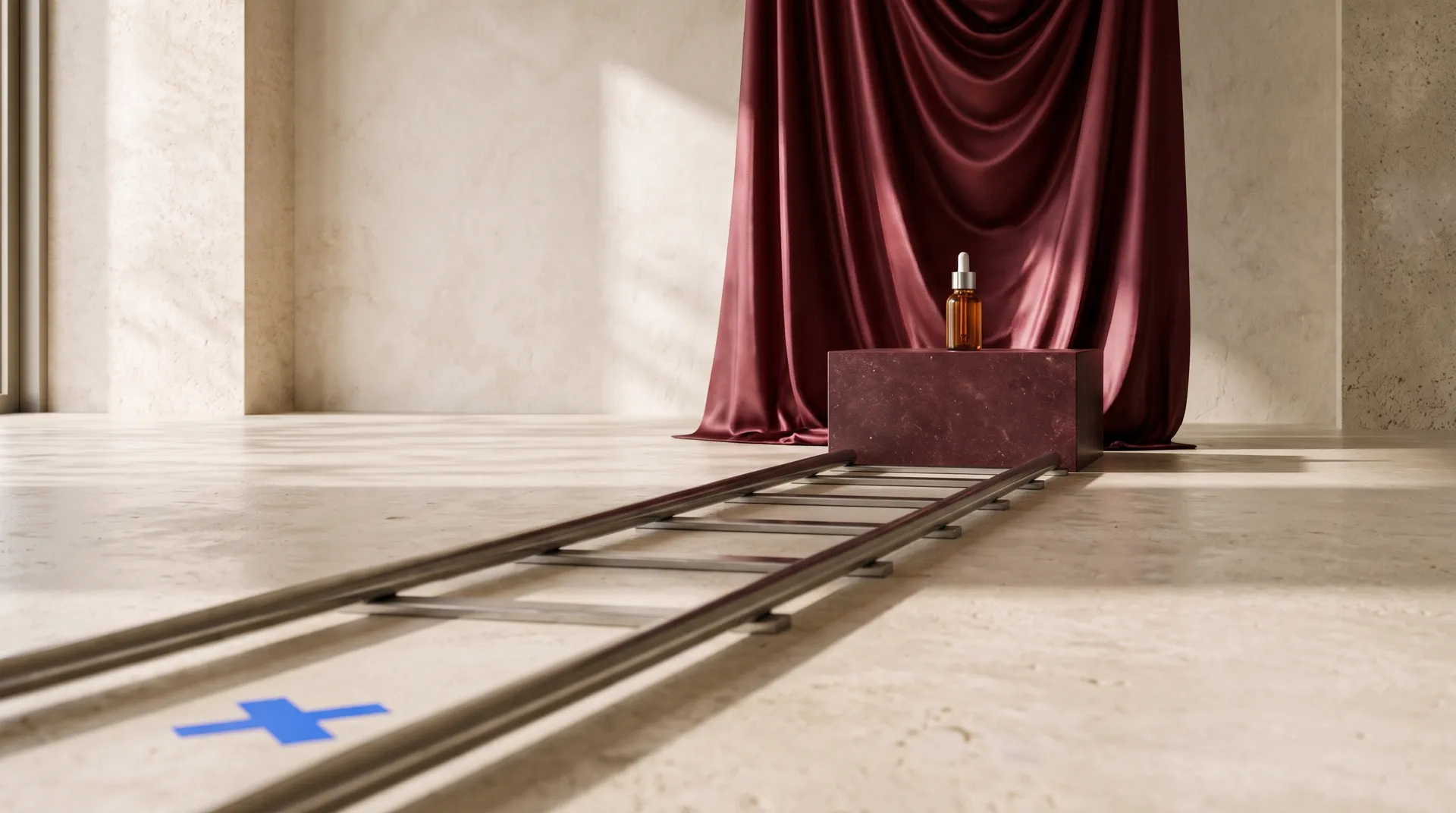
The source image is a premium skincare campaign visual: an amber glass serum bottle with a chrome dropper cap and a clean white label, burgundy satin, and carefully controlled studio lighting. It looks simple, and that is the point. Almost everything in it is something image-to-video models tend to break:
- glass reflections that become inconsistent from frame to frame
- labels that stretch or lose definition
- a bottle that subtly changes shape during the move
- fabric that moves like underwater animation instead of natural airflow.
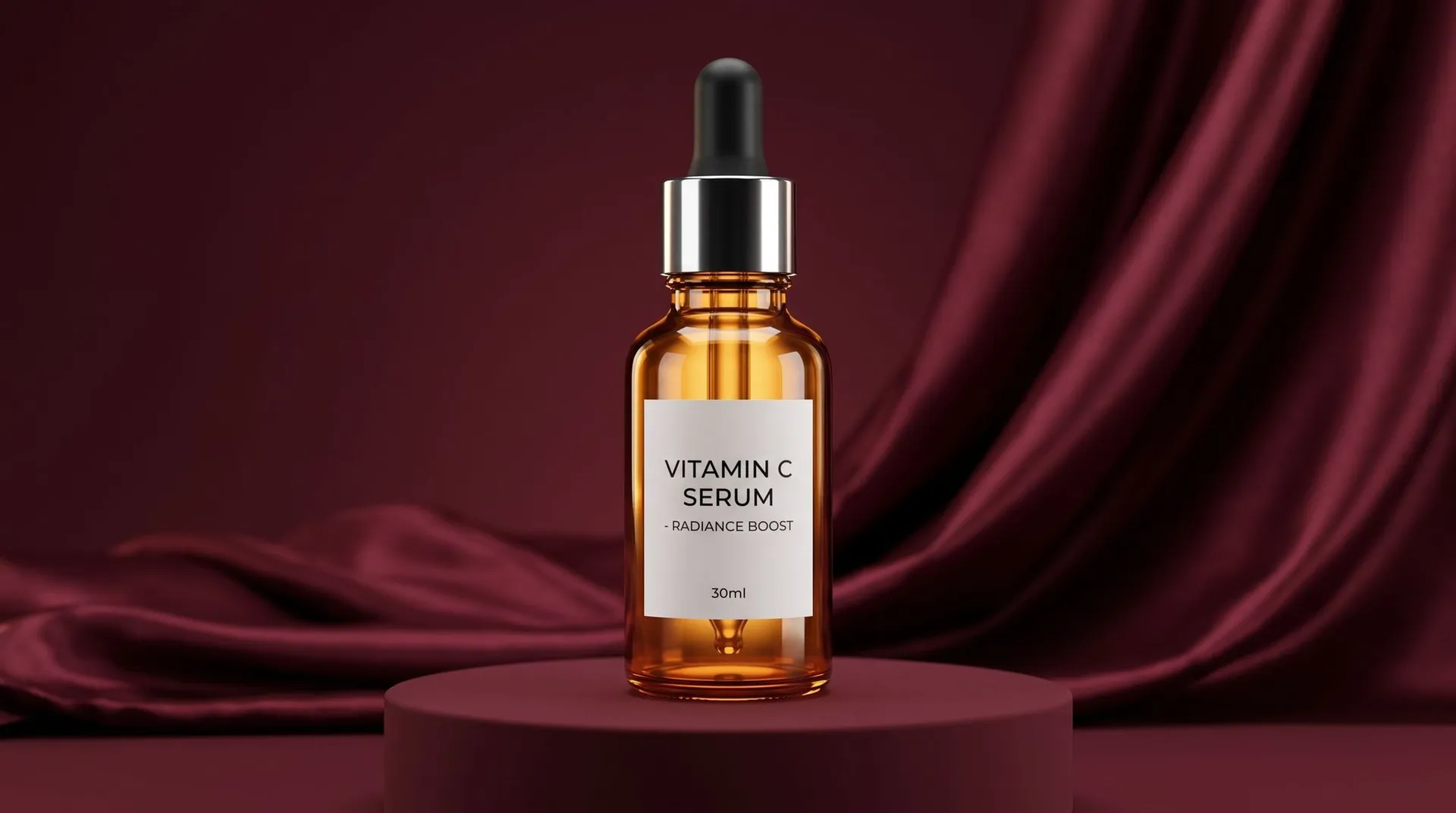
In a casual AI video, nobody would notice. In a brand campaign, each of those is a reason to reject the clip.
Every model received the same conditions:
- the same starting image
- a target length of six seconds in 16:9, with one exception: Google Veo 3.1 only generates 8-second clips in getimg.ai, so its clip ran 8 seconds
- the same motion prompt
- one generation per model, with no cherry-picking
- no upscaling and no editing
- no last frame input.
All five models were run from the same image-to-video setup in getimg.ai, so the source image and prompt reached each model unchanged.
Why the Test Skipped the Last Frame Input
All five models in this test support first-and-last-frame control in getimg.ai: you can supply both the opening image and the image the clip should end on, and the model generates the motion between them. That feature is useful in production, and the test deliberately did not use it.
Forcing the ending turns the job into interpolation. The model only has to find a path between two fixed images, which hides how much it would drift on its own. Without a last frame, the model has to finish the camera move while holding on to the product, the label, the palette, and the composition from the source. Any change it introduces along the way stays visible in the final frame.
That is why one of the five categories compares the first and last frames directly. In this setup, the final frame is the most honest measure of how reliably a model keeps visual consistency on its own. In real campaign work, the first and last frame control is the natural fix once you know where a model tends to wander, and the scores below show which models need that safety net more than others.
The Shared Motion Prompt
Every model received this prompt with the source image as its first frame:
Create a six-second premium skincare ad from this first frame. Slow controlled dolly-in with a subtle clockwise camera orbit of approximately fifteen degrees. The serum bottle remains completely stationary on the pedestal. Preserve the exact bottle shape, cap, glass color, label, logo, typography, proportions, and reflections. The burgundy satin in the background moves gently from soft airflow. Add a subtle traveling light reflection across the glass, physically consistent with the existing studio light. No product rotation, no cap movement, no liquid splash, no new objects, no label distortion, and no scene cut. End on a clean, slightly closer hero composition with the bottle centered and the label fully readable.
The prompt gives the model motion without inviting chaos. It asks for one continuous camera move (a slow dolly-in with a subtle orbit), one environmental movement (satin in soft airflow), and one lighting event (a reflection traveling across the glass). Everything else is locked. The product does not rotate, the cap does not move, nothing splashes, nothing new enters the frame, and no model gets to make creative decisions that change the original campaign.
The prompt also describes the ending: a slightly closer hero composition with a centered bottle and a readable label. That line matters because it gives the model a destination without supplying a last frame. The bottle is not supposed to perform. It is supposed to survive the shot, which makes every failure easy to spot.
How the Score Is Weighted
The 100-point score has five categories with deliberately unequal weights.
Category | Points | What it checks |
Product preservation | 30 | Bottle silhouette, cap, glass color, label position and legibility, reflections |
Camera movement | 20 | Whether the dolly-in and orbit happen as asked, and whether the shot feels directed |
Natural motion | 20 | Fabric weight, light continuity, reflections that track the camera |
First-to-last-frame consistency | 15 | Bottle shape, label, palette, and composition in the final frame against the source |
Ad readiness | 15 | Whether the footage can take typography, a logo, and a CTA and run as part of a campaign |
Product preservation carries the most points because if a product changes its shape or branding halfway through an ad, the clip becomes hard to use commercially. A slightly cautious camera move can still run. A bottle with a changed cap or a warped label cannot, especially when the packaging is approved artwork.
Camera and natural motion share the middle tier, since they decide whether the clip looks like a commercial shot or an animated photograph. First-to-last consistency and ad readiness are weighted lower individually, but together they account for 30 points, the same as the product: they measure whether the clip ends somewhere a designer can actually use.
5th Place: MiniMax H3 (85/100)
MiniMax H3 scored 85 out of 100, and fifth place does not mean a bad result. The first impression is good. The camera movement creates a real sense of depth, the composition feels intentional, and the clip still communicates a premium skincare campaign. Camera movement scored 18 out of 20, and ad readiness 14 out of 15, the highest ad-readiness score in the test.
The limitation shows up on closer inspection, and it sits in the most important category. The bottle stays recognizable, but its smaller details are less consistent through the shot. Product preservation scored 24 out of 30 and first-to-last consistency 12 out of 15, both the lowest in the test. When the object in the center of the frame is what the brand is selling, that is the wrong place to lose points.
Natural motion scored 17 out of 20. The movement is reasonably convincing, but a clip that looks attractive on one viewing is not the same as footage that holds up under closer inspection.
For social content, this clip could be completely acceptable. For a product campaign where the packaging has to stay accurate, it needs more control. MiniMax H3 is also built for multi-shot work and accepts up to nine reference images in getimg.ai, a strength a single continuous product move barely uses.
Score: Product 24 | Camera 18 | Motion 17 | First-to-last 12 | Ad-ready 14
Best for: creative starting points, social content, and planned multi-shot sequences where pixel-exact packaging matters less.
4th Place: Kling O3 (88/100)
Kling O3 scored 88 out of 100 and tied Seedance 2.5 for the best product preservation score, 29 out of 30. The bottle feels stable, the packaging stays consistent, and the composition stays closer to the original than any other clip in the test. First-to-last consistency scored a full 15 out of 15: flicking between the source image and the final frame shows a camera move, not a redesign.
An ad, though, is more than technically correct animation. It needs visual direction, rhythm, and a reason to find the product desirable. That is where Kling lost ground. Camera movement scored 16 out of 20: the camera follows the requested direction, but conservatively, and the shot lacks the visual impact of the top three. Natural motion also scored 16 out of 20, because the fabric movement adds less to the composition than it could.
Ad readiness scored 12 out of 15. The footage is clean and easy to edit, but it reads more like proof that the image can be animated than like a directed commercial shot. If your priority is a recognizable product above everything else, that restraint is useful. Kling O3 may not create the biggest cinematic moment. It protects the expensive object in the middle of it.
Score: Product 29 | Camera 16 | Motion 16 | First-to-last 15 | Ad-ready 12
Best for: packaging that cannot change: regulated labels, legal copy on pack, and approved product artwork.
3rd Place: Google Veo 3.1 (90/100)
Google Veo 3.1 scored 90 out of 100 and produced the most natural motion in the test, scoring a full 20 out of 20 in that category. The difference is that it animates a complete scene rather than individual objects. The background fabric, the camera movement, and the reflections work together, so the bottle sits in a physical environment instead of a collection of elements moving independently. The lighting keeps its continuity, and the environment feels believable.
That matters for premium advertising, which often relies on subtle details: a reflection, a texture, a slow camera move. Veo 3.1 shows that a clip does not need dramatic action to look expensive.
Veo did not win because the test judges more than realism. Camera movement scored 17 out of 20, with the requested direction followed less closely than in the top two clips. Product preservation scored 27 out of 30 and first-to-last consistency 13 out of 15: the campaign identity held up less well than in Seedance's and Wan's clips. Ad readiness scored 13 out of 15. Veo 3.1 was also the only model to run 8 seconds instead of six, since that is the only length it offers in getimg.ai. The Veo 3.1 review covers the model's wider capabilities beyond product shots.
Score: Product 27 | Camera 17 | Motion 20 | First-to-last 13 | Ad-ready 13
Best for: product clips where natural, believable environment motion is the main priority and an 8-second length fits the placement.
2nd Place: Wan 3.0 (92/100)
Wan 3.0 scored 92 out of 100, and its defining quality is balance. The product stays recognizable, the lighting stays consistent, and the motion adds depth without distracting from the original campaign. Product preservation scored 28 out of 30, and first-to-last consistency 14 out of 15.
Turning a product image into video does not always mean making the scene more dramatic. Sometimes the best result is the one that makes the photograph feel as if it had been shot as video in the first place, and that is what Wan 3.0 achieved. The amber glass, the burgundy environment, and the premium studio atmosphere all stay connected to the source. The motion supports the product instead of overwhelming it. Natural motion scored 19 out of 20, one point behind Veo 3.1.
Compared with Veo 3.1, the camera movement follows the requested direction more closely, scoring 18 out of 20. Compared with Kling O3, the clip has a stronger sense of atmosphere and rhythm, and ad readiness scored 13 out of 15. Small typography and precise packaging elements still need a check before the footage goes to a client, but as a starting point for a six-second beauty ad, Wan 3.0 delivered an impressive balance of realism and control.
Score: Product 28 | Camera 18 | Motion 19 | First-to-last 14 | Ad-ready 13
Best for: restrained, premium product content where the clip should feel like the photograph come to life.
1st Place: Seedance 2.5 (95/100)
Seedance 2.5 won with 95 out of 100. What sets it apart is the relationship between the camera movement, the composition, and the product. It does not just add motion. It makes the shot feel directed.
Camera movement scored a full 20 out of 20. The camera moves closer to the bottle with purpose, and the subtle orbit creates depth without pulling attention away from the label. The satin and the lighting build the atmosphere instead of competing as separate effects. Natural motion scored 19 out of 20, level with Wan 3.0.
That is the difference between a moving image and a commercial shot. A good product ad has visual priorities: the eye knows where to look, the camera reveals something, and the ending feels deliberate. Seedance brought those together while keeping the product connected to the original reference. Product preservation scored 29 out of 30, tied with Kling O3 for the best in the test, and the scene developed naturally instead of zooming into a static photograph.
The ending matters too. The last frame is where an ad becomes useful: it takes the headline, introduces the logo, or holds a clean moment before the cut to the next shot. Seedance 2.5 gave a strong foundation for that final beat, with first-to-last consistency at 14 out of 15. Ad readiness scored 13 out of 15, so even the winning clip benefits from a pass in editing before the brand elements go on. Its win did not come from the biggest camera move or the most visual effects, but from creative decisions that felt connected. Seedance 2.5 delivered the strongest combination of product preservation, camera direction, natural motion, and ad potential in the test.
Score: Product 29 | Camera 20 | Motion 19 | First-to-last 14 | Ad-ready 13
Best for: product ads where the camera move carries the idea and the product has to stay intact.
Side by Side: How Each Model Handled the Same Brief
Seen next to each other, the five clips show that each model approaches an identical brief differently. Split by category, the winners look like this:
Category | Winner | Score |
Product preservation | Kling O3 and Seedance 2.5 | 29/30 |
Camera movement | Seedance 2.5 | 20/20 |
Natural motion | Google Veo 3.1 | 20/20 |
First-to-last-frame consistency | Kling O3 | 15/15 |
Ad readiness | MiniMax H3 | 14/15 |
Each model also has a recognizable character:
- MiniMax H3 creates a strong starting point but loses consistency in small details.
- Kling O3 keeps the product most recognizable, with more restrained creative movement.
- Google Veo 3.1 produces the most natural environment motion.
- Wan 3.0 strikes the most convincing balance between atmosphere and consistency.
- Seedance 2.5 brings everything together with the strongest sense of camera direction.
A model can be excellent at beautiful video and still be the wrong choice for a particular commercial task. Choosing by one impressive example is unreliable. Choosing by the thing your project cannot afford to get wrong is not.
Which Image-to-Video Model to Choose for Your Campaign
The right model depends on what the campaign cannot afford to lose. Based on how each model behaved in this test, the choice maps to campaign priorities like this:
If your priority is... | Choose | Why |
The strongest all-round clip | Seedance 2.5 | Most directed camera move, with a top product score |
A photograph that feels shot as video | Wan 3.0 | Best balance of atmosphere, realism, and consistency |
Natural, believable environment motion | Google Veo 3.1 | Highest natural motion score, at a fixed 8-second length |
A label that is legally or commercially sensitive | Kling O3 | Joint-highest product score and a perfect first-to-last match |
A quick creative starting point or social clip | MiniMax H3 | Highest ad-readiness score, built for multi-shot direction |
The five models also differ on specs that can decide the choice before quality does:
Model | Durations in getimg.ai | Aspect ratios | Max quality | Last frame input |
Seedance 2.5 | 4s to 30s | 1:1, 16:9, 9:16, 4:3, 3:4, 21:9 | 1080p | Yes |
Wan 3.0 | 4s to 30s | 1:1, 16:9, 9:16, 4:3, 3:4 | 1080p | Yes |
Google Veo 3.1 | 8s | 16:9, 9:16 | 1080p | Yes |
Kling O3 | 4s to 10s | 16:9, 9:16 | 4K | Yes |
MiniMax H3 | 5s to 15s | 21:9, 16:9, 4:3, 1:1, 3:4, 9:16 | 2K | Yes |
A square feed placement rules out Veo 3.1 and Kling O3, which only output 16:9 and 9:16. A six-second bumper rules out Veo 3.1, which only generates 8-second clips. A 20-second clip points to Seedance 2.5 or Wan 3.0, and a 4K master points to Kling O3.
Why the Final Frame Decides Whether a Clip Is an Ad
Most people judge an AI video by its most impressive second, usually somewhere in the middle, where the camera is moving fastest and the light is doing the most. That moment is rarely what gets published as the lasting impression. The final frame is.
In a paid social ad or a product page video, the last frame is where the headline, the logo, and the CTA land. It is also the frame the viewer is left with, and the frame an editor cuts from into the next shot. A clip that looks incredible for five seconds and then ends on a slightly changed bottle, an off-center composition, or a camera still drifting leaves nowhere clean to put the message.
That is why the test weighs first-to-last consistency and ad readiness together at 30 points. Before choosing a favorite clip, pause every output on its last frame and put the five endings side by side. In this test, that comparison shows a split: Kling O3 matched the source perfectly but ended without a strong closing beat, while MiniMax H3 had the most usable ending for copy despite drifting furthest from the source.
From Campaign Image to Finished Video Ad: The Workflow
The ranking above holds for this product, this lighting, and this camera move. A different product or motion can reorder it, so the workflow is more useful than the result. This is how to turn a campaign image into a video ad, and how to repeat the test with your own product:
- Start from a strong reference image. Use the approved campaign visual. The better the original composition, the less the video model has to invent.
- Write a locked-product motion prompt. Describe one camera move, one environmental movement, and one small lighting event. List what must not change and describe the final composition.
- Run the same direction across a few models. Same first frame, same format, the closest clip length each model allows, and one generation each. Different models interpret the same brief in very different ways, and you only see how by comparing them.
- Score by the cost of failure. Give the most points to whatever would force a reshoot or a legal review if it changed.
- Inspect the full clip, then the last frame. Watch the entire sequence, not just the first second or the most impressive moment. Check the packaging, reflections, typography, movement, and ending against the source.
- Choose by campaign priority. Pick the model whose weakest category is one you can live with, not the one with the strongest reputation.
- Finish it in editing. Add the brand elements, typography, logo, and CTA, make any corrections, and turn the generated footage into a finished campaign asset.
All five models used here are available in Create video, so the same image and prompt can move between them without re-uploading or rewriting anything. The goal is not more video for its own sake. It is footage that solves a specific creative problem.
What to Inspect in Each Clip
Scoring only works when the same details are checked every time. These are the points where drift usually shows up in product animation:
- Product silhouette: overlay or flick between the first and last frame and watch the outline of the product. Any change in width or shoulder shape is drift.
- Cap and small parts: thin elements such as caps, droppers, and pumps are the first to grow, shrink, or bend.
- Label and typography: read the smallest text on the final frame at full resolution. Softening usually starts with the finest lettering.
- Glass and reflections: reflections should move with the camera and the existing light, not wander independently or flare.
- Environmental motion: fabric, smoke, or liquid should have weight and some irregularity, and it should support the composition rather than compete with it.
- Camera path: check whether the requested move actually happened. A requested orbit that turns into a pure zoom is a camera miss, even if the clip looks smooth.
- Final composition: confirm the product is centered or placed as asked, the camera has come to rest, and there is clear negative space for copy.
Watch each clip at least twice: once at full speed for overall impression, and once slowly with attention on the product. The first viewing tells you whether you like it. The second tells you whether you can publish it.
How to Write Image-to-Video Prompts That Protect the Product
The shared prompt in this test follows a structure that works well for any product animation. It treats the product as fixed and everything around it as the place where motion happens.
- Limit the motion to a few events. One camera move, one environmental movement, and one lighting event give the clip life without giving the model room to reinvent the product. Every additional instruction is another chance for drift.
- Name what must stay fixed, item by item. "Preserve the product" is vague. "Preserve the exact bottle shape, cap, glass color, label, logo, typography, proportions, and reflections" gives the model a checklist.
- Rule out the common failures explicitly. No product rotation, no cap movement, no liquid splash, no new objects, no label distortion, no scene cut. These are the changes models make most often when left to choose.
- Describe the ending. A line such as "end on a slightly closer hero composition with the product centered and the label readable" gives the model a destination even without a last frame.
- Keep motion physically consistent with the source. Asking for light that matches the existing studio light keeps the clip in the same world as the approved still.
The image and video prompting guide covers the wider prompt structure, including camera vocabulary and how to describe motion. The same principle applies to stills: realistic AI product photos also start from a clear list of what must not change.
Limitations of This Test
This is one product, one camera move, and one generation per model, which keeps the comparison fair but also narrow. A few limits are worth stating plainly:
- Specific outputs, not universal rankings. The scores describe five clips made for one brief. They do not say which model is best in general.
- One subject type. A glass bottle with a label stresses reflections and typography. A fabric product, a person, or a food shot would stress different things and could reorder the ranking.
- One generation per model. Every video model varies from run to run. A second generation could move individual scores by a point or two, which is enough to swap close neighbors such as Veo 3.1 and Kling O3.
- One length exception. Veo 3.1 ran 8 seconds while the other four ran six, because 8 seconds is its only option in getimg.ai.
- Human scoring. Points were assigned by visual inspection against a fixed checklist, not by an automated metric. The checklist reduces bias but does not remove it.
- No last frame and no editing. In production, supplying a last frame and making small corrections close many of the gaps measured here. The test measures how much work each model leaves you, not the best result it can reach with help.
- Audio not scored. Several of these models generate native audio. The comparison focused on the image only.
None of this changes the main finding: the model with the most natural motion and the clip with the most usable ending did not win. The winner was the one that kept the product intact while giving the camera move real direction.
Frequently Asked Questions
In this test, Seedance 2.5 produced the best product ad, scoring 95 out of 100. It delivered the most directed camera move (20/20) and tied Kling O3 for the best product preservation (29/30), keeping the bottle and label intact through the move. Wan 3.0 came second at 92 with the best balance of atmosphere and consistency, and Google Veo 3.1 third at 90 with the most natural motion. The test used one skincare product image, one prompt, and one generation per model, so results can differ for other products.
Kling O3 and Seedance 2.5 tied for the most accurate product in this test, both scoring 29 out of 30 on product preservation. Kling O3 also scored a full 15 out of 15 on first-to-last-frame consistency, the only perfect score in that category, at the cost of a more conservative camera move and less atmosphere. For any model, read the smallest label text on the final frame before approving a clip.
Image-to-video models regenerate every frame, so small details such as caps, glass edges, and fine typography can drift as the camera moves, especially toward the end of the clip. Drift increases when the prompt asks for many motion events at once or leaves the product's behavior unspecified. To reduce it, lock the product in the prompt, name each element that must stay the same, limit the motion to a few events, and supply a last frame when the ending has to match exactly.
Use a last frame when the ending must match an approved composition exactly, such as a packshot that leads into a logo or a CTA. A last frame turns the generation into controlled motion between two fixed images and removes most drift at the end of the clip. Leave it empty when you want the model to find its own ending or when you are testing models against each other, since a forced ending hides how much each model drifts on its own.
Describe one camera move, one environmental movement, and one small lighting event, then state that the product stays stationary. List every product detail that must not change, such as shape, cap, color, label, and typography, and rule out common failures like rotation, splashes, new objects, and scene cuts. End the prompt with the final composition you want, for example the product centered and the label readable. This structure gives the clip motion while keeping the product intact.
Generated videos can generally be used in paid ads, subject to the platform's terms and applicable third-party rights, such as trademarks or likenesses that appear in the source image. Most paid social platforms also have their own disclosure rules for AI-generated content. The guide on whether AI-generated images and videos can be used commercially covers the details for commercial use.
Related Articles