Why Creative Teams Struggle with AI Tools (and How to Fix It)

Creative AI made solo work faster, but teamwork? Messier. Too many tools, too many versions, not enough alignment.
If that sounds familiar, you’re not alone. Here’s how teams are finally fixing it.
Want to skip ahead to the solution? You can try getimg.ai's Team features right now.
⚡ TL;DR: How to Fix AI Collaboration for Creative Teams
- The Problem: most AI tools are built for solo creators, leading to version control chaos, scattered assets, and lost prompts when working as a team.
- The Solution: getimg.ai Teams, a centralized workspace that allows real-time collaboration without overwriting or blocking team members.
- Key Features: simultaneous asset generation, shared folders, author tracking (knowing who made what), and a safety trash bin.
Where Collaboration Breaks Down
It usually starts with good intentions.
Someone tests a model “just to see what it can do.” Another person tweaks the output in Photoshop. A third saves their version in a shared drive… somewhere.
By the end of the week, the team’s juggling five tools, twelve files named final_v3, and no one remembers which prompt produced the good version.
It’s not that teams can’t organize, it’s that the tools weren’t built for collaboration.
Most AI platforms treat creativity as a solo act. Which is fine, until you’re trying to keep a campaign, a brand, or a client project visually consistent across multiple people.
That’s where things start to fall apart: ideas slow down, quality drops, and everyone spends more time managing assets than creating.
The Fix: One Workspace, One Team
Creative teams don’t need another tool that only helps with a small part of the job. They need a shared space that actually works the way they do.
One place where everyone can generate, edit, and organize content together, without losing track of who made what or which version is final.
That’s exactly what you're getting with getimg.ai’s Teams .
You can create a private or public Team, invite your collaborators, and instantly share everything (generations, uploads, likes, and folders) in real time.
If someone’s generating a batch of images, you can still queue your own right away. No waiting, no blocking, no “who’s working right now?” confusion.
It’s the same creative flow you get when working solo, just scaled up for the whole team.
Simple Ways to Stay Organized
Even with the best tools, great teamwork doesn’t just happen: it’s about how you use them.
A few small habits make a huge difference when your team starts creating together:
🗂️ Set up your folders early
The best way to avoid folder chaos? Before diving in, agree on a structure that makes sense for your workflow: maybe one folder per platform, campaign, or client.
If you generate new content while a folder is open, it automatically saves there. No dragging or sorting later.
%20(1)%20(1)%20(2)-1920x395.webp)
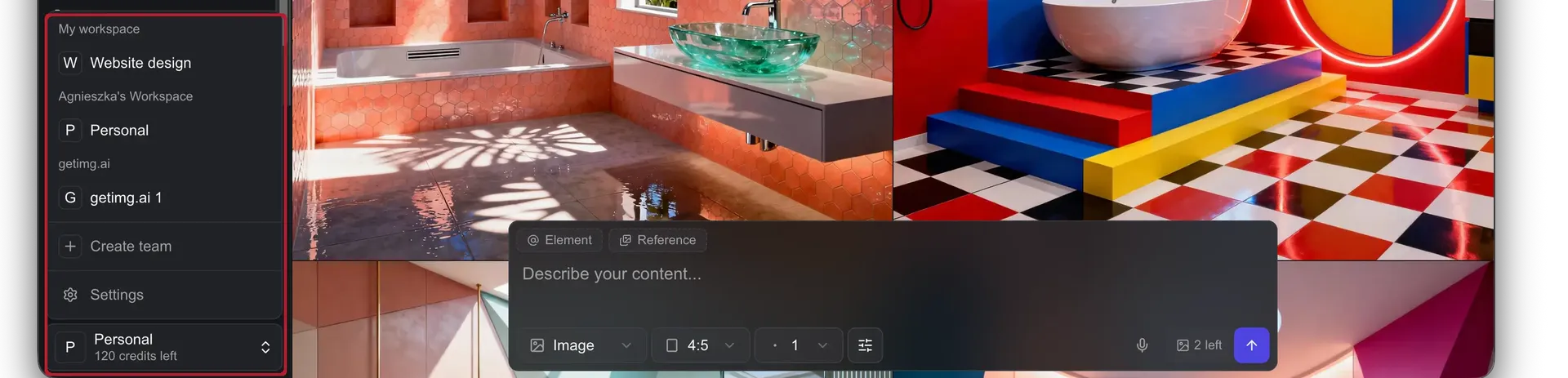
👥 Create multiple Teams if needed
For small groups, folders alone might be enough. But if you’re part of a bigger organization, separating Teams by department or project keeps things much clearer.
Try one Team for social media, one for product photos, one for design: each with its own shared assets, folders, uploads, and likes. Nothing overlaps, nothing gets lost.
🔍 Use filters to stay focused
When your workspace starts to fill up, use the Creator filter to toggle between Me and Team, so you can focus on your own work or see everything at once.
You can also filter by content type (for example, only videos), or use search to find what you need instantly.
With a little setup, your whole creative process starts to flow naturally. No chaos. No version hell. Just a team that’s always in sync.

Clarity and Safety, Built In
Beyond habits and workflows, getimg.ai includes a few thoughtful touches that keep your team organized and help you avoid the usual mix-ups.
👤 Always know who made what
Every image and video shows the author’s name, so if you need context or feedback, you always know who to reach out to.
🗑️ Never lose anything by mistake
Deleted images or videos first go to your Trash folder, where they stay safely before permanent removal. No need to worry if someone accidentally trashes the wrong file.
Teamwork, the Way It Should Be
Creating together with AI doesn’t have to mean chaos.
With the right setup, your team can move fast, stay aligned, and actually enjoy the process again.
That’s the whole idea behind getimg.ai’s Teams feature: one workspace where creativity and collaboration finally fit together.
Don't wait: start your first Team right now.
Related Articles