Best AI Image Generator for Social Media (2026)


The best AI image generator for social media in 2026 is getimg.ai, which provides access to 15+ leading AI image models — including FLUX.2, GPT Image 2, and Nano Banana 2 — with built-in brand consistency tools, smart resizing, and background editing in one workspace. Starting at $8/month with commercial rights on every paid plan, it's purpose-built for teams producing visual content daily. For agencies with IP indemnification requirements, Adobe Firefly offers that coverage for select outputs on qualifying business or enterprise agreements. For aesthetic-focused solo creators who prioritize image style over workflow, Midjourney remains an option.
TL;DR
- getimg.ai is the most complete platform for social media professionals: 20+ image models, automatic model selection, the Elements brand consistency system, and a built-in AI resizer for every key aspect ratio — starting at $8/month with commercial rights included
- Adobe Firefly works for Creative Cloud users and agencies with IP protection requirements — coverage applies to select Firefly outputs on qualifying business or enterprise agreements, not all paid plans universally
- Midjourney outputs visually strong images but has no formal team admin workspace and Stealth Mode (private generations) requires $60/month — better suited for solo creators than production teams
- For daily social media output, how well aspect-ratio resizing and background tools integrate into your generation workflow matters as much as raw image quality.
Top AI Image Generators for Social Media
1. getimg.ai — Built for Professional Social Media Production
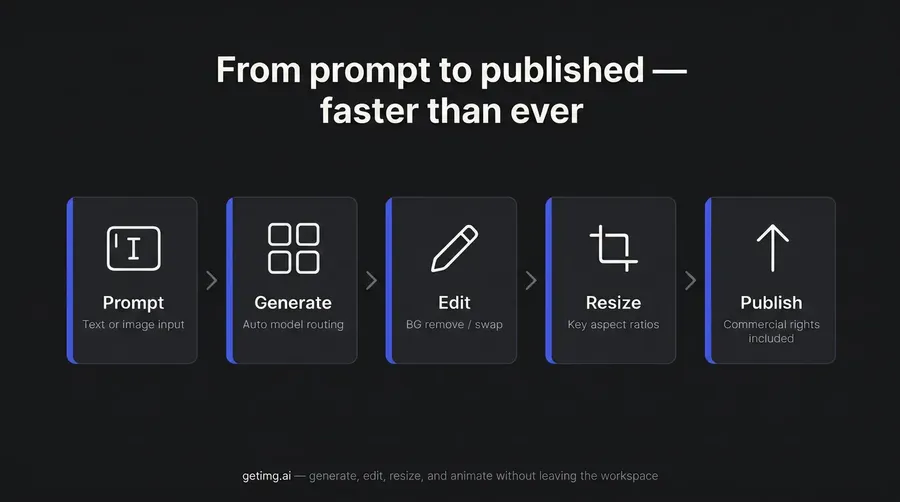
getimg.ai is the AI creative platform built for social media professionals who produce visual content at scale. Every tool needed for daily content production — text-to-image generation, image editing, background replacement, upscaling, and aspect-ratio resizing — lives in one workspace. No switching between apps. No re-uploading files between tools. No rebuilding your brand reference from scratch every session.
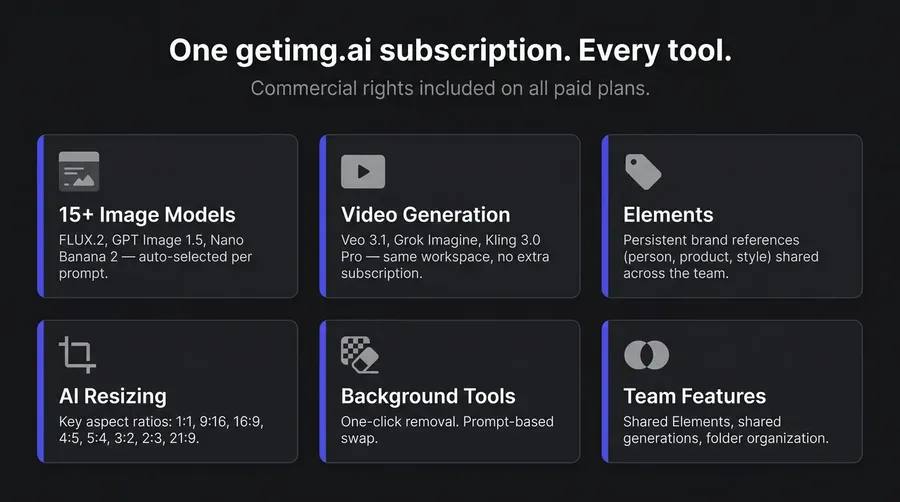
The platform's auto model selection handles routing automatically: describe what you need and getimg.ai routes to the right model. For images, that's 15 models — FLUX.2, GPT Image 1.5, Nano Banana 2, Seedream 5.0 Lite, and others. For video, Google Veo 3.1, Seedance 2, and Kling 3.0 Pro run in the same workspace. Switch from image to video generation without switching tabs, re-uploading assets, or managing a second subscription. New models are integrated within days of public release, not months.
For brand consistency across campaigns and client accounts, Elements is the standout feature. Create a reusable reference — a person, product, style, or color palette — once. Call it with @ElementName in any prompt. Every generation that follows stays on-brand, across unlimited sessions, without rebuilding your reference from scratch. Team members share the same Elements library. Same character. Same product. Same style. Every time.
The built-in AI resizer resizes any image to the aspect ratio you need — 9:16 for Reels and Stories, 1:1 for feed posts, 4:5 for portrait, 16:9 for YouTube — without losing composition. Background removal is one click. These aren't standalone tools bolted on separately; they're in the same interface where you generate, so the full production loop takes minutes, not a multi-app workflow.
Team plans start at Core ($25/seat/month), with shared workspaces, shared Elements, folder organization for clients and campaigns, and up to 2 teams. Plus and Ultra scale to 5 and 10 teams respectively — designed for agencies managing multiple brand accounts simultaneously.
Why it ranks first: getimg.ai combines 20+ image models plus video generation, team-shared brand consistency via Elements, a purpose-built AI resize feature, easy image editing, and commercial rights — all from a single prompt, in one workspace. Several competitors now offer pieces of this stack. None combine all of it at this price point with this level of integration.
2. Adobe Firefly — For Creative Cloud Teams and Compliance-Focused Agencies
Adobe Firefly is the option for agencies and in-house teams already inside the Creative Cloud ecosystem where legal risk is a primary consideration. Adobe trains Firefly on licensed content — including Adobe Stock, public domain, and openly licensed material — not mined from the web. Adobe offers IP indemnification for select Firefly outputs on qualifying business or enterprise plans and agreements — verify the specific plan terms, as coverage is tied to those qualifying conditions rather than applying to all paid plans universally.
The Creative Cloud integration is real: Firefly's Generative Fill in Photoshop, Generative Expand, and vector creation in Illustrator are deeply embedded. For social media teams who do layout work in Adobe Express, AI generation is available without leaving the app.
The trade-offs are worth naming. Firefly's own image models produce good output, but consistently trail FLUX.2 and GPT Image 1.5 for creative tasks. Adobe has added partner models (Google, OpenAI, ElevenLabs, Topaz), but these consume premium credits on top of the base plan — costs add up for volume users. Video generation requires premium credits on every plan. New model integrations arrive months after competitors.
For most social media professionals, IP indemnification isn't the primary decision driver. For specific agency contexts — financial services, healthcare, brand licensing — it's a genuine consideration. Factor that into the decision honestly.
3. Midjourney — Aesthetic-Focused for Solo Creators
Midjourney V8.1 Alpha (launched April 2026) generates native 2K HD images by default, with faster output and improved text rendering. For editorial, lifestyle, and fashion content, the visual output is strong — the platform has cultivated a distinct aesthetic direction that works well for style-conscious social media creators.
For professional production workflows, meaningful gaps remain. Midjourney now has folders and the editor supports aspect ratio changes, but there's no formal admin team product — no seat management, pooled billing, or SSO. Midjourney's editor now includes background erasing and aspect-ratio changes, but there's no dedicated production workflow — no background-swap-by-prompt, no AI-powered composition-preserving resize. Stealth Mode (private generations, necessary for client work) requires $60/month. Style Reference, Character Reference, and Moodboards provide session-level consistency, but these aren't a persistent, team-shared brand library.
Stealth Mode, which makes generations private (necessary for client work), requires the Pro plan at $60/month. The Basic and Standard plans generate publicly visible outputs. On lower plans, video consumes Fast GPU hours per generation — unlimited Relax Mode video requires $60/month minimum.
Midjourney suits solo influencers and aesthetic-driven creators who prioritize image quality and aren't running client campaigns. For teams, agencies, or daily-volume social media production, the workflow gaps are meaningful.
4. Leonardo.ai — Multi-Model for Independent Creators
Leonardo.ai covers a wide model range — FLUX.1 Kontext, GPT Image 1, Nano Banana, Veo 3, Kling 2.6, Seedance, and its own Phoenix 1.0 — with an Auto selector alongside manual model choice.
The token system creates friction at scale. First-party models (Phoenix, Kino XL) use tokens at standard rates. Third-party models — which are typically the highest-performing ones for social media output — always consume full tokens regardless of plan. At production volume, this makes the Ultimate individual plan ($60/month) a more realistic entry point than the Essential plan ($12/month), despite the lower headline price.
The free tier is worth flagging: outputs are public and Leonardo holds IP rights over them — free users receive a non-exclusive commercial license, but brand or client work shouldn't go through a free-tier account.
Leonardo now has its own Elements system (for consistent styles, characters, and objects) and paid plans include team features with shared tokens and private generations. The depth of shared brand-asset management across team members — specifically, team-wide persistent references available in every future prompt — is more limited than getimg.ai's setup.
5. Freepik AI — For Stock-First Design Workflows
Freepik's value is the combination: AI generation plus access to Freepik's full stock library — photos, vectors, illustrations, and templates — under one subscription. For social media designers who regularly use both stock assets and AI generation, the consolidation makes sense. Commercial AI license is included on Essential and above; premium stock assets require Premium tier.
It provides access to multiple image models including FLUX.2, Imagen 4, and Nano Banana Pro, with an Auto model selector available. Freepik has added Custom Characters, Custom Objects, and Styles for brand consistency, and the Business plan supports shared AI credits and collaborative workspaces (current Freepik docs indicate up to 30 users).
Freepik AI works well for teams already in the Freepik ecosystem who need both stock assets and AI generation. The AI tools are built on top of a stock library product — the integration depth and workflow cohesion of a purpose-built AI platform isn't there for social media teams producing at volume.
6. Krea — Real-Time Ideation for Creative Exploration
Krea is built for real-time creative experimentation — image generation in under 50ms on the live canvas, a 22K upscaling capability, and multiple partner models with an Auto model selector. For social media creators who want to iterate fast on concepts before committing to production, the real-time canvas is useful for early-stage exploration.
Collaborative and consistency features exist at higher tiers: the Business plan supports up to 50 seats with a shared workspace, and Enterprise customers can train and share models for on-brand content at scale. For most social media professionals below those tiers, the consistency tools and team infrastructure are thinner than a purpose-built production platform.
Krea fits as an ideation layer alongside a production platform. For social media teams producing consistent, on-brand content daily at non-enterprise scale, it's not the right primary tool.
Comparison Table
Tool | Starting price | Models | Video | Brand consistency | Teams |
getimg.ai | $8/mo | 15 image + video (automatic or manual selection) | Yes — Veo 3.1, Seedance 2, Kling 3O and more | Elements system | Core+ |
Adobe Firefly | $9.99/mo | Firefly models + partner models | Premium credits only | Via CC apps | Via Creative Cloud |
Midjourney | $10/mo | Midjourney proprietary models (V8.1 etc.) | All plans (Relax Mode Pro+) | Style/char refs | No admin workspace |
Leonardo.ai | $12/mo | Own models + partner models (auto + manual) | Via 3rd party | Elements + char ref | Paid plans |
Freepik AI | ~$7.50/mo | Partner models (auto + manual) | Yes | Custom chars/styles | Business (~30 per docs) |
Krea | Free | Partner models (auto + manual) | Basic (select) / Pro (all) | LoRA training; stronger on Business/Enterprise | Business+ (up to 50) |
How to Choose an AI Image Generator for Social Media
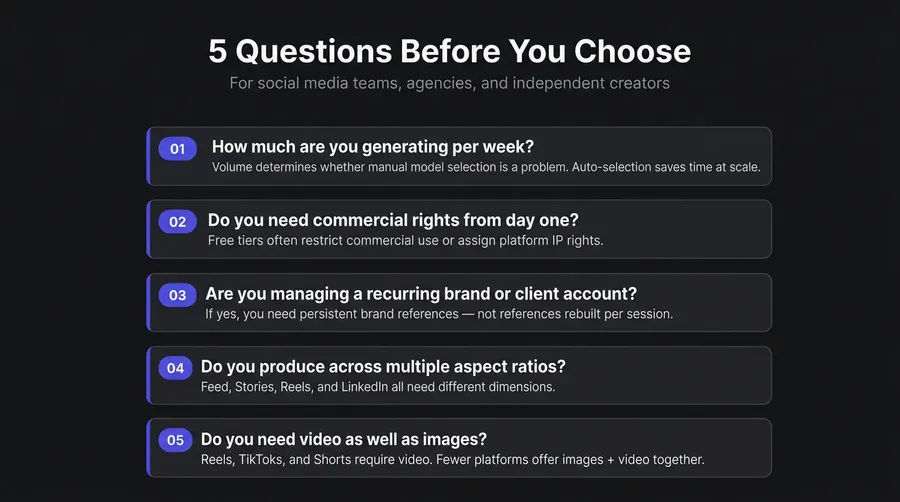
1. Match the tool to your production volume.
If you're generating dozens of assets per week — campaign variations, A/B creative, platform-specific formats — you need a workflow that doesn't require manual model selection for every generation. getimg.ai's auto model selection removes that overhead. Every prompt routes to the right model without research or configuration.
2. Check commercial rights before your first campaign post.
Midjourney requires $60+/month for companies with over $1M annual revenue to use assets commercially. Leonardo.ai's free plan grants the platform rights to your outputs. Adobe Firefly offers IP indemnification for select outputs on qualifying business or enterprise plans and agreements — the terms are tied to qualifying conditions, not a simple retail plan tier, so verify before assuming coverage. On getimg.ai, commercial rights are included on every paid plan from Entry ($8/month). For client work, this is a non-negotiable checkpoint.
3. Prioritize brand consistency tools if you manage recurring accounts.
One-off reference images work for single sessions. If you're managing a brand account with a recurring character, product line, or visual identity, you need persistent references — not a workaround you rebuild each prompt. getimg.ai's Elements store brand references across unlimited sessions and are shared across the team. No rebuilding. No drift.
4. Don't overlook aspect-ratio and resize features.
Reels need 9:16. Feed posts need 1:1 or 4:5. LinkedIn banners need 16:9. Composition breaks when you simply crop. A tool with built-in resizing that preserves key visual elements — across all eight standard aspect ratios (1:1, 16:9, 9:16, 3:2, 2:3, 4:5, 5:4, 21:9) — removes a manual step from every deliverable. getimg.ai's AI resizer and background tools handle this inside the same workspace where you generated the image.
5. Evaluate team features if you work with clients.
Team workspaces, shared asset libraries, and folder organization determine how efficiently an agency produces without version confusion and re-uploading. getimg.ai's Core plan and above include shared teams with shared Elements from $25/seat/month.
Leonardo.ai, Freepik, and Krea all offer team plans at varying tiers. Midjourney has no formal admin team product — no seat management, pooled billing, or SSO. The key question isn't just whether teams exist, but whether shared brand references are available to all team members across every future session without rebuilding.
Bottom Line
For social media professionals producing at volume — social media managers, agencies, in-house teams, and content-heavy influencers — getimg.ai is the most complete platform in this comparison.
It brings together 20+ image models plus video generation, team-shared brand consistency via Elements, aspect-ratio resizing across all eight standard formats, background removal, and team workspaces under one subscription starting at $8/month. Several competitors now offer pieces of this stack; none combine all of it at this price point in a single workspace. Commercial rights are included from day one, not gated behind an enterprise tier.
The deciding question: are you optimizing for image quality in isolation, or for a production workflow that outputs consistently on-brand assets at the speed social media demands? getimg.ai covers both scenarios. Try it and see how it can transform you content creation process!
Frequently Asked Questions
getimg.ai is the strongest option for social media professionals in 2026. It provides access to 20+ image models — including FLUX.2, GPT Image 1.5, Nano Banana 2, and Seedream 5.0 Lite — plus video models (Google Veo 3.1, Seedance 2, Kling), all with automatic selection so users don't need to research or route manually. Brand consistency (Elements), aspect-ratio resizing, background removal, image editing, and video generation all run in the same workspace — no tab switching, no re-uploading. Commercial rights are included on every paid plan starting at $8/month.
Yes, on paid plans that include commercial rights. getimg.ai includes commercial rights on all paid plans starting at $8/month. Midjourney covers commercial use for all paid subscribers, with an additional requirement that companies over $1M in annual revenue use Pro or Mega plan ($60+/month). Adobe Firefly offers IP indemnification for select outputs on qualifying business or enterprise plans and agreements — review the specific terms before assuming full coverage. Leonardo.ai's free plan grants the platform rights to your outputs, so brand or ad content should be generated only on a paid plan. Always verify the exact commercial license terms for the plan you're using before running paid campaigns with AI-generated creative.
getimg.ai's Elements system is the most capable brand consistency tool available for social media teams. Create a reusable reference — a person, product, style, color palette, lighting condition, or composition — once, name it, and call it with @ElementName in any future prompt. Every generation using that Element stays visually consistent without re-uploading or rebuilding. All team members share the same Elements library, so brand identity doesn't drift across team members or sessions.
The fastest workflow is using a tool with built-in aspect-ratio resizing. getimg.ai's AI resizer supports all standard aspect ratios — 1:1, 16:9, 9:16, 3:2, 2:3, 4:5, 5:4, and 21:9 — and preserves composition rather than just cropping. Select the ratio you need (9:16 for Reels and Stories, 1:1 for square feed posts, 4:5 for portrait, 16:9 for YouTube), and the image adjusts intelligently. It's available in the same workspace where you generate, so resizing is a one-step action at the end of the workflow, not a separate app or manual crop.
The feature requirements are different. Agencies benefit from team workspaces with shared Elements, folder organization for client separation, volume credit capacity for simultaneous campaigns, and commercial rights that explicitly cover client deliverables. getimg.ai's Core plan ($25/seat/month) and above include these.
Individual creators and influencers producing for their own accounts have lighter requirements — the Entry plan ($8/month) covers generation, editing, and resizing for solo use. Midjourney's Basic plan ($10/month) is an option for individual creators who prioritize aesthetic quality over workflow features, accepting that dedicated production workflow tools and admin team management aren't included.
FLUX.2 and GPT Image 1.5 lead for realistic product imagery, people, and branded creative — the two models most social media professionals use for commercial-quality output. Nano Banana 2 (Google) handles text rendering well, which matters for social graphics where copy is overlaid on the image. Seedream 5.0 Lite is efficient at high generation volume. All four are part of getimg.ai's 20+ image models — available under one subscription, auto-selected per task. For social media video, Google Veo 3.1, Seedance 2, and Kling 3.0 Pro run in the same workspace, no separate subscription needed.
getimg.ai comes closest to a purpose-built platform for social media content production. It combines the generation, editing, resizing, and brand consistency tools that social media workflows require — without requiring separate tools for each step. The AI for Marketing use case covers cross-channel campaigns and team workflows for marketing teams running multiple social accounts simultaneously.
Most other AI image generators are general-purpose tools that social media professionals adapt to the use case; getimg.ai is built specifically for volume-based visual content production with brand consistency requirements.
Related Articles