Best AI Image Generator for E-Commerce (2026)


The best AI image generator for e-commerce in 2026 is getimg.ai: 24 image models including FLUX.2, GPT Image 2, Nano Banana 2, and Seedream 5.0 Lite, with the Elements system for product consistency across every shot, background replacement, smart resize for storefront aspect ratios, and upscaling up to 16K. Pricing starts at $8/month with commercial rights on every paid plan. Adobe Firefly adds IP indemnification on qualifying business plans. kive.ai is a product-photography specialist. Midjourney is strong on aesthetic quality. Freepik AI bundles stock photography with generation. Leonardo.ai and Krea cover broader generation use cases.
TL;DR
- getimg.ai: 24 image models, Elements for product consistency, background swap, Smart Resize, upscaling to 16K, commercial rights at an affordable price.
- Adobe Firefly: IP indemnification on qualifying agreements plus Generative Fill in Photoshop for catalog retouching.
- kive.ai: AI studio replacement built only for product photography; narrowest fit, $15/month billed yearly.
- For high-SKU catalogs, persistent product references and per-image cost matter more than headline image quality.
Best AI Image Generators for E-Commerce: Ranked
1. getimg.ai: Best AI Image Generator for E-Commerce Teams
getimg.ai is a professional AI creative platform built for teams that ship visual content daily. For e-commerce specifically, four capabilities matter:
- the Elements system (a Product Element holds your SKU reference and travels across every prompt with `@ElementName`);
- multi-model access to 24 image models with auto-selection per task;
- a full editing stack including one-click background removal, AI background replacement, Smart Resize, and upscaling up to 16K;
- and commercial rights on every paid plan.
Why it ranks first: e-commerce catalogs do not need one beautiful shot. They need the same beautiful shot of the same product, on twelve different backgrounds, in five aspect ratios, at every resolution from thumbnail to zoom view. That workload breaks every AI tool that requires you to re-prompt your product from scratch each session.
Elements removes that problem at the system level. Create a Product Element once from one to twenty reference photos. Every generation that follows uses the same product reference automatically, with no drift between hero shots, lifestyle scenes, and category banners.
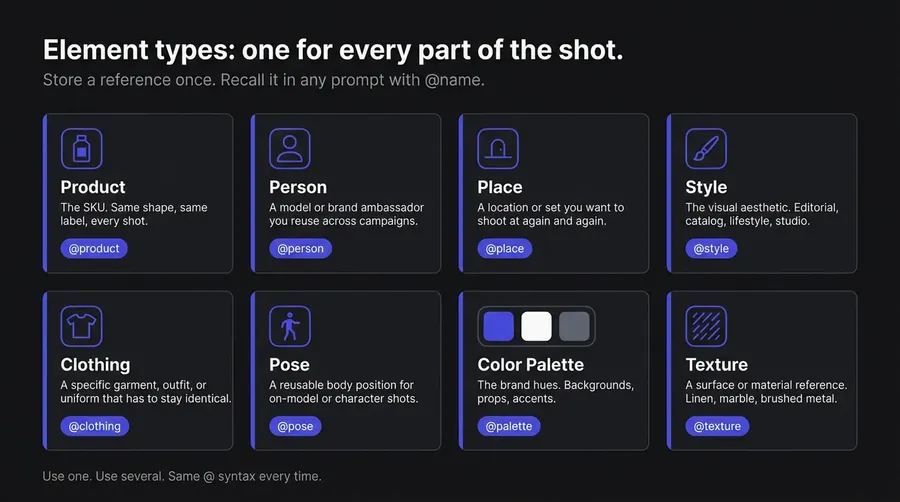
The platform handles model selection automatically. Describe the shot you want; getimg.ai routes to the right model. For text on packaging mockups or promo cards, that means Nano Banana 2 or GPT Image 2. For high-fidelity product photography, FLUX.2 or Seedream 5.0 Lite. You can switch manually when a campaign needs a specific look.
What e-commerce teams use it for:
- Generating on-white pack shots, lifestyle scenes, and category banners from one product reference: upload the SKU, store it as a Product Element, then place it into every background a campaign needs.

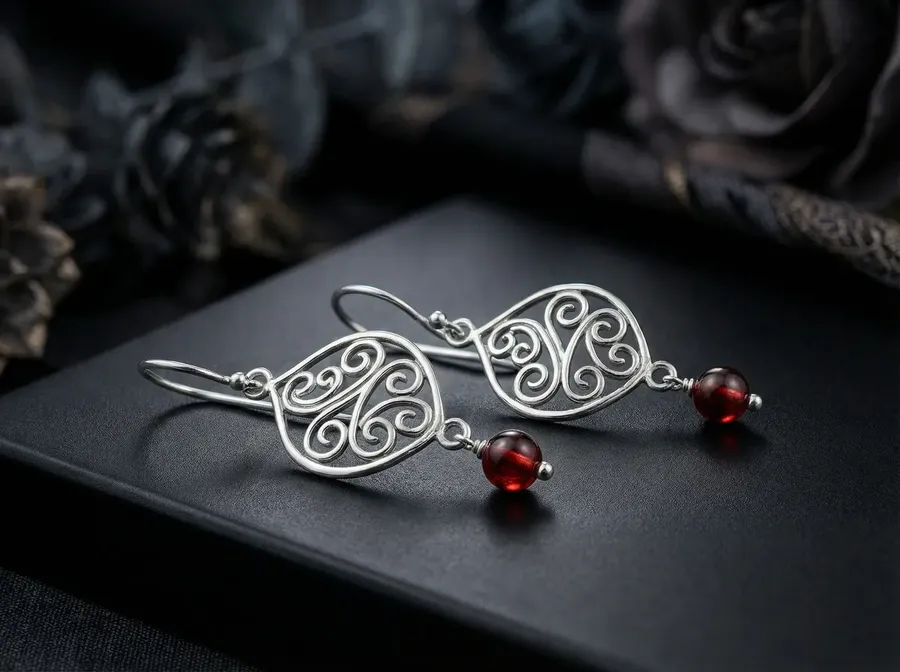
Image 1
Make this look like a premium studio product photo. Soft diffused lighting, premium background with necessary decor, realistic texture. Keep the product design and branding exactly the same.
- Swapping product backgrounds at volume: one-click background removal outputs transparent PNGs, or describe a new scene (studio cyclorama, beach, kitchen counter, holiday set) and the AI renders the product in context.
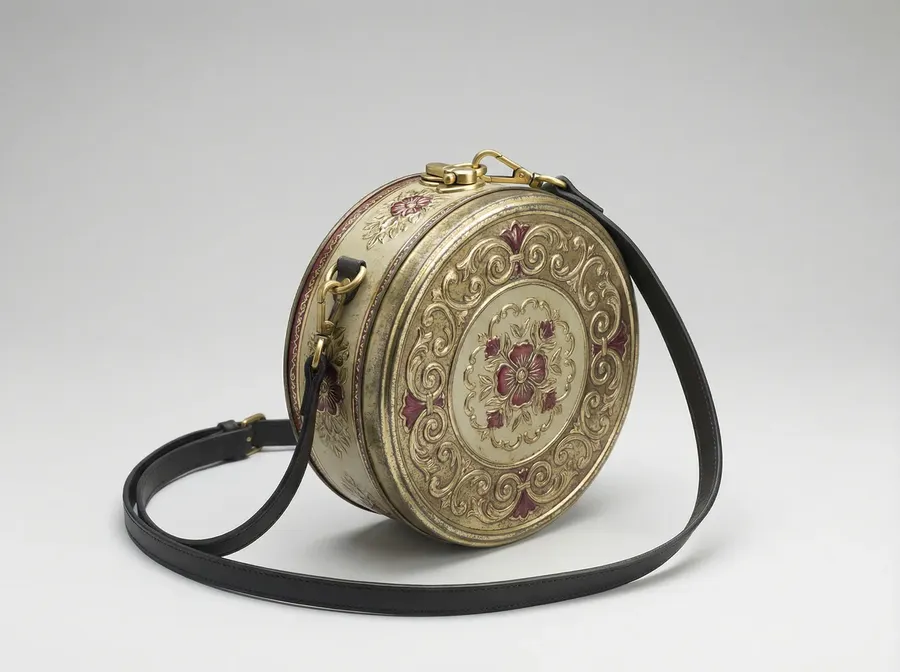
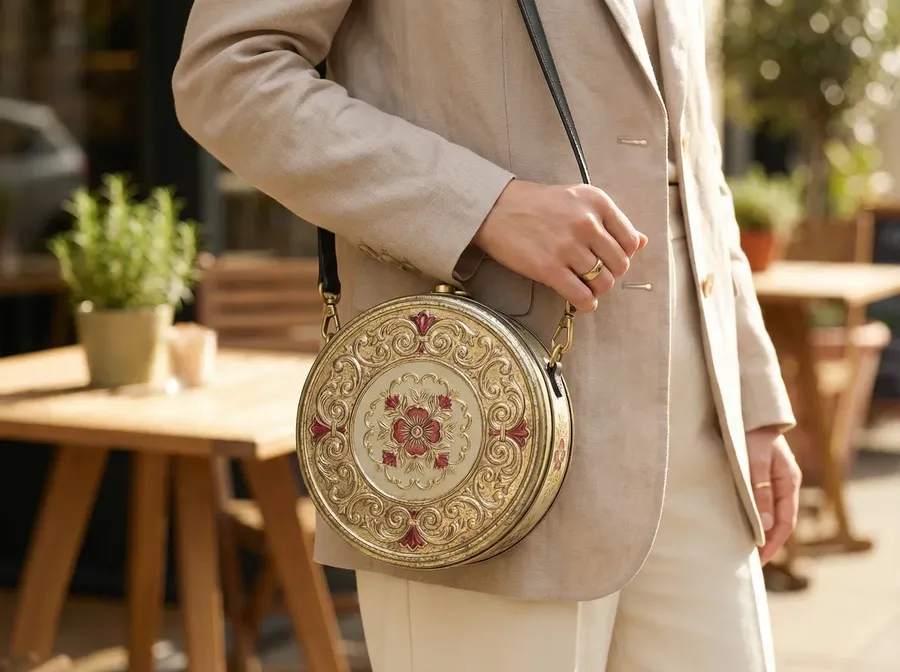
Image 1
Create a lifestyle photo of a model wearing the bag naturally. Keep bag size, shape, and branding accurate. Realistic straps and shadows. Background: modern city sidewalk.
- Resizing every shot to the aspect ratios each storefront demands: Smart Resize regenerates the image at 1:1 for Amazon and Shopify grids, 4:5 for Instagram feed, 9:16 for Reels and TikTok shop, 16:9 for YouTube product spots, and 2:3 or 3:4 for Pinterest pins, without losing composition.
- Upscaling product photography to 2K, 4K, or up to 16K on supported upscalers, so the same generated image works as a thumbnail and as a zoom-in detail view.
- Localizing product imagery for regional storefronts: prompts work in 20+ languages, so a team in Tokyo briefs in Japanese while the team in São Paulo briefs in Portuguese, and outputs reflect local context.
- Generating up to 16 image variations per batch, so a single brief produces multiple lifestyle takes without rerunning the prompt one at a time.
- Producing AI-generated video alongside product images in the same place: Seedance 2.0, Google Veo 3.1, and Kling O3 handle short-form product video, hero clips, and motion ads for storefront listings.
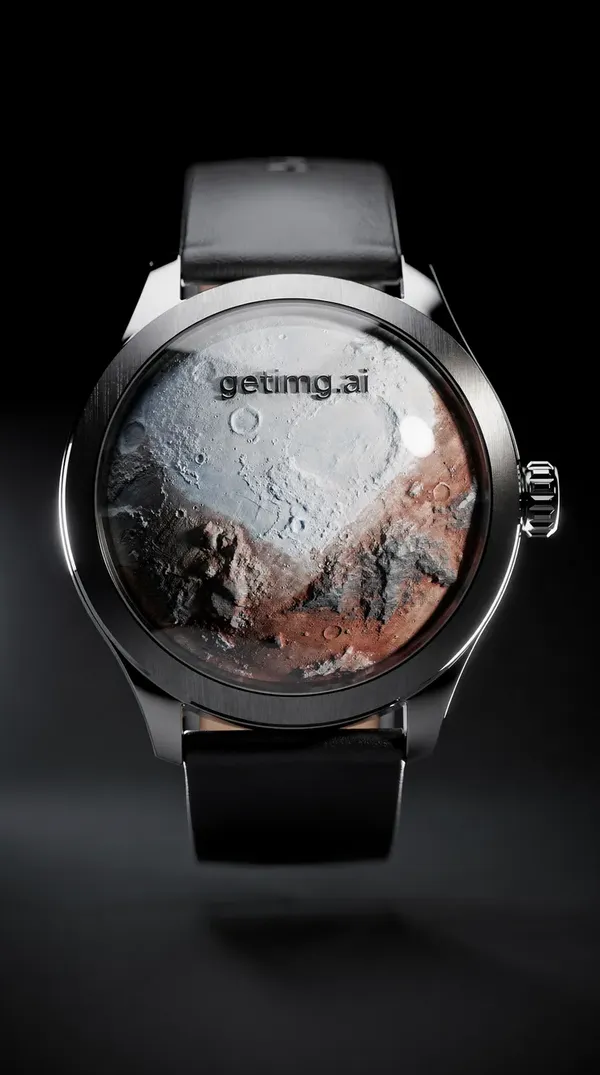
First Frame
Camera rotates 180 degrees around the watch.
Feature | Detail |
Image Models | 24 models available in-app, including FLUX.2, GPT Image 2, Nano Banana 2, Seedream 5.0 Lite, Grok Imagine, Z-Image Turbo, and more |
Video Models | 26 models available in-app, including Google Veo 3.1, Seedance 2.5, Kling 3.0 Pro, Wan 3.0, and more |
Product Consistency | Elements system supports Product, Person, Style, Color Palette, Lighting, Pose, Texture, and additional reference types |
Background Tools | One-click background removal (including batch processing) and AI background replacement using prompts |
Resize for Storefronts | Smart Resize and Outpainting with support for 9 aspect ratios |
Upscaling | 2K and 4K on most upscalers, up to 16K on Topaz Standard 2, Topaz Bloom 2, Topaz Wonder 3.5, and Crystal Upscaler |
Teams | Core: up to 2 teams • Plus: up to 5 teams • Ultra: up to 10 teams |
Commercial Rights | Included with all paid plans |
Starting Price | $8/month (Entry plan, 3,000 credits) |
Access to All Image & Video Models | From $25/month (Core plan, 15,000 credits) |
Best for: D2C brands, marketplaces, agencies, and in-house catalog teams producing product photography, lifestyle imagery, and storefront assets at volume.
2. Adobe Firefly: IP Indemnification and Photoshop Retouching
Adobe Firefly targets brands with active legal review and teams already retouching catalog imagery inside Photoshop. Firefly's models are trained on licensed Adobe Stock content, public-domain material, and openly licensed material; Adobe does not mine the web or video-hosting sites for Firefly training.
Adobe offers Firefly IP indemnification for eligible outputs, features, surfaces, and export events when the customer's qualifying agreement includes the applicable Firefly indemnity terms. Coverage is tied to those qualifying conditions, not all paid plans universally.
Why it ranks here: for enterprise e-commerce brands, regulated categories (beauty, supplements, financial products, alcohol), and agencies managing high-profile client accounts, the indemnification claim is meaningful.
The Photoshop integration is the second reason: Generative Fill and Generative Expand let retouchers fix backgrounds, extend product shots to new aspect ratios, and clean up packshots inside the same file they were going to open anyway, without leaving Creative Cloud.
Tradeoffs: Firefly's own image model lags FLUX.2, GPT Image 2, and Nano Banana 2 on product photorealism in many comparisons. Video generation and partner-model outputs (Google, OpenAI) consume premium credits quickly, so production costs climb faster than the headline price implies. There is no Elements-equivalent for persistent product reference: Creative Cloud Libraries store assets but do not act as a structural consistency system inside Firefly generations.
Feature | Detail |
Image Models | Firefly Image 4 and Firefly Image 5, plus partner models from Google, OpenAI, Topaz, and Runway |
Product Consistency | Managed through Creative Cloud Libraries; no dedicated Elements-style reference system |
Editing Tools | Generative Fill and Generative Expand integrated directly into Photoshop |
Commercial Coverage | Firefly IP indemnification available for eligible outputs, features, surfaces, and export events when covered under a qualifying Adobe agreement that includes applicable Firefly indemnity terms |
Starting Price | $9.99/month (Standard plan, includes 2,000 premium credits and unlimited standard generations) |
Who uses it: Enterprise e-commerce departments and agencies who already use Photoshop for catalog retouching and need documented IP coverage at the plan level.
3. kive.ai: Product Photography Specialist
kive.ai is a narrow vertical tool aimed directly at e-commerce brands and DTC marketing teams. The pitch is "AI studio replacement": upload a product photo, generate styled lifestyle and on-model imagery, and skip the photoshoot. The product is built around brand visuals and structured product imagery rather than open-ended generation.
Why it ranks here: for a brand that only needs product photography (no video, no general creative work, no design assets), kive.ai is purpose-built. Product reference handling and brand-styled outputs are the core flow, which can be faster to onboard than a general-purpose platform if the use case never expands.
Tradeoffs: The narrow focus is the limitation. Multi-modal needs (video, banners, ad creatives, social content, design assets) require a second tool. Pricing scales quickly at production volume compared with general-purpose platforms that offer the same image quality plus video and editing in one subscription. Model selection is limited compared with platforms exposing the full FLUX, GPT Image, Nano Banana, and Seedream model families.
Feature | Detail |
Focus | Product photography and branded visual content creation |
Model Access | Curated model selection focused on commerce and product imagery rather than broad general-purpose AI generation |
Video Generation | Available, but not a primary focus of the platform |
Brand Consistency | Supports brand-styled outputs and product-reference workflows for consistent visual identity |
Starting Price | $15/month (Basic, billed annually); Pro at $75/month (billed annually); Enterprise pricing available on request |
Best For | Brands and e-commerce teams looking for a dedicated product photography solution rather than a general AI creative platform |
Who uses it: e-commerce brands and DTC teams whose only AI use case is replacing studio photography for catalog and lifestyle shots.
4. Midjourney: Aesthetic Quality, Limited E-Commerce Workflow
Midjourney's V8.1 Alpha (launched April 2026) outputs native 2K HD images, with improved prompt comprehension and incremental gains on text rendering. For brand campaigns, hero imagery, and visual direction work where the shot has to feel premium, the output quality holds up.
Why it ranks here: for brand-led content (campaign moodboards, hero pages, editorial product features, lookbook style), Midjourney can produce images that read as art-directed photography rather than rendered output. The image editor handles Smart Select, Vary Region, Retexture, and aspect ratio changes inside one interface.
Tradeoffs: Midjourney has no purpose-built persistent product consistency system. Style Reference, Character Reference, and Moodboards are session-level inputs, not a structural product library: every new session restarts that reference. Text on packaging is still unreliable for catalogs that show product copy. Stealth Mode (private generations, useful for unreleased SKUs) requires the $60/month Pro plan or higher.
There is no formal team admin product (no seat management, pooled billing, or SSO). Midjourney does include Upscale as a creation action and editor tools such as Smart Select and Erase Background with transparent PNG export, but it does not offer the same dedicated e-commerce background-replacement and product-workflow stack as tools built around catalog production.
Feature | Detail |
Image Model | Midjourney V8.1 Alpha with 2K HD image generation by default |
Product Consistency | Session-based reference system; no persistent product library or reusable brand asset system |
Editing Tools | Smart Select, Vary Region, Retexture, Remix, and aspect ratio adjustments |
Private Generations | Available only on the Pro plan ($60/month) and above |
Commercial Rights | Included on paid plans; businesses with more than $1M in annual revenue must subscribe to the Pro plan or higher |
Starting Price | $10/month |
Who uses it: creative directors and brand designers producing aesthetic hero imagery and brand campaigns. Not the right choice for high-volume catalog production.
5. Freepik AI: Stock Library Plus AI Generation
Freepik AI combines stock content, AI credits, AI generation, and editing tools (Replace Background, Remove Background, Retouch, Resize) in one subscription. Useful for e-commerce designers who want AI-generated custom shots alongside licensed stock for backgrounds, textures, and template assets.
Why it ranks here: for workflows that mix custom AI product imagery with licensed stock, the bundled approach reduces tool sprawl. The model library is broad and current, including FLUX.2 family, Imagen 4, Nano Banana Pro, and FLUX.1 Kontext, with an auto model selector.
Custom Characters, Custom Objects, and Styles cover the basics of brand reference handling. Freepik Business adds pooled credits, seat management, collaboration, SSO, and basic legal indemnification on commercial AI licensing.
Tradeoffs: AI generation sits on top of a stock library product. The interface is built around stock browsing rather than AI production. Licensing is layered: Essential includes a commercial AI license for AI tools, while Premium and above are needed for broader premium-stock access, and Premium+/Pro add broader AI generation and editing access. Confirm the exact tier coverage at billing time.
Feature | Detail |
Image Models | Extensive model library including FLUX.2 models, Imagen 4, Nano Banana Pro, FLUX.1 Kontext, and additional image-generation models |
Stock Library | Access to photos, vectors, illustrations, icons, templates, and other creative assets |
Brand Consistency | Custom Characters, Custom Objects, and Custom Styles for reusable visual references |
Team Workspace | Available on the Business plan, including pooled credits, SSO, and basic AI licensing indemnification |
Commercial Rights | Included with Essential plans and above through a commercial AI license; Premium and higher tiers add access to premium stock assets |
Pricing | Multiple tiers available (Essential, Premium, Premium+, Pro, and Business); check Freepik's pricing page for current pricing and limits |
Who uses it: e-commerce designers already inside the Freepik ecosystem who want AI generation alongside their existing stock subscription.
6. Leonardo.ai: Multi-Model Access at Mid-Range Pricing
Leonardo.ai is the closest positioning overlap with getimg.ai on the broader market: multi-model, broad audience, paid plans from $12/month annual. It integrates GPT Image 1, FLUX.1 Kontext, Veo 3, Kling 2.6, and Nano Banana alongside its own Phoenix 1.0 and Kino XL models. The AI Canvas covers basic editing, and LoRA training lets users build custom style models for brand-specific looks.
Why it ranks here: for individual e-commerce sellers, freelance designers, and small DTC teams, the $12/month Essential plan with 8,500 fast tokens is workable. Leonardo's Elements (trained with LoRA-based techniques on a face, style, subject, or product) and Character references cover basic product consistency. The community asset marketplace surfaces models and styles that other users have built.
Tradeoffs: Leonardo's token system charges first-party and third-party models at different rates. Third-party models (the most capable for product photography: GPT Image 1, FLUX.1 Kontext, Nano Banana) always consume tokens at full speed with no relax-mode fallback.
Leonardo allows commercial use on free and paid plans, but free-plan outputs are public and non-exclusive in practice: Leonardo owns those assets as between user and platform, and other users can see and reuse them, which makes the free plan unsuitable for unreleased SKUs or client work. Paid plans provide private generation options and stronger ownership. Team plans (Growth, $48/seat, billed as $144/month for three seats) add shared tokens and private generations.
Feature | Detail |
Image Models | Phoenix 1.0, Kino XL, plus third-party models including GPT Image 1, FLUX.1 Kontext, and Nano Banana |
Product Consistency | Elements (LoRA-based references) and Character References for maintaining consistent subjects across generations |
Editing Tools | AI Canvas, inpainting, image editing workflows, and LoRA training |
Team Workspace | Available on the Growth plan ($48 per seat, billed as $144/month for three seats) |
Commercial Rights | Available on both free and paid plans; free outputs are public and non-exclusive, while paid plans add privacy controls and stronger ownership protections |
Starting Price | $12/month (Essential plan, includes 8,500 fast tokens with annual billing) |
Who uses it: individual e-commerce sellers and small creative teams who want broad model access at a mid-range price without enterprise team infrastructure.
7. Krea: Real-Time Ideation for Product Concepts
Krea generates images in near real-time and is one of the fastest tools on this list for visual exploration. The real-time canvas is useful for the pre-production phase of a catalog: testing visual directions, exploring packaging concepts, and iterating on style before a final shoot or AI generation run.
Why it ranks here: Krea is fast in a way that changes the workflow shape. For brand and creative teams sketching product moodboards, generating reference imagery for shoots, or testing how a packaging redesign might read in a styled scene, real-time iteration shortens the loop from idea to "yes, this direction."
Basic ($9/month) includes a commercial license, image/3D/lipsync models, LoRA fine-tuning up to 50 images, and 4K upscaling. Pro ($35/month) adds all video models, Nodes and Apps workflow automation, and 8K upscaling. Max ($105/month) unlocks 22K upscaling and 2,000-image LoRA training.
Tradeoffs: Krea is better suited to ideation than production at scale. Consistency across many product shots is harder to maintain than on platforms with a persistent reference system. There is no editing workflow comparable to getimg.ai's background removal, background replacement, resize, and upscaling stack. Free-plan outputs carry no commercial rights; production work requires paid tiers.
Feature | Detail |
Image Models | 50+ AI models available across the platform, including Veo 3, FLUX, Krea 1, Luma, Ideogram, and others |
Product Consistency | LoRA fine-tuning available from the Basic plan; no dedicated Elements-style consistency system |
Real-Time Generation | Sub-50ms generation speeds for supported workflows |
Upscaling | Up to 4K on Basic, 8K on Pro, and 22K on Max plans |
Automation | Visual workflow automation through Nodes and Apps (available on Pro plans and above) |
Commercial Rights | Included with Basic and higher plans; free-tier outputs do not include commercial rights |
Starting Price | $9/month (Basic), $35/month (Pro), $105/month (Max) |
Who uses it: Creative leads and brand designers in the concept phase of a campaign or catalog refresh.
AI Image Generator Comparison Table
Tool | Starting Price | Image Models | Product Consistency | Background Tools | Commercial Rights |
getimg.ai | $8/month | 24 image models available in-app | Elements (Product, Style, Color Palette, Lighting, and more) | One-click background removal and AI background replacement | Included on all paid plans |
Adobe Firefly | $9.99/month | Firefly Image models plus partner models | Creative Cloud Libraries | Generative Fill and background editing in Photoshop | Firefly IP indemnification available under qualifying business and enterprise agreements |
kive.ai | $15/month (annual billing) | Curated model selection focused on product imagery | Brand-styled product references | Included in the product photography workflow | Included on paid plans |
Midjourney | $10/month | Midjourney V8.1 Alpha (2K HD) | Session-based references only | No dedicated background editing workflow | Included on paid plans; companies above $1M revenue require the $60/month Pro plan |
Freepik AI | Tiered (Essential and above) | Broad library including FLUX.2, Imagen 4, Nano Banana Pro, and FLUX.1 Kontext | Custom Characters, Custom Objects, and Custom Styles | Included | Included with Essential plans and above through a commercial AI license |
Leonardo.ai | $12/month | Phoenix models plus third-party models | Elements (LoRA-based) and Character References | Available inside AI Canvas | Available on free and paid plans; free outputs are public and non-exclusive |
Krea | $9/month | 50+ models including Veo 3, FLUX, Krea 1, Luma, and Ideogram | LoRA fine-tuning | Not a core workflow | Included on Basic plans and above |
How to Choose the Right AI Image Generator for E-Commerce
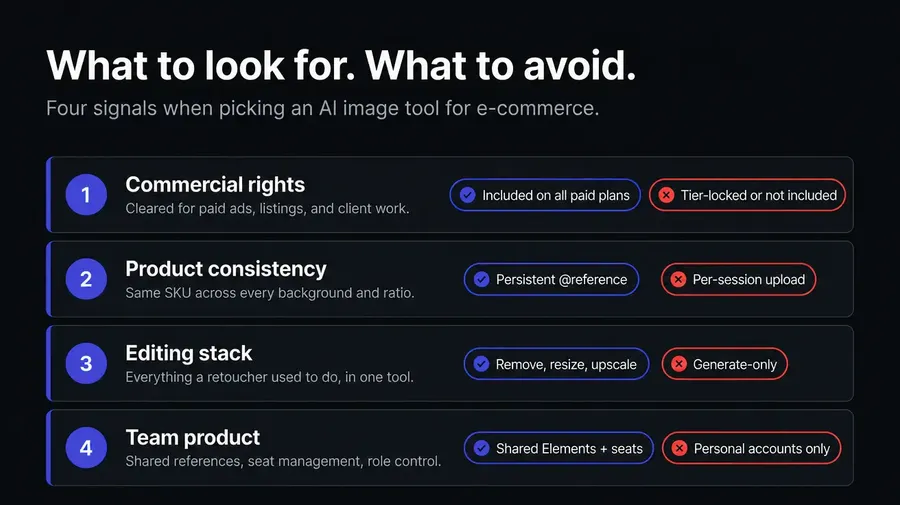
1. Confirm commercial rights at your specific plan level
Every product image you publish or run as a paid ad needs to be cleared for that use. getimg.ai, Midjourney, and Freepik AI include commercial rights on paid plans.
Adobe Firefly offers IP indemnification on qualifying business and enterprise agreements specifically (not all paid plans). Leonardo's free outputs are public and reusable by the platform, so they are not suitable for product photography. Always verify the terms attached to the exact plan you are buying.
2. Pick a tool with persistent product consistency
Reference image upload works for one shot. Catalogs need dozens or hundreds of shots of the same product on different backgrounds, in different contexts, at different aspect ratios.
getimg.ai's Elements system stores a Product reference once and recalls it with `@ProductName` in every prompt, across unlimited sessions. Tools that rely on per-session reference upload will drift between shots and add manual rework time at every step.
3. Make sure the editing stack covers what your shoot pipeline replaces
A catalog shoot does not stop at the camera. It produces a transparent PNG for the website, a styled lifestyle scene for social, a packshot resized for Amazon, and a high-res version for zoom.
The AI tool that replaces that pipeline needs all four operations under one prompt-able interface: background removal, background replacement, aspect ratio resize, and upscaling. getimg.ai is the only platform on this list with all four built into the same sidebar.
4. Test on a real catalog batch, not a single hero shot
A tool that produces one stunning product photo may be impractical at 200 SKUs. Run the same product across ten backgrounds, three aspect ratios, and two resolutions, and measure the credits and time it takes. Headline pricing rarely reflects production cost. Models like Nano Banana 2 and GPT Image 2 cost more per generation than older models; FLUX.2 [klein] and Seedream 5.0 Lite are cheaper at volume.
5. Map your team structure to the platform's team product
Solo sellers can use any platform. Brands with a designer, a copywriter, and a paid-media lead all working on the same catalog need shared workspaces, shared Elements, and folder organization for SKUs and campaigns.
getimg.ai's Teams start on Core ($25/seat) and scale to ten teams on Ultra. Midjourney has no formal team admin product. Leonardo and Freepik have team plans with shared assets but shallower persistent product reference systems.
The Bottom Line
For e-commerce teams, the decision comes down to one question: does the AI tool replace your studio shoot, or just supplement it?
getimg.ai is built to replace it. Elements gives every SKU a persistent product reference that travels across every generation. Background removal and AI background replacement handle the operations a retoucher used to do by hand. Smart Resize covers every storefront aspect ratio. Upscaling takes the same image from thumbnail to zoom view. Commercial rights are included on every paid plan from $8/month, with 24 image models and 26 video models in the same interface, multilingual prompt support for global storefronts, and Teams from Core upward.
The alternatives each cover a narrower slice. Adobe Firefly fits enterprise teams with active legal review and Photoshop-led retouching. kive.ai is the narrow product-photography specialist for brands that want a single-purpose tool. Midjourney is for brand and editorial work where aesthetic quality matters more than catalog throughput. Freepik AI bundles AI with a stock library for designers already in that ecosystem. Leonardo and Krea cover broader generation use cases.
If your team ships product imagery daily across catalog, ads, social, and storefront updates, start creating with getimg.ai, commercial rights included.
Frequently Asked Questions
The best AI image generator for e-commerce in 2026 is getimg.ai. It combines 24 image models (including FLUX.2, GPT Image 2, Nano Banana 2, and Seedream 5.0 Lite) with the Elements system for persistent product consistency, one-click background removal, AI background replacement, Smart Resize for storefront aspect ratios, and upscaling up to 16K. Commercial rights are included on every paid plan from $8/month.
Adobe Firefly is worth evaluating for enterprise brands needing IP indemnification on qualifying business or enterprise agreements. kive.ai is a narrower product-photography specialist. Midjourney produces strong aesthetic output but lacks a persistent product consistency system. The right choice depends on catalog size, team structure, and whether the AI tool replaces or supplements your studio pipeline.
Yes, provided your subscription includes commercial rights. getimg.ai includes full commercial rights on every paid plan from $8/month, so generated product images can be published to Shopify, Amazon, Etsy, your own DTC site, and any storefront. Adobe Firefly offers IP indemnification for select Firefly outputs on qualifying business or enterprise agreements.
Midjourney grants commercial rights on paid plans (companies with over $1M annual revenue must be on the $60/month Pro plan or higher). Leonardo grants rights on paid plans only; free-tier outputs are public and reusable by the platform. Always confirm the terms at your exact plan tier before publishing AI-generated product photography commercially.
Use a structural consistency system, not session-level reference uploads. getimg.ai's Elements feature lets you create a Product Element from one to twenty reference photos of your SKU. The reference is stored in your account and called into any prompt with `@ProductName`.
Every generation that follows uses the same product reference automatically, with no drift between hero shots, lifestyle scenes, and category banners. Style, Color Palette, and Lighting Elements work the same way, so a single Element call can carry your full brand reference into every prompt.
getimg.ai handles background work in two modes. One-click background removal isolates the subject and outputs a transparent PNG (supports batch processing). For full background replacement, attach the product as a reference image and describe the new scene in a prompt: studio cyclorama, kitchen counter, beach, holiday setting, brand-color backdrop. The AI renders the product in the new scene while preserving the product itself.
Yes. getimg.ai includes 26 video models in the same interface as the 24 image models, with Google Veo 3.1, Seedance 2.5, Kling 3.0 Pro, and Wan 3.0 covering short-form product video, hero clips, and motion ads for storefront listings.
A product launch needing a hero image, a 1:1 packshot, and a banner can be produced from one Product Element across image generation and image editing, while a matching 9:16 reel or hero clip is briefed separately in the Create video generator with First Frame, Last Frame, or reference images.
Elements work in image generation, image editing, and video models that accept reference images. Most competing platforms require switching tools entirely between image and video work, which getimg.ai avoids by keeping both inside the same interface.
A traditional studio shoot produces a fixed set of images from one session: the SKU is photographed, retouched, and delivered. Reshooting for a new background, a new aspect ratio, or a seasonal context means a new session, new cost, and new turnaround. AI product photography decouples the product reference from the shot: the SKU reference is created once and recalled into any new background, scene, aspect ratio, or campaign on demand.
For brands shipping new collections monthly, running seasonal campaigns, or maintaining many regional storefronts, the unit economics shift in favor of AI image generation past a certain catalog size and refresh cadence. AI does not replace every shoot: hero photography, talent on set, and tactile categories (fashion fit, food texture, jewelry sparkle) still benefit from a real camera. The pragmatic pattern is hybrid: photograph the hero, AI-generate the variations.
Related Articles