Best AI Video Model for Suspense: Seedance 2.5 vs Veo 3.1 vs Wan 3.0 vs Kling O3 vs MiniMax H3
In a controlled suspense test, Seedance 2.5 directed the most tense shot, scoring 93 out of 100. Google Veo 3.1 followed at 92, Wan 3.0 at 89, Kling O3 at 87, and MiniMax H3 at 84. All five models animated the same empty corridor from one first frame and one timed motion prompt: a slow push-in, one light flicker, one shadow behind frosted glass, and a still final hold. Seedance 2.5 won on camera control, the only perfect score in that category.
Final Suspense Test Scores
Each clip was scored out of 20 in five categories that decide whether a slow shot builds tension or just fills time: pacing, camera control, the light flicker, the shadow movement, and whether the central object stayed exactly as it started.
Rank | Model | Pacing /20 | Camera /20 | Flicker /20 | Shadow /20 | Object /20 | Total |
1 | Seedance 2.5 | 19 | 20 | 18 | 18 | 18 | 93/100 |
2 | Google Veo 3.1 | 19 | 18 | 18 | 19 | 18 | 92/100 |
3 | Wan 3.0 | 18 | 17 | 18 | 19 | 17 | 89/100 |
4 | Kling O3 | 16 | 18 | 16 | 17 | 20 | 87/100 |
5 | MiniMax H3 | 17 | 17 | 16 | 18 | 16 | 84/100 |
The spread is nine points, and the top two are separated by one. Every model kept the scene recognizable, and none turned the shot into a monster reveal. The differences sit in timing and restraint: when the flicker lands, how long the room stays still afterward, whether the camera move adds pressure or disappears, and whether the briefcase on the chair survives eight seconds untouched. Kling O3 had the only perfect object score and still finished fourth, because a protected scene is not the same as a tense one.
These scores describe the clips produced in this test. They are not a general ranking of the five video models.
Why Suspense Is Hard for AI Video Models
Video models are trained to make things happen. That is usually what you want: a prompt that says "a storm begins" should produce wind, rain, and a changing sky. Suspense asks for the opposite. The viewer expects an event, and the shot delays it. The camera moves, but barely. The light changes once, not seventeen times. A shadow appears while its source stays hidden. The object in the center grows more important without doing anything at all.
This is where AI video tends to overperform itself into failure. Left to interpret "suspenseful," a model may add a person, open the door, move the object, turn a single flicker into strobing light, or rush the camera because it reads "cinematic" as "something dramatic every second." Tension needs empty time, and empty time is the one thing a generative model is not built to protect.
That makes suspense different from a scare. A scare shot builds toward a payoff and delivers it, which is the territory of AI horror video techniques like the reveal on the returning light. A suspense shot holds the payoff back. This test measures that holding back, so it rewards restraint over spectacle.
How the Suspense Test Works
The test asks one question: which video model can direct time, not just generate motion? To isolate that, everything except the model stayed fixed.
Condition | Setting |
Input | One first frame, generated as a still image |
Clip length | 8 seconds, 16:9 |
Motion prompt | Identical for all five models, with timestamped beats |
Camera | One slow dolly-in, no zoom, orbit, handheld motion, or cut |
Events allowed | One flicker, one shadow, nothing else |
Anchor object | A closed black briefcase that must not change |
Scoring | Five categories, 20 points each, by visual inspection |
The shot is deliberately quiet. There is no monster, no jump scare, and nothing explodes. One light flickers, one shadow crosses a frosted-glass door, and the camera moves forward very slowly. A model that understands the shot leaves the rest of the corridor alone.
All five models ran from the same image-to-video setup in getimg.ai, so the first frame and the prompt reached each model unchanged.
The First Frame
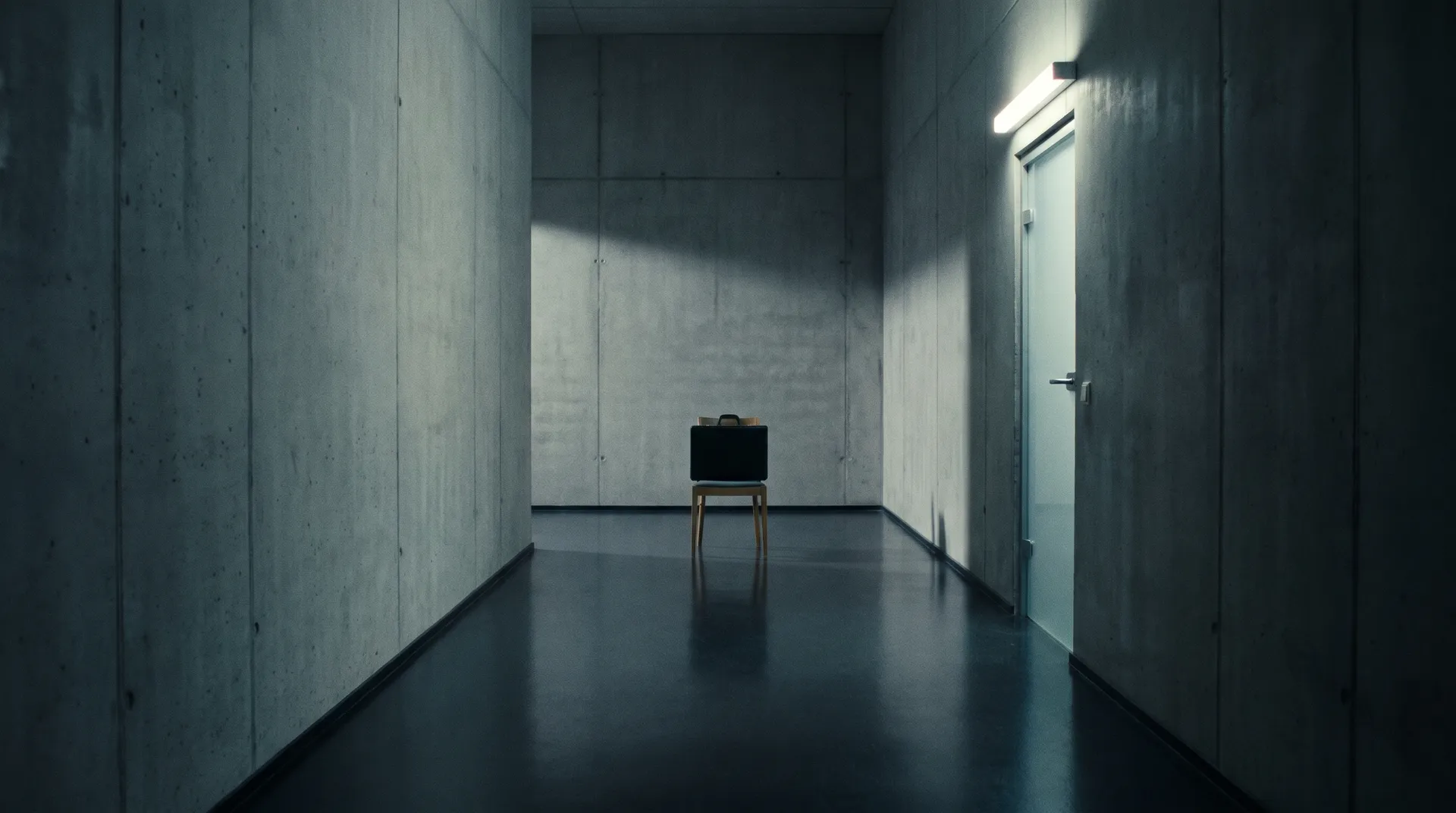
The starting image is simple on purpose: an empty office corridor at night in symmetrical one-point perspective, cold grey walls, and one wooden chair at the far end. On the chair sits a closed matte-black hard-shell briefcase with two chrome latches. A frosted-glass door is set into the right wall, with a single fluorescent light above it. The camera sits at human eye level on a 50mm lens, with no dutch angle, no fog, and no figure already hiding in the frame.
The briefcase is the anchor of the whole test. If it changes shape, moves, opens, or disappears, the model has broken the scene, however atmospheric the rest of the clip looks. Every element the video needs is already in this image, so the model only has to decide what happens over time.
First-frame prompt:
Cinematic suspense frame in an empty modern office corridor at night, symmetrical one-point perspective, cold desaturated grey walls, one simple wooden chair at the far end, a closed matte-black hard-shell briefcase with exactly two chrome latches resting on the chair, frosted-glass door on the right wall, one fluorescent ceiling light above the door, subtle practical lighting, realistic materials, deep controlled shadows, human eye-level camera, 50mm lens, no people, no fog, no text, no visible threat, 16:9.
The Motion Prompt and Timeline
Every model received the same motion prompt, built around four timed beats.
Time | Beat |
0.0 to 2.8 s | Slow push-in, no event |
2.8 s | The light above the door flickers off and on once |
4.8 to 5.8 s | One human-shaped shadow crosses behind the frosted glass |
6.5 to 8.0 s | Complete stillness, camera holds on the briefcase |
Motion prompt:
Create one continuous eight-second suspense shot from this first frame. The camera performs an extremely slow, perfectly stable dolly-in of approximately eight percent, at fixed human eye level, with no zoom, no orbit, no handheld movement, and no cut. For the first 2.8 seconds, nothing happens except the almost imperceptible camera push. At 2.8 seconds, the fluorescent light above the frosted door flickers off and on exactly once. Return to stillness. Between 4.8 and 5.8 seconds, one long human-shaped shadow passes naturally from left to right behind the frosted glass, but no person or body becomes visible. The black briefcase remains completely closed, stationary, and unchanged on the chair. Preserve its exact shape, two chrome latches, size, position, and shadow. Do not open the door, move the chair, reveal a figure, add objects, create a jumpscare, or change the corridor. End with 1.5 seconds of complete stillness while the camera holds on the briefcase.
The timeline matters more than any adjective in the prompt. "Creepy" is vague. "Nothing happens for 2.8 seconds" is direction. The final hold is part of the test too: a model that fills the last second and a half with another event has understood activity, not the shot.
How Each Category Was Scored
Category | What earns full points |
Pacing | Quiet opening, beats land near their timestamps, the room resets between them, the final hold is kept |
Camera control | A stable, slow dolly that is felt more than seen and adds pressure toward the briefcase, with no zoom or drift |
Flicker | One off-on cycle from the one practical light, physically connected to the space |
Shadow | A believable, soft, human-shaped shadow that stays behind the glass and never becomes a body |
Object preservation | The briefcase, its two latches, the chair, and their shadows stay identical from first to last image |
5th Place: MiniMax H3 (84/100)
MiniMax H3 scored 84. Its shadow was the strongest part of the clip, with believable shape, speed, and softness, earning 18 out of 20. The problem was timing. The clip started building energy almost immediately: the camera push was more visible than requested, the flicker arrived early, and the shadow followed before the room had fully settled. Pacing and camera control each scored 17.
The flicker scored 16. It looked convincing but lit more of the corridor than a single fluorescent light should. The briefcase scored 16 as well: it stayed on the chair, but the handle became more prominent and one latch shifted slightly in the final seconds.
The clip is dynamic, and that is exactly why it is less suspenseful. MiniMax H3 is geared toward organizing sequences with several beats, and here it treated four quiet instructions like a miniature trailer. For a fast teaser or a multi-shot sequence, that energy is useful. For one slow take, it releases the tension too early.
4th Place: Kling O3 (87/100)
Kling O3 scored 87 and won object preservation with a perfect 20. The briefcase did not move, the latches stayed locked, the chair stayed the same, and the last image was an extremely clean continuation of the first. Camera control scored 18, with a stable dolly and disciplined framing.
Pacing scored 16. Every beat happened at roughly the right time, but the pauses felt mechanical: the shot waited because the prompt told it to wait, not because the timing created pressure. The flicker, also 16, was readable but slightly digital, jumping between full brightness and darkness with no in-between. The shadow scored 17. It stayed hidden behind the glass, as asked, but moved at a uniform speed that looked more like an animated layer than a person passing through real space.
Kling O3 protects the scene better than it performs it. That makes it the most reliable choice when an object or a set must not change, which is valuable in its own right, but reliability alone does not make a shot tense.
3rd Place: Wan 3.0 (89/100)
Wan 3.0 scored 89 and showed the best grasp of the physical scene. The shadow scored 19: it changed density as it crossed the frosted glass, softened near the edge, and disappeared without ever becoming a visible body. The flicker scored 18. The ceiling light affected the nearby wall first, and then the corridor fell slightly darker, a small delay that made the light feel connected to the space.
Pacing also scored 18. The opening stayed quiet, though the final hold ran a little shorter than requested. Camera control scored 17: the movement was stable but almost too cautious, and the 8 percent dolly became hard to notice in the middle of the clip. The briefcase scored 17. Its silhouette held, but one chrome latch caught an extra highlight and looked slightly larger by the end.
Wan 3.0 produced the most physically convincing light and shadow in the test. It lost points because the camera contributed too little pressure to the shot.
2nd Place: Google Veo 3.1 (92/100)
Google Veo 3.1 scored 92 and gave the most natural performance in the test. Pacing scored 19: the opening left enough empty time for the eye to start searching the frame, the flicker interrupted that search, and the shadow arrived only after the room felt still again. The shadow also scored 19. It accelerated slightly, slowed as it left the glass, and never revealed more than the prompt allowed.
The flicker scored 18, subtle, imperfect, and physically integrated. Camera control scored 18. The dolly was smooth, but the model added a small amount of lens breathing after the light change: not a full zoom, but not fully neutral either. Object preservation scored 18, with the briefcase locked and stable apart from a small change in the highlight on the handle.
Veo 3.1 treated suspense as a relationship between events. The light does not create the tension and neither does the shadow; the silence between them does. The Veo 3.1 overview covers the model's wider features, including last-frame support and reference images.
1st Place: Seedance 2.5 (93/100)
Seedance 2.5 won with 93. The margin over Veo 3.1 is one point, and it comes from one specific thing: the camera had a purpose. Camera control scored a full 20. The dolly was almost invisible at first, and only after the flicker did the briefcase register as slightly larger in the frame. The movement worked on the viewer without announcing itself, which is what a suspense push-in is for.
Pacing scored 19. The clip respected the silence, landed the flicker close to the planned moment, and gave the room time to recover before the shadow appeared. The flicker and the shadow scored 18 each. Veo 3.1 and Wan 3.0 rendered the shadow slightly more naturally, but Seedance used it better within the composition: it crossed only the readable part of the glass and was gone before its shape could be fully understood. Object preservation scored 18. The briefcase stayed closed and in place, with one highlight shifting more than it should while the form, latches, and position held.
Seedance 2.5 won because the camera, timing, light, and shadow all pointed at the same object. It did not add suspense elements. It directed the ones already in the shot.
Category Winners
Category | Winner | Runner-up |
Pacing | Seedance 2.5 and Veo 3.1 (19) | Wan 3.0 (18) |
Camera control | Seedance 2.5 (20) | Veo 3.1 and Kling O3 (18) |
Flicker | Seedance 2.5, Veo 3.1 and Wan 3.0 (18) | Kling O3 and MiniMax H3 (16) |
Shadow movement | Veo 3.1 and Wan 3.0 (19) | Seedance 2.5 and MiniMax H3 (18) |
Object preservation | Kling O3 (20) | Seedance 2.5 and Veo 3.1 (18) |
No model won every category, and the overall winner did not have the best shadow or the best object score. The categories also pull against each other. Kling O3's perfect object score came with the most mechanical pacing, and MiniMax H3's energetic shadow came with the earliest beats. The models that finished on top balanced all five instead of maximizing one.
Which AI Video Model to Choose for a Slow, Tense Shot
The winner changes when the job changes. Based on this test:
If the shot needs | Start with | Why |
A camera move that builds pressure | Seedance 2.5 | Perfect camera score; the push-in registers only after it has worked |
Natural timing between beats | Veo 3.1 or Seedance 2.5 | Both scored 19 on pacing and kept the room still between events |
Physically believable light and shadow | Wan 3.0 or Veo 3.1 | Shadows that changed density and softened against the glass |
A set or object that must not change | Kling O3 | The only perfect object score, with a clean first-to-last match |
Energy for a teaser or multi-beat sequence | MiniMax H3 | Builds momentum fast, which suits trailers more than single slow takes |
For suspense specifically, the best model is not the one that invents the most convincing threat. It is the one that keeps the threat outside the shot. Since all five models are available in Create video, the same first frame and prompt can move from one model to the next without re-uploading or rewriting anything.
How to Write a Suspense Prompt That AI Video Models Follow
The biggest result of the test is the prompt structure, not the ranking. A prompt that asks for "a creepy cinematic scene" gives the model permission to fill every second. A prompt that schedules the silence takes that permission away.
- Start from a first frame that already contains everything. Place every object, light, and door in the still image, so the video model only has to direct time and never has to invent the set.
- Define the quiet period in seconds. "Nothing happens for 2.8 seconds" is something a model can follow; "slowly builds tension" is not.
- Time one interruption. Give the flicker, the sound, or the shadow a timestamp, and say it happens exactly once.
- Return to stillness. Write it as its own instruction after each event, or the model will treat the event as the start of a sequence.
- Introduce one incomplete piece of information. A shadow behind glass, a sound from off screen, or a door that stays closed. Say explicitly what must not become visible.
- Lock the anchor object. Name its shape, parts, position, and shadow, and list the changes you are ruling out: opening, moving, new objects, a revealed figure.
- Hold the ending. Ask for a final stretch of complete stillness, long enough for the viewer to keep looking.
The image and video prompting guide covers the wider prompt structure, and the overview of camera movements that make AI video look cinematic explains which moves carry tension and which release it.
What to Check When You Review a Suspense Clip
A suspense clip can look fine at normal speed and still fail on the details. Review each candidate the same way:
- Watch it once without sound and with your eyes on the anchor object only, from the first second to the last.
- Compare the first and last image side by side. Latches, handles, and highlights are where drift shows up first.
- Note the actual timestamp of each beat and compare it to the prompt. Early beats are the most common pacing failure.
- Check whether the room settles between events or carries motion from one beat into the next.
- Count the flickers. More than one, or a flicker that lights the whole corridor, breaks the single-source logic of the shot.
- Pause on the shadow at its widest point and confirm no body, face, or hand has appeared.
- Measure the final hold. A shot that ends on movement has lost its last beat.
If a clip passes everything except the ending, first and last frame control can pin the final composition so the shot lands where you planned.
Limitations of This Test
This is one scene, one camera move, and one scored clip per model. That keeps the comparison fair, but also narrow.
The scores describe five specific outputs, not the general ability of each model. Video models vary from run to run, and a second generation could move individual categories by a point or two, enough to swap close neighbors such as Seedance 2.5 and Veo 3.1. The scene stresses slow pacing, a single practical light, and a soft shadow; a suspense shot built on a moving character, an exterior at night, or sound-led tension would stress different things and could reorder the ranking.
Scoring was done by visual inspection against fixed criteria, not by an automated metric, which reduces bias without removing it. Audio was not scored, although several of these models can generate it. And no last frame or editing was used: the test measures how well each model directs time on its own, not the best result it can reach with extra control.
The Bottom Line
Seedance 2.5 directed the most tense shot in this test at 93/100, with a perfect camera score, and Google Veo 3.1 followed one point behind with the most natural pacing and shadow. Wan 3.0 rendered the most physical light and shadow, Kling O3 protected the scene perfectly, and MiniMax H3 brought the most energy, which suits trailers better than a single slow take.
The larger lesson is in the prompt. Define the quiet period, time one interruption, return to stillness, show one incomplete piece of information, and hold the ending. Then run the same first frame and timeline across models and compare the moments when nothing happens, because that is where a model shows whether it can direct a shot or only fill it.
Commercial rights are included, subject to our terms and applicable third-party rights.
Test your suspense shot in getimg.ai
Frequently Asked Questions
In this test, Seedance 2.5 produced the most suspenseful shot, scoring 93 out of 100, with the only perfect camera control score: its slow push-in added pressure without drawing attention to itself. Google Veo 3.1 came a close second at 92 with the most natural pacing and shadow movement, followed by Wan 3.0 at 89, Kling O3 at 87, and MiniMax H3 at 84. The test used one empty-corridor scene and one timed prompt, so results can differ for other suspense setups.
Video models are trained to produce visible change, so when a prompt asks for tension, they tend to add events: an extra flicker, a figure, a moving object, or a faster camera. Words like "creepy" or "suspenseful" make this worse, because they describe a feeling instead of a schedule. Giving each beat a timestamp, stating that nothing happens in between, and asking for a final stretch of stillness keeps most models from filling the empty time.
Put the object in the first frame, then describe it precisely in the motion prompt: its shape, color, parts, position, and shadow. State that it stays closed, stationary, and unchanged, and list the changes you are ruling out, such as opening, moving, or new objects appearing. In this test, Kling O3 kept the anchor object perfectly intact. For any model, compare the first and last image of the clip before using it, since small details like latches and highlights drift first.
Write the prompt as a timeline. Give the opening a duration in which nothing happens, attach a timestamp to each event, say how many times it happens, and add a "return to stillness" instruction after it. End with a held moment of a set length. Models will not hit every timestamp exactly, but a timed prompt produces far more controlled pacing than an adjective such as "slowly builds." In this test, Seedance 2.5 and Veo 3.1 followed the timeline most closely.
A jump scare builds tension and then releases it with a sudden reveal, such as a figure appearing when the light returns. Suspense keeps the release back: the viewer knows something may happen, and the shot refuses to show it. In AI video, that means prompting for restraint, with one incomplete hint like a shadow behind glass, long still moments, and an ending that holds instead of revealing. Suspense is harder for models, because it asks them not to generate.
Yes. In getimg.ai, Create video gives access to several video models, including Seedance 2.5, Veo 3.1, Kling O3, Wan 3.0, and MiniMax H3, so you can attach the same first frame, paste the same prompt, and switch models between runs. Keep the clip length and aspect ratio the same for a fair comparison, and judge each result against the same checklist, such as beat timing, camera stability, and whether the anchor object stayed unchanged.
Related Articles