How to Create a Dolly Zoom Effect with AI


A dolly zoom is the famous cinematic effect where the background seems to rush toward or away from a fixed subject: the "vertigo" shot. Creating one with AI means generating that move from a single still, so a photo becomes a short clip with the world expanding or collapsing behind the subject. You add a photo, choose the direction of the effect and its intensity, and the model animates it. On getimg.ai the Dolly zoom Action does this without a camera, a dolly track, or a matched zoom.
TL;DR
- A dolly zoom keeps the subject fixed while the background rushes toward or away from it, the classic vertigo effect.
- In getimg.ai, open the Dolly zoom Action, add a photo, and choose the effect and intensity.
- Effects are world falls away, world closes in, and there and back; intensity runs from 1 to 5.
- Set the quality (480p, 720p, 1080p), aspect ratio, and duration (5s, 6s, or 10s).
- It turns a single still into a moving shot.
What a Dolly Zoom Is
The dolly zoom is one of film's most recognisable moves. The camera physically travels toward or away from the subject while the lens zooms the opposite way, so the subject stays the same size but the background appears to warp, stretching away or crowding in. It creates a distinct sense of unease or revelation, which is why it shows up at pivotal moments in cinema. Shooting it for real is notoriously fiddly: it needs a dolly, a zoom lens, and precise coordination between the move and the zoom to hold the subject locked.
Creating a dolly zoom with AI produces the effect from a still. The model understands the depth in your photo, separating subject from background, and animates the vertigo move so the subject holds while the world behind it rushes. What was a single frame becomes a short, cinematic clip, with the difficult camera choreography handled for you.
When to Use It (and When to Shoot It)
The dolly zoom is a punctuation mark, best used deliberately:
- Openers and reveals, giving an intro shot a cinematic charge.
- Dramatic beats in social video, a striking moment that stops the scroll.
- Music and mood pieces, where the warping background carries emotion.
- Turning a strong still into motion, adding a filmic move to a photo you already have.
Shooting it on set still wins when the dolly zoom is a signature moment in a larger live-action production and must integrate seamlessly with surrounding footage shot the same way. And because it is a strong, attention-grabbing effect, restraint matters: a dolly zoom on every shot loses its impact fast. AI is the fast route to the effect from a still; a real rig is for the set-piece that has to be captured in camera.
How to Create a Dolly Zoom, Step by Step
Here is the workflow in getimg.ai. Open the Dolly zoom Action to follow along.
1. Add the photo
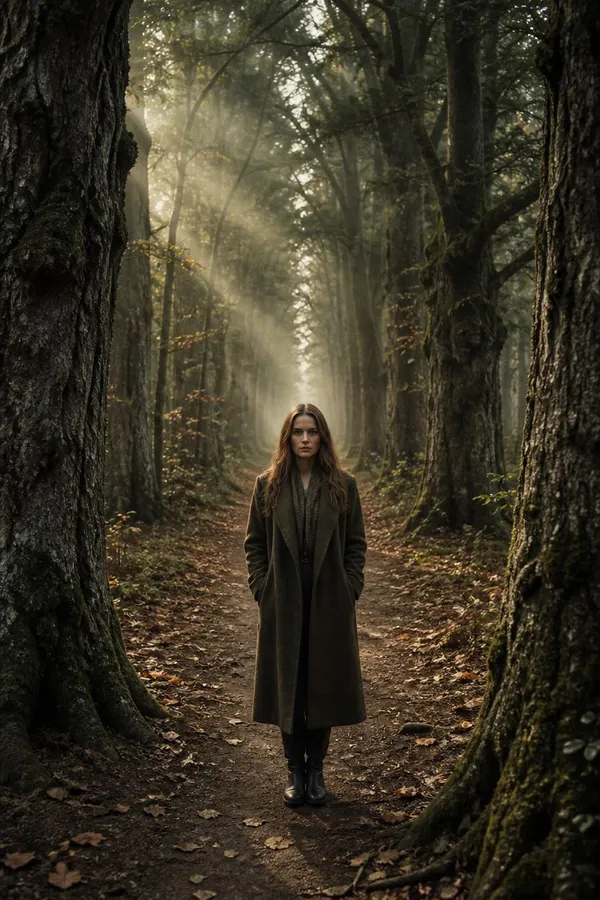
Add the photo the camera should move through. Images with a clear subject and a sense of depth behind them, a person or object in front of a receding background, give the effect the most to work with, because the move relies on the separation between subject and background.
2. Choose the effect
Pick the direction: world falls away to push the background away from the subject, world closes in to crowd it inward, or there and back to do both in one clip. Each creates a different feeling, from expansion to claustrophobia.
3. Set the intensity
Set the strength of the effect on a scale of 1 to 5. Lower values give a subtle, tasteful move; higher values make the warp dramatic and overt. Because the effect is powerful, a moderate setting often reads better than the maximum.
4. Set quality, aspect ratio, and duration, then generate
Choose the resolution (480p, 720p, or 1080p), an aspect ratio (same as photo, 16:9, 9:16, or 1:1), and the duration (5s, 6s, or 10s). Use the text field for any extra detail about the setting or mood. Run the Action and the clip appears in the gallery to the right of the controls.
How to Get a Clean Dolly Zoom
- Start with depth. The effect depends on separation between subject and background. A photo with a clear foreground subject and a receding background produces a much stronger vertigo move than a flat, shallow scene.
- Keep the subject clear. A well-defined subject holds steady while the world moves around it. An ambiguous or busy foreground makes the lock less convincing.
- Use intensity with restraint. A moderate setting reads as cinematic; the maximum can look gimmicky. Match the strength to the moment the shot is meant to carry.
- Match the aspect ratio to the destination. Use "same as photo" to preserve the original framing, or pick 9:16 for vertical social and 16:9 for a widescreen edit.
- Use it sparingly. The dolly zoom earns its impact by being rare. One well-placed vertigo shot beats a whole sequence of them.
Motion Effects Alongside Other Video Tools
The dolly zoom is one of several ways to bring a still to life. The Image transition Action animates a move between two images, and for full control over motion and scene the open-ended Create video generator produces clips from a prompt or a reference. Turning a photo into a moving shot is a common step in an image-to-video workflow, and the dolly zoom is the tool when the specific move you want is the vertigo effect.
The Bottom Line
The Dolly zoom Action gives you cinema's vertigo shot from a single still: add a photo, choose whether the world falls away or closes in, set the intensity, and generate. It handles the difficult camera choreography for you and turns a strong photo into a filmic moment, best used with restraint so the effect keeps its impact.
Open the Dolly zoom Action in getimg.ai, add a photo with a clear subject and depth, and try "world falls away" at a moderate intensity. Commercial rights are included, subject to our terms and applicable third-party rights.
Frequently Asked Questions
A dolly zoom, also called the vertigo effect, keeps the subject the same size while the background appears to rush toward or away from it. In live action it is created by moving the camera and zooming the lens in opposite directions at once. It produces a distinctive sense of unease or revelation, which is why it marks pivotal moments in film.
Three: world falls away pushes the background away from the subject, world closes in crowds it inward, and there and back does both within one clip. Each carries a different feeling, from expansion and revelation to tension and claustrophobia.
Intensity runs from 1 to 5. Lower values give a subtle, tasteful move; higher values make the warp dramatic. Because the dolly zoom is a powerful effect, a moderate intensity often reads better than the maximum, which can look gimmicky.
Photos with a clear subject and a real sense of depth behind them. The effect relies on separating the subject from a receding background, so a foreground subject in front of a deeper scene produces a stronger, cleaner vertigo move than a flat or shallow image.
You can generate clips of 5, 6, or 10 seconds at 480p, 720p, or 1080p, in "same as photo," 16:9, 9:16, or 1:1. Choose the aspect ratio to match where the clip will be used.
Commercial rights are included, subject to our terms and applicable third-party rights. Make sure you hold the rights to the original photo you animate.
Related Articles