Best AI Sound Effect Generator (2026): 6 Tools Compared

The best AI sound effect generator for most creators is getimg.ai. You describe a sound in plain language, set the length (5, 10, 20, or 30 seconds), generate up to four variants, and download an .mp3, with commercial rights included on every paid plan. It pairs sound-effect generation with a large library of image and video models under one subscription, so you can score a clip in the same place you make the visuals. ElevenLabs, Adobe Firefly, and Stable Audio are the main alternatives, each with different strengths.
What Is an AI Sound Effect Generator?
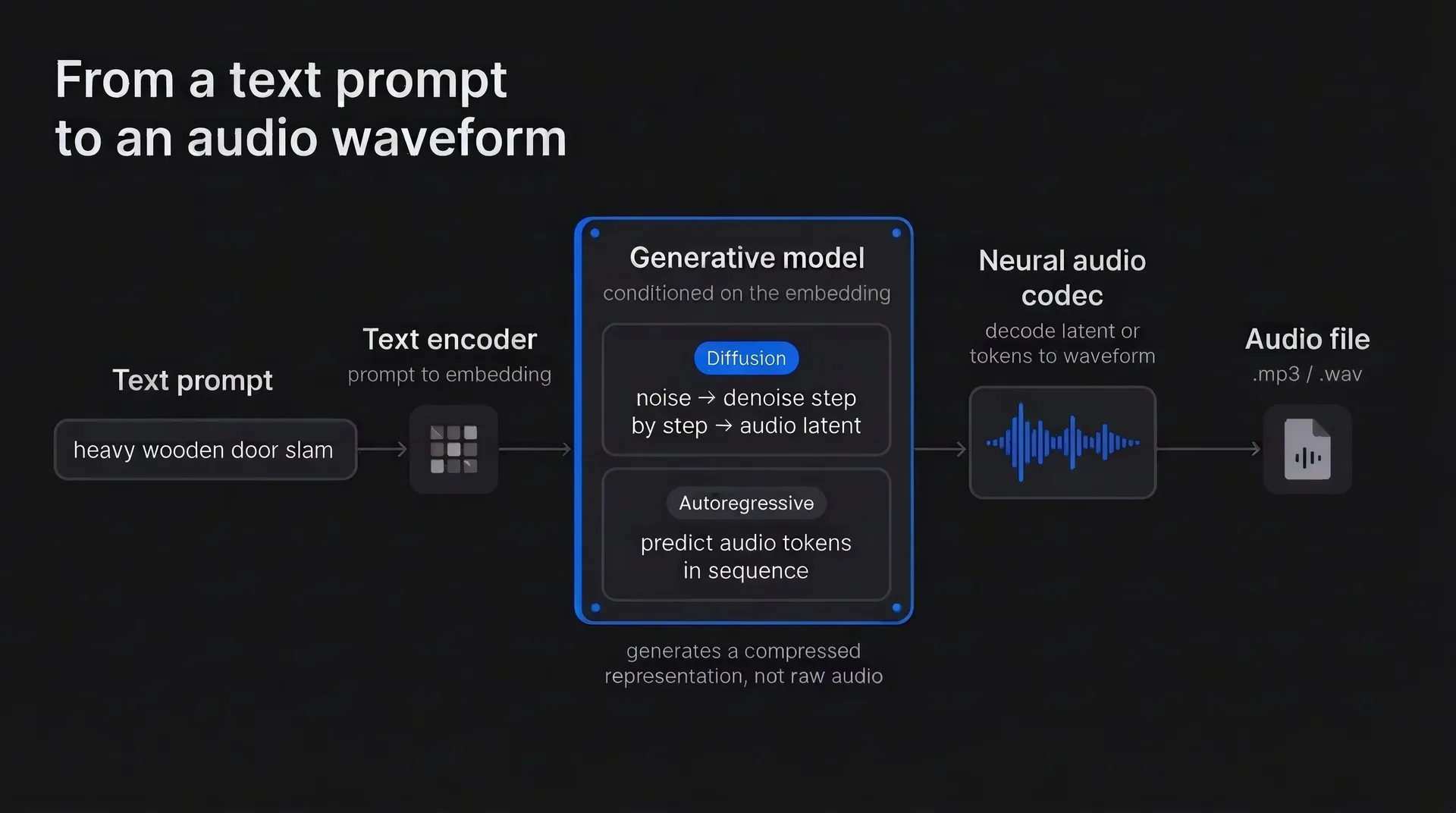
An AI sound effect generator synthesizes a new audio output from a text description. You type a prompt like "heavy wooden door slam" or "distant city traffic at night," and the model produces a matching sound you can download and drop into a video, game, podcast, or app.
Unlike a stock library, it does not return an existing file; it usually generates a new variation each time, so you can request specific sounds a library may not stock. Clip lengths, formats, and options vary by tool: many cap individual effects around 30 seconds, common downloads include MP3 and WAV, and most consumer tools produce several variations per prompt.
Advanced options include seamless looping for continuous ambience and duration control. Commercial rights vary by tool, plan, and model, so confirm the license before using output in client or monetized work.
The 6 Best AI Sound Effect Generators in 2026
1. getimg.ai: Best Creative Platform for Sound Effects & More
Who it's for: sound designers, creators and teams, especially those who want to generate images, video and audio in the same workflow.
getimg.ai generates sound effects inside the same platform you use for images and video, so you can score a clip without opening a second app or paying a second subscription. In the Create sound effect generator, you describe the sound in plain language, choose a length of 5, 10, 20, or 30 seconds, and generate 1, 2, or 4 variants in one run so you can pick the best take. Output downloads as .mp3.
Sound effects run on Eleven Sound Effects 2, so you get the same output quality as ElevenLabs' own generator without leaving your image and video workspace. Pricing is per sound effect: a flat charge no matter which length you pick, which keeps cost predictable when you generate in volume.
The real advantage is the connected workflow. One platform also generates images, video, music, and speech, backed by 50+ image and video models for the surrounding work.
Large Crowd Clapping
Rapid Fire Laser
Large Crowd Clapping
Rapid Fire Laser
A game developer can prototype UI clicks, impacts, and ambient loops in the same place they build concept art. A YouTuber can generate whooshes and stingers for transitions right next to their thumbnails. A marketer can build an ad with visuals, voiceover, and sound effects without exporting between four tools.
Woodland Ambience
Achievement Unlocked
Woodland Ambience
Achievement Unlocked
Every paid plan includes commercial rights from day one, so anything you make is cleared for client work, monetized channels, and merchandise. There is no free plan.
2. ElevenLabs: Sound Effects on a Multimodal Platform
Who it's for: sound designers and developers who want deep audio tools with an API.
ElevenLabs generates four sound-effect variants per website generation, up to 30 seconds each, with seamless looping. Downloads are available as MP3 at 44.1kHz for all effects, or WAV at 48kHz for non-looping effects. The prompt limit is 450 characters, and you can set a duration or let the model choose.
Its free plan doesn't include a commercial license. ElevenLabs is best known for AI voice, but it added image and video generation in late 2025 and a multimodal Flows workspace, so it is no longer an audio-only platform.
3. Adobe Firefly: Text and Voice-Guided Sound Effects
Who it's for: creators who work across Adobe's creative apps.
Adobe Firefly generates four sound-effect variants of up to 30 seconds from a text prompt, with an optional recorded voice or sound as a guide for timing and loudness. Generation runs at 48kHz and currently costs 10 generative credits. It works in the Firefly web app and the Firefly video editor, which is still in beta.
Audio-only results download as WAV, while video projects with generated audio export as MP4. Firefly has a limited free tier, so a paid Creative Cloud subscription is not required to try it. Adobe says Firefly is trained on licensed and public-domain content and that output can generally be used commercially, subject to its terms and beta-service conditions.
4. Stable Audio 3.0: Music and Sound Effects
Who it's for: creators who need music and longer-form audio alongside sound effects.
Stable Audio 3.0 is Stability AI's current audio family, launched in May 2026. It spans four models, including a dedicated on-device Small SFX model for sound effects and larger models that generate variable-length audio past six minutes. The family also supports editing, inpainting, and continuation, and Stability AI says the models were trained on licensed and Creative Commons data.
Open weights are available for Stable Audio 3.0 Small SFX, Small, and Medium. For self-hosting, commercial use falls under the Stability AI Community License for organizations with less than $1 million in annual revenue; organizations above that threshold generally need an Enterprise License.
The hosted Stable Audio website uses separate Personal, Creator, and Enterprise plan licenses, so commercial rights also depend on how you access the model. It is a capable option when you want music generation and long-form audio as well as short effects.
5. MyEdit by CyberLink: Browser-Based Generator
Who it's for: quick, browser-based sound effects with no install.
MyEdit, from CyberLink, is a browser-based AI image, video, and audio platform with a text-to-sound-effect generator and no software to install. It generates several options per prompt and downloads as MP3, WAV, FLAC, or M4A, alongside utilities like noise removal and text to speech.
MyEdit markets its generated effects as royalty-free and suitable for use across creative projects, but CyberLink's public terms do not clearly grant commercial rights for generated audio: they expressly address commercial use for photo and image output, while the general service terms otherwise default to personal use unless supplemental terms or a purchased EULA apply. Confirm the applicable audio license before using MyEdit output commercially.
6. Meta AudioGen: Research Model for Developers
Who it's for: developers and researchers who want to self-host a model.
AudioGen is a research-oriented text-to-sound model in Meta's AudioCraft toolkit, alongside MusicGen and EnCodec. It runs locally and writes WAV files, but it needs technical setup and capable hardware (the medium model calls for a GPU with at least 16GB of memory).
The AudioCraft code is MIT-licensed, but the released AudioGen weights use CC BY-NC 4.0, so they are not licensed for commercial use. Version 2 was trained on 10-second clips using a mix of research datasets and third-party sound-effect collections, though its AudioCraft implementation supports generation beyond ten seconds.
Meta discontinued the public Audiobox demo in February 2026. Separately, access to the underlying Audiobox model was offered to a limited group of selected researchers and institutions under a research-only license.
How They Compare: Specs at a Glance
Tool | Max Clip Length | Output | Commercial Use | Beyond Sound Effects |
getimg.ai | 30 seconds (5, 10, 20, or 30s) | .mp3 | Yes, on all paid plans | Images, video, music, and speech |
ElevenLabs | 30 seconds | MP3; WAV (non-looping) | Paid plans only; free tier is non-commercial | Image, video, music, and voice |
Adobe Firefly | 30 seconds (4 variants) | WAV or MP4 with video | Yes, subject to Adobe terms | Image, video, vector, speech, and music |
Stable Audio 3.0 | Model-dependent; supports clips beyond 6 minutes | 44.1 kHz stereo; format varies by interface | Self-hosted: Community or Enterprise license by revenue; web app: plan-based | Music and sound effects |
MyEdit | Not disclosed | MP3, WAV, FLAC, M4A | Vendor-claimed; check license terms | Image, video, and audio |
Meta AudioGen | User-defined; extended generation supported | WAV (self-hosted) | No (CC BY-NC 4.0 model weights) | Audio only |
How to Choose the Right AI Sound Effect Generator
Decide how much you want in one place
Some generators focus on audio; others (including getimg.ai) also generate images and video, which saves app-switching if you produce social media content or marketing materials.
Check the license for your plan and model
Commercial rights vary by tool, plan, model, and deployment: from included on all paid plans, to revenue-tiered or plan-based, to noncommercial. A commercial license is permission under set terms, not a guarantee of uniqueness or freedom from third-party claims. Confirm it before you publish or bill a client.
Match length to the job
For short impacts and UI cues, most tools work. For continuous ambience or long beds, look for a looping toggle or long-form generation.
The Bottom Line
AI sound effect generators now turn a short text prompt into a usable clip in seconds, and the field is strong. ElevenLabs, Adobe Firefly, and Stable Audio 3.0 all generate high-quality effects, and several have grown well beyond audio into image and video.
getimg.ai earns the top spot on breadth and simplicity. The same subscription that runs sound effects on the Eleven Sound Effects 2 engine also gives you 50+ image and video models, plus music and text to speech, with commercial rights on every paid plan and flat per-effect pricing.
Start generating sound effects with getimg.ai today!
Frequently Asked Questions
For most creators, getimg.ai is the best pick because it pairs sound-effect generation (on the Eleven Sound Effects 2 engine) with a large library of image and video models under one subscription, with commercial rights on every paid plan.
It depends on the tool, plan, model, and how you access it. Commercial rights are not universal: getimg.ai includes them on every paid plan, and Adobe generally allows commercial use subject to its terms.
Stable Audio 3.0 licensing depends on access. The open-weight models use revenue-tiered Community and Enterprise licenses for self-hosting, while the hosted web app has its own Personal, Creator, and Enterprise plans. ElevenLabs grants no commercial rights on its free plan, and Meta AudioGen's released weights are noncommercial.
A commercial license is permission under specific terms, not a guarantee of uniqueness or freedom from third-party claims. Confirm the license before publishing client or monetized work.
Length limits vary. Many tools cap individual effects at 30 seconds, including getimg.ai (5, 10, 20, or 30 seconds) and ElevenLabs and Adobe Firefly (up to 30 seconds). Meta AudioGen is oriented toward very short clips.
Formats vary by tool. getimg.ai exports .mp3. ElevenLabs offers MP3 at 44.1kHz for all effects and WAV at 48kHz for non-looping effects, with 48kHz commonly treated as the professional video and film standard. Adobe Firefly downloads audio as WAV, or video with audio as MP4, and MyEdit supports MP3, WAV, FLAC, and M4A. A PCM WAV file avoids lossy compression and is generally better for further editing, while MP3 is smaller and easier to deliver.
To create a sound effect with AI, open a text-to-sound-effect tool, describe the sound you want, set a length, and generate. In getimg.ai you use the Create sound effect generator: type the sound in plain language, choose 5, 10, 20, or 30 seconds, generate 1, 2, or 4 variants in one run, then download the best take as an .mp3. Add relevant detail about material, distance, environment, and action, then test a few variations. No sound design experience is required.
Related Articles