-900x505.webp)
Gemini Omni Flash 1.1 AI Video Generator
Describe a shot and Gemini Omni Flash 1.1 builds it, with dialogue, effects, and music timed to the action. Start from text or your own image, choose any length from 4 to 10 seconds at 16:9 or 9:16, and render a finished clip up to 4K in your browser.
Access 48+ leading AI models. Pay for one subscription.


Video that follows real-world physics and logic
Gemini Omni is built on Gemini, so it brings real understanding to a shot: gravity pulls, liquids pour, and a historical or technical scene keeps its details straight.
For professional work that means fewer takes where an object floats or a step happens out of order, and more clips you can actually ship. Very complex motion still has limits, so describe the action clearly and generate a couple of options.
From prompt to finished clip in 3 steps
No installs, no render queue, no editing suite.
1. Open the Create video tool
Sign in and open the Create video tool, then pick Gemini Omni Flash 1.1 from the model menu in the prompt box.
2. Describe the shot
Spell out the action, the camera, and any dialogue or sound you want. Our video prompt guide and the example below show what works.
3. Set the specs and generate
Choose any length from 4 to 10 seconds, 16:9 or 9:16, and a resolution up to 4K, then press the arrow. Your clip renders in the browser with its sound, ready to download.
Speech, effects, and music, built into the clip
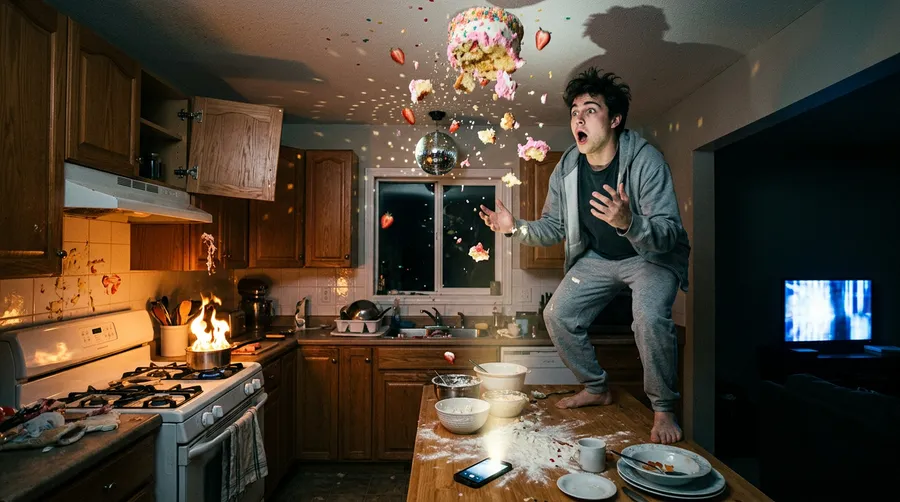
Gemini Omni generates audio together with the picture, not as a second step. Ask for a spoken line, a specific effect on a specific beat, or a music bed, and it comes back lip-synced and timed to the action. For social and ad work, that drops the sound-design and licensing pass and gets you a finished cut sooner.
Text to Video
Get the exact scene you describe
Name the camera move, the lighting, the art style, the small background details, and Gemini Omni puts them in the shot. Because it follows instructions closely, you spend your time refining direction instead of fighting the model to get what you described on screen, which matters when a client sends revisions.
Image to Video
Animate a still image you already have
Drop in a product shot or a generated still to set your first frame, add a last frame when you want to lock how the shot ends, and Gemini Omni Flash 1.1 fills the motion between them: a slow push-in, a product turning on its axis, a scene coming to life. Describe the movement in the prompt and existing assets become video, no reshoot required.
Frequently Asked Questions
Everything runs in the Create video generator on getimg.ai, in your browser. Pick Gemini Omni Flash 1.1 from the model menu, write a prompt that describes the action and any sound you want, then set the length anywhere from 4 to 10 seconds at 16:9 or 9:16 and pick a resolution up to 4K.
Press the arrow and the model generates the clip and its audio in one pass. There is nothing to install and no GPU to rent, and you can queue the next clip while the first one renders.
Gemini Omni Flash 1.1 is the latest version of Google's audio-native model on getimg.ai. Next to the original Gemini Omni Flash, it stretches clip length to anywhere from 4 to 10 seconds, adds first- and last-frame control so you can set how a shot starts and ends, and renders up to 4K. The reasoning and built-in sound carry over unchanged.
The original Gemini Omni Flash is still available in the model menu, so you can keep using it whenever it fits the job.
It is built on Gemini, so it reasons about a scene before rendering it. Motion tends to respect real-world physics and factual scenes hold together, which avoids the floaty, off-model results that make some AI video unusable for client work.
Sound is the other half. Run it through our Create video Action and clips will come back with dialogue, effects, and music already matched to the picture, so a usable cut is where you start, not what you earn after an hour in an editor.
Gemini Omni covers a lot of everyday professional video. A few examples:
🟣 Social and ad creative: short 9:16 or 16:9 spots with voiceover and music, ready to post the moment they render.
🟣 Product and demo clips: animate a product shot or an interface still into a moving showcase without a reshoot.
🟣 Explainers and concept work: lean on the model's world knowledge for processes, mechanisms, and historical or technical detail.
Yes. Every paid getimg.ai plan includes commercial rights, so clips you make with Gemini Omni can go straight into client campaigns, paid ads, social, and product pages. Commercial use is covered from the Entry plan up, subject to the usage policy.
Both are top-tier Google video models you can switch between in the model menu. Gemini Omni Flash 1.1 leads with reasoning and built-in sound, first- and last-frame control, clips from 4 to 10 seconds, and output up to 4K. Google Veo is a strong alternative with its own visual character and motion style. Run the same prompt on each and keep the result that fits the job.
Short, plain descriptions already work, because getimg.ai fills in sensible detail in the background. Add specifics like the camera move, the lighting, or an exact line of dialogue when you want tighter control, and leave them out when you are happy to let the model decide.
Yes. Alongside the in-app model, getimg.ai offers access to the Gemini Omni Flash API for generating video directly from your own apps and pipelines. It isn't part of the app subscription: API access runs on a separate, flexible usage-based system, so you pay only for what you generate.
Generate your first Gemini Omni Flash 1.1 clip
Open the Create video tool, describe the shot, and download a finished clip with sound in minutes. One subscription covers Gemini Omni alongside dozens of image and video models, with commercial rights on every paid plan.