getimg.ai's AI Video Generation Prompt Book
Make better AI videos with clear, human-friendly prompts. Learn how to shape action, framing, lighting, and style with just a few clear words.
Before You Begin: How to Approach Prompting
You don’t need a complex script to make great AI videos. One clear sentence is often enough, and getimg.ai handles the technical details.
This guide shows practical ways to shape movement, style, pacing, framing, and overall mood when you want more control.
Try out all of those prompting tricks in getimg.ai!
The Basics: How to Write a Video Prompt
Think about what you’d say to a camera operator or director.
A simple structure you can follow:
[subject] + [movement or action] + [scene or setting] + [style or mood]
Keep sentences short. Make the action clear. Aim for visual clarity, not long keyword lists.
Make sure the actions and dialogue are quick enough to fit the clip. Avoid wordy speeches or actions that take a long time to complete.
Examples
a swimmer surfacing in an indoor pool, water sliding down their face, quiet echoing atmosphere
a golden retriever running through tall grass at sunrise, soft natural light, warm calm mood
a firefighter knocking down a door in a smoke filled hallway, glow from embers lighting the edges of their gear
Describe what you want to see, not what you don’t want. E.g., instead of “no music, " write “the only sound is a distant whisper”.
For more complex clips, describe the sequence over time. You can use words like "then", "finally", to indicate the order of events.
dust floats in a sunbeam between tall bookshelves. then a man enters the aisle. finally, he pulls out a heavy book from the shelf and blows dust off the cover.
In Auto mode, getimg.ai picks the model and enhances your prompt. We recommend leaving it on.
If you want full control, you can turn enhancement off or choose a model manually.
Prompt Patterns You Can Reuse
You can drop these straight into your docs as “recipes.”
Pattern | Template |
Simple action | a [subject] [action] in a [place], [camera move], [mood or style] |
Character moment | [shot type] of [character], [emotion], [lighting], [camera behavior], [ambient sound] |
Environment pass | [camera move] across [environment], [time of day], [weather], [music or ambience] |
Shot Types and Framing
Use framing terms to tell the model how close the camera is and how much of the world to show.
Shot Types
Shot type | What it looks like | When to use it | Example prompt snippet |
Extreme close up | Very tight, only part of a face or object | Emotions, details, textures | extreme close up of a woman’s eye as a tear slowly gathers, catching reflections of passing headlights before it rolls down |
Close up | Face or single object fills most of the frame | Reactions, product focus | close up of a man’s face as he laughs nervously, then the laughter fades and fear takes over |
Medium shot | Waist up | Dialogue, character actions | medium shot, framed waist up: a diver climbs a ladder onto a boat, water streaming off their wetsuit while they rip off their mask and gasp for breath |
Full body | Character from head to toe | Walk cycles, fashion, character animation | full body shot of a breakdancer in streetwear performing a short but very dynamic looping routine, including a handstand |
Wide shot | Character plus environment | Establishing scenes, landscapes | wide shot of a lone traveler walking down a long empty highway, then falling down to his knees in exhaustion |
Extreme wide / aerial | Environment dominates, people are tiny or absent | Epic, scale, context | extreme wide aerial shot of a wildfire creeping across a forest slope while firefighters create a barrier far below |
Extreme Close Up
Close Up
Medium Shot
Full Body Shot
Wide Shot
Aerial
Angles and Perspective
Angle / view | Effect on feeling | Example wording |
Eye level | Neutral, natural, documentary feel | shot at eye level as a man steps out of his car in a dark parking lot, headlights glowing behind him, scanning the area with nervous energy |
Low angle | Subject feels powerful or imposing | low angle shot of a black SUV pulling up fast and stopping just inches from the camera, headlights flaring hard into the lens |
High angle | Subject feels small or vulnerable | high angle shot of a lifeguard sprinting into the water, toward a struggling swimmer in the distance |
Top down | Map or diagram feel, strong shapes | top down view of a chef plating a dish. At the beginning the plate is empty. Then hands place a steak in the center. Finally sauce is drizzled artistically over the meat, culinary show style. |
Over the shoulder | Puts us inside a conversation or interaction | perspective from behind the shoulder of a detective placing a photograph on the interrogation table, pushing it toward the suspect as the suspect slowly leans forward to see the photo |
POV (point of view) | First person feel, immersive | POV of a mountain biker riding fast down a rocky trail, handlebars visible, shaky intense motion |
Eye Level
Low Angle
High Angle
Top Down
Over the Shoulder
POV (point of view)
Camera Movement
Camera movement is one of the strongest controls you have. Use simple, familiar words.
Camera Movement Types
Movement phrase | What the camera does | Example snippet |
slow pan left / right | Rotates on the spot, sweeping across the scene | slow pan left across a smoky street scattered with debris, burned out cars, falling ash, and firefighters moving carefully through the haze in the background |
dolly forward | Moves forward in a straight line toward the subject | dolly forward toward an abandoned train car covered in vines while dust floats in the sunlight. |
dolly backward | Moves away from subject | dolly backward as a hooded person approaches the camera in a dim underground tunnel, the retreat revealing graffiti covered walls and pools of water on the floor |
zoom in | Changes focal length to move | a man sitting on a hotel bed, head in his hands, city lights flickering behind him through sheer curtains. a quick zoom in on a lipstick mark on his collar |
zoom out | Pulls away to show context | slow zoom out from a single red rose in a vase, then the camera pulls back to reveal a messy dining table, and finally reveals a lonely man sitting in the background |
orbit around subject | Moves in an arc around a center point | quick orbit around two people arguing in a parking garage lit by harsh overhead fluorescents, the camera circles to reveal more of the empty space around them |
tilt up / down | Camera rotates vertically | tilt down from ornate stained glass windows inside a cathedra to rows of empty pews, then to a young woman kneeling alone in soft candlelight |
handheld feel | Slight shake and drift, like a person holding the camera | handheld, shaky shot following a scientist running through a smoke filled lab as sparks flash from broken equipment. |
static tripod | Camera stays fixed | completely static shot filmed on a fixed tripod, quiet park path as a dog suddenly bolts into frame, followed seconds later by a frantic owner sprinting after it |
Pan Left
Dolly Forward
Dolly Backward
Zoom In
Zoom Out
Orbiting
Tilt Down
Handheld Feel
Static Tripod
You can mix and layer, e.g., “slow dolly forward with a subtle handheld feel” or “orbit around the statue and slowly tilt up.”
Motion & Camera FX
These effects help you shape how movement feels in the clip. Use them to make motion smoother, more stylized, more chaotic, or more cinematic.
Effect type | What it does | Prompt Example |
motion blur | Suggests fast movement | train rushing past, a subway train rushing through a station, strong motion blur on the train body, passengers on the platform staying sharp while light strips inside the train smear into long lines |
foreground rush | Fast objects move close to the lens | foreground rush effect, a person walking through a market while people and objects pass close to the lens, giving the shot strong motion and depth |
depth shift | Clear foreground vs background feel | depth shift effect, foreground sharp on frost crystals covering a cold window while the person outside is barely a shape, depth shift pulls through the frost, bringing the figure outside into crisp detail as they lean closer |
Motion Blur
Foreground Rush
Depth Shift
Time Lapses
Use the word slowly, gradually, or time lapse to signal a continuous shift.
Useful cues:
- light slowly fades
- scene gradually brightens
- sunrise forming / sunset forming
- timelapse from day to night
- timelapse of moving shadows.
at the beginning the street is nearly empty, then people slowly appear, and by the end it becomes a crowded night market, smooth time lapse
Color Grading
Color grading adjusts the overall color balance, contrast, and intensity to match the style you want. Some popular styles include:
- cinematic teal-and-orange (best for action, city scenes, dramatic storytelling)
- high-contrast noir (mystery, crime, suspense)
- cool blue grade (night scenes, isolation, calm moods, winter, sci-fi)
- warm golden grade (nostalgia, romance, cozy interiors, sunset tones).
color graded in high contrast noir: a person stands inside a fogged phone booth lit intensely from above, trying to make a call
color graded in cinematic teal and orange: a street food vendor grills sizzling pieces of beef under a bright orange heat lamp, empty plate ready on the side of the grill
color graded in cool blue palette: a woman leans over a balcony at night, smoking, city lights glowing behind her
color graded in warm golden tones: two people run into each other’s arms at a train station bathed in glowing sunset light streaming through large windows
Stylized Video
Style | Useful Prompt Cues | Example Prompt |
Anime | classic 90s anime look, modern cel-shaded action style, soft Ghibli-inspired shading, pastel slice-of-life tones, dramatic speed lines, expressive eyes | Lively anime style night market. A food stall chef flips ingredients in a wok, and a burst of flame rises into the air. The camera starts on the sizzling pan then tilts up to catch the fire lighting up the chef’s face and the crowd behind. |
Cartoon (2D) | 2D cartoon animation, thick outlines, flat colors, squash-and-stretch | 2D cartoon-style haunted house exterior at night. all the windows light up yellow simultaneously as the house 'face' wakes up. Finally the front door opens like a mouth and bats fly out. |
Rubber Hose (1930s) | rubber hose animation, stretchy limbs, bouncy looping motion, vintage black-and-white | rubber hose animation, vintage black-and-white. a character with long noodle limbs is whistling and walking down the street. then he steps on a banana peel and his legs tie themselves into a literal knot. he pops back into shape with a puff of smoke. |
Claymation | claymation, sculpted clay texture, soft fingerprints, stop-motion jitter | claymation-style green monster sitting on a hair, eating a sandwich, textured clay surface, at the beginning he holds the sandwich, then takes a big bite |
Stylized 3D | 3d cartoon, soft plastic shader, simplified forms, clean edges | 3D animation. in a cozy kitchen, a cartoon dad flips a pancake way too high with a pan. the camera follows the pancake up past the surprised face, then tilts back down as it lands on his head. |
Pixel / Retro | pixel animation, 8-bit or 16-bit palette, dithering, chunky pixel motion | pixel art, the wind blows the warrior's cape, then he raises his pixelated sword as lightning strikes the background |
Anime
2D Animation
Rubber Hose
Claymation
Stylized 3D
Pixel Art
Audio Prompting
When generating a clip with audio, you can describe three main things:
- Music
- Ambient sounds / sound effects
- Dialogue.
Music and ambience
Category | Useful Cues |
Soft & Emotional | soft piano music, gentle strings, warm acoustic guitar, quiet choir pads |
Cinematic & Dramatic | orchestral build up, deep cinematic drones, tense low brass, rising atmosphere |
Electronic & Modern | dark synth music, upbeat electronic beat, soft techno pulse, ambient electronica |
Natural Ambience | quiet wind and waves, forest ambience, light rain on surfaces, mountain air whoosh |
Urban & Human Spaces | busy city ambience, café chatter, station announcements, distant traffic wash |
Horror & Unease | unsettling ambience, low tense rumble, faint whispers, distant metallic echo |
a guitarist sits on a covered porch plucking gentle chords while rain patters softly on the roof. the ambience blends the crisp nylon guitar sound with natural wind and distant thunder.
Sound effects
Category | Useful Cues |
Impact & Action | explosion boom, glass shatter, heavy thud, metal hit, firework pop |
Mechanical & Industrial | engine rev, train brake screech, hydraulic hiss, machinery clank |
Sci-Fi & Futuristi | laser zap, energy pulse, hologram shimmer, spaceship hum |
Horror & Suspense | sharp sting, ominous rumble, distant scream, whispery breath |
Nature Power Events | lightning crack, wave crash, avalanche roar, heavy branch snap |
Scene Changers | ticking clock, alarm blare, rythmic heartbeat thump |
a stressed singer reaches for the curtains and parts them. heartbeat thump that keeps getting stronger and heavy breathing are the only sounds.
Dialogue
Use quotes and speakers. This makes intent clearer for models that support dialogue.
Speaker: “Line of dialogue”
Dialogue example:
Detective: “Tell me exactly what happened”
Suspect: “I already told you everything I know”
Narrator: “In this city, every secret has a price”
Full prompt example:
dimly lit interrogation room, medium shot of a detective sitting next to a suspect at a metal table, slow push in, soft fluorescent light overhead, rain outside the window, Detective: “Tell me the truth”, Suspect: “You would not believe me. There's no point.”, tense ambient drones in the background
Prompting With First & Last Frame
First Frame
A First Frame locks in the opening image of your video. The clip always begins with that frame.
For how to set it, see the First & Last Frame Control Guide →
Your prompt should focus on what happens after that moment.
You can directly reference anything visible in the image: people, objects, light, weather, clothing, mood, environment, camera position, etc.
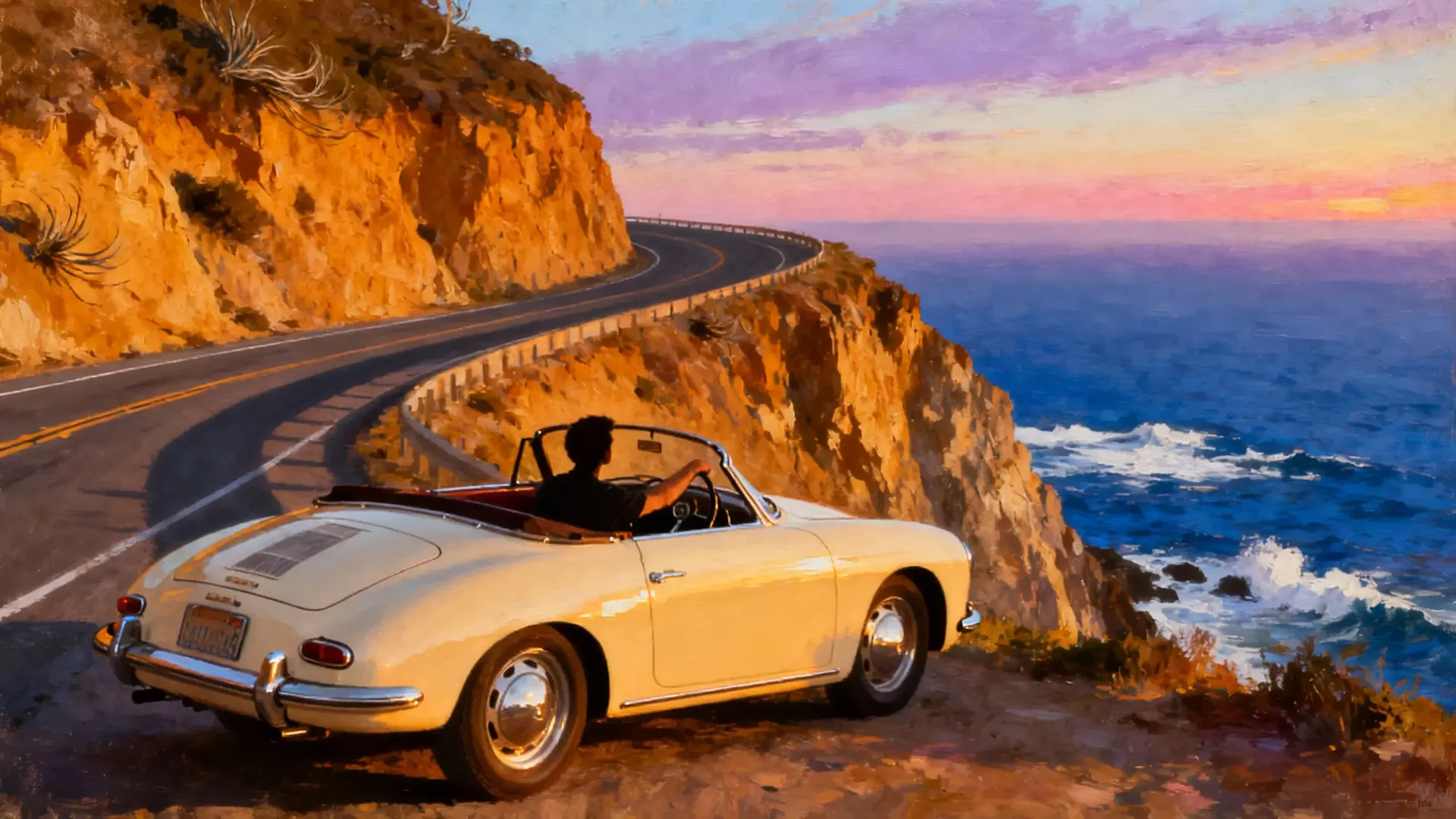
First Frame
camera zooms in as the driver opens the car door and steps out to look at the ocean, wind moving his clothes
First + Last Frame
A Last Frame is a final target image the video transitions into by the end.
You can only use a Last Frame together with a First Frame, there’s no “Last Frame only” mode.
Your prompt should describe what changes during the clip as the scene moves toward the final image.
-900x486.webp)
%20(1)-900x506.webp)
First Frame
Last Frame
the image in the frame slowly transitions from blank canvas to a portrait
You cannot use First/Last Frames together with reference images in the same video. Choose one method or the other.
Creating Loops
If you use the same image for both the First and Last Frame (as two separate files!), the video naturally loops back to where it started.
This works great for simple repeating motions or clips meant to play on repeat without a hard cut.
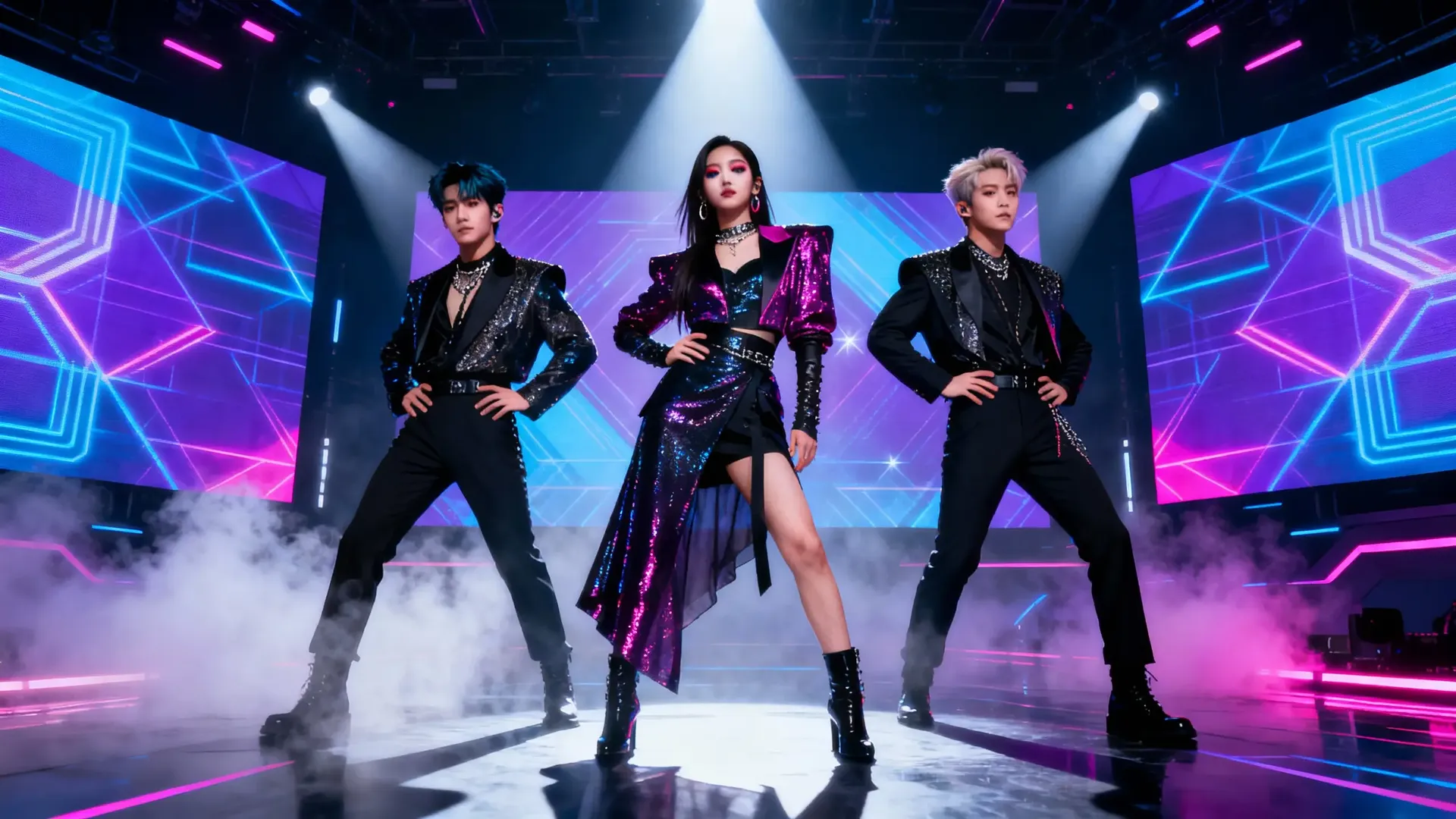
First & Last Frame Image
the K-pop style group does a few complex synchronized dancing moves, then transitions into the starting formation
Prompting With Reference Images
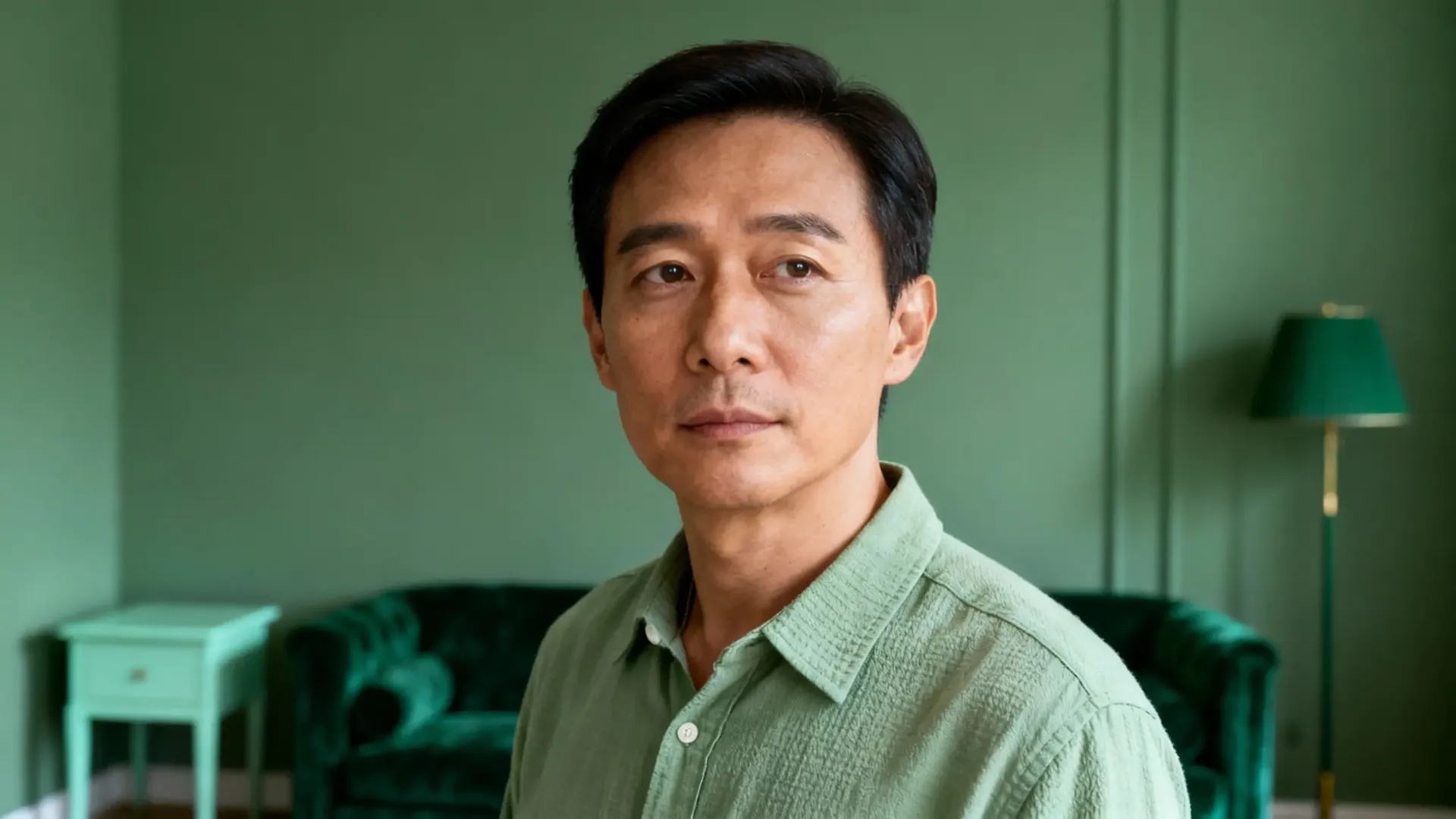
Reference images tell the model what should appear during the video, not how it starts or ends.
For how to attach references, see the Video Reference Images Guide →
Your prompt should describe:
- how the people/objects/places from your reference images behave
- when they appear
- how they interact.
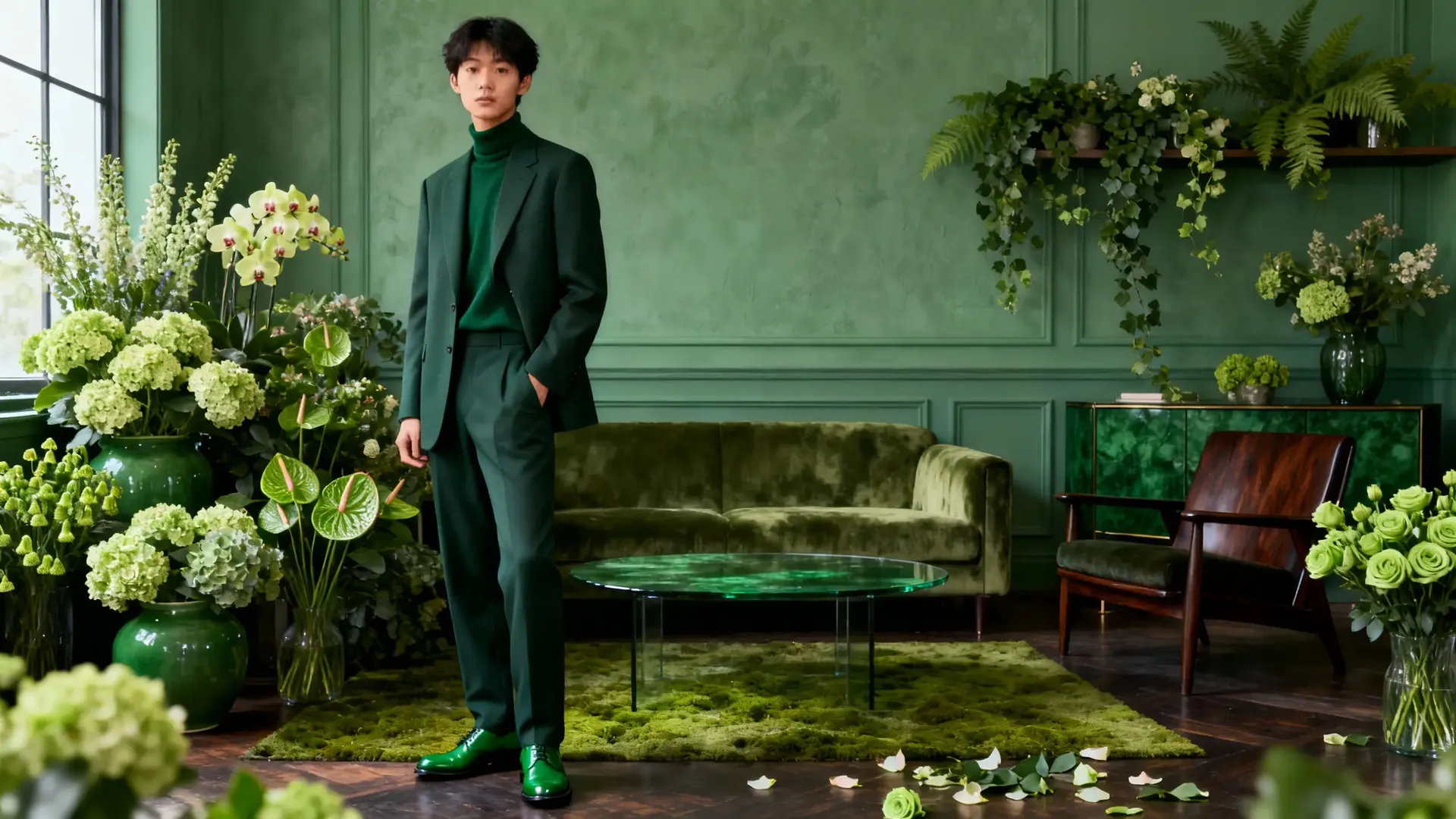
Reference Image 1
Reference Image 2
people from image 1 and 2 meet and shake hands in a green room with flowers
Reference Prompt Patterns
Pattern | What it does | Example line in prompt |
Person from image X | Keeps a specific character | the person from image 1 walks into the cafe |
Object from image X | Inserts product or prop | the car from image 2 drives past the camera |
Space from image X | Uses that environment | the man opens the door and walks into the room from image 3 |
Logo or branding reuse | Keeps branding consistent | the logo from image 1 appears on the billboard in the background |
Mix of person and object | Character interacts with a specific object | the person from image 1 comes out of the elevator, holding the bag from image 2 |
You cannot use First Frame (or First + Last Frame) and Reference in the same generation.
Try a few ideas and build from whatever clicks for you. Once you’re comfortable, you can dig into more focused workflows.
And if you want to explore further, take a look at our Image Generation Prompt Book → (useful for generating first/last frame or reference images!).
For niche-specific workflows, check out these prompt books:
Frequently Asked Questions
To get the most consistent results, think like a director giving instructions. A proven formula is: [Subject] + [Movement/Action] + [Scene/Setting] + [Style/Mood]. Keep your sentences short and visually descriptive. For example: "A golden retriever running through tall grass at sunrise, soft natural light, warm calm mood."
For complex clips involving a sequence of events, use transition words to indicate the passage of time. Use "then" or "finally" to tell the AI what happens next. For example: "Dust floats in a sunbeam. Then a man enters the aisle. Finally, he pulls a book from the shelf."
If you are using a model that supports audio, you can describe music, sound effects, and spoken lines. For dialogue, use a specific format: Speaker: "Line of dialogue". Example: Detective: "Tell me the truth." For non-speech audio, describe the sound clearly, such as "quiet wind and waves" or "distant traffic wash."
You can create a perfect loop by using the First and Last Frame feature. Upload the exact same image file as both the First Frame and the Last Frame. Your prompt should describe an action that fits between those two identical states (like a dance move or a subtle smile), allowing the video to play on repeat without a visible cut.
No. You must choose one method or the other. Use Reference Images when you want to define specific characters, objects, or styles that appear during the video. Use First Frame (or First + Last Frame) when you need to lock in the exact starting image of the clip.