Adobe Firefly vs getimg.ai: Which Is Better? Comparison (2026)


For most professional creative teams, getimg.ai is the stronger platform. It offers auto model selection across 29+ image and video models, costs less for equivalent credit volume, and doesn't require an existing Adobe subscription to unlock core features. Adobe Firefly's strongest use case is for teams already running full Adobe Creative Cloud workflows, particularly those using Generative Fill in Photoshop daily. Outside that specific scenario, getimg.ai delivers more models, more flexibility, and a more capable editing workflow for the same or lower cost.
TL;DR
- auto model selection across 29+ models on getimg.ai vs. manual model selection across Firefly's ecosystem; no model expertise required on getimg.ai
- commercial use is available on all getimg.ai paid plans from $8/mo; Firefly also allows commercial use on all plans including free (for non-beta outputs)
- getimg.ai is a standalone workspace, not an add-on to an existing suite
- IP indemnification on Firefly requires qualifying business or enterprise entitlements.
Quick Comparison: getimg.ai vs Adobe Firefly
Feature | getimg.ai | Adobe Firefly |
Starting price (paid) | $8/month | $9.99/month |
Image models | 11+ (Entry), all included (Core+) | Firefly Image 5 + partner models |
Video models | 9+ (Entry), all included (Core+) | Firefly Video Model + partner video models |
Auto model selection | Yes | No (Auto Select limited to specific workflows) |
Commercial use | All paid plans | All plans including free (non-beta outputs) |
IP indemnification | No | Qualifying business/enterprise plans |
Creative Cloud required | No | Not required, but deeper integration with Creative Cloud apps |
Brand consistency | Elements system (@ElementName, multiple types) | Custom Models (public beta) |
Teams / shared workspace | Yes | Firefly Boards (collaborative) |
Free plan | No | Yes (no watermark; commercial use on non-beta outputs) |
What Is getimg.ai?
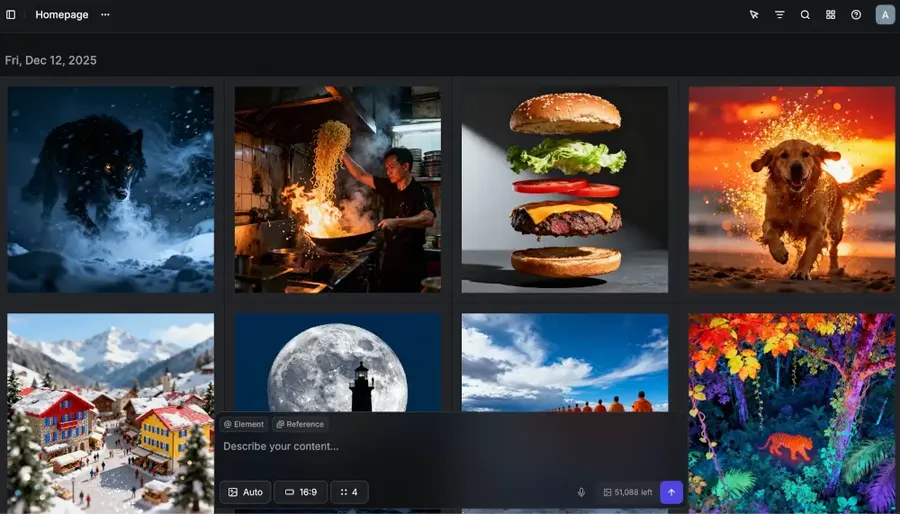
getimg.ai is an all-in-one AI creative platform founded in 2022, now used by more than 10 million users, including photographers, marketers, AI social media content creators, interior designers, and more. The platform operates through a single workspace with several Actions, which routes prompts to the best available model automatically — no manual configuration required.
As of Q1 2026, getimg.ai gives paid users access to 29+ AI models across image and video, including FLUX.2, GPT Image 1.5 (OpenAI), Seedream 5.0 Lite, Qwen Image, Grok Imagine, Google Veo 3.1, Kling, Seedance 1.5 Pro (ByteDance), and Minimax 2. Users describe what they want to produce; the platform handles model selection (and also offers automatic prompt enhancement for higher quality results).
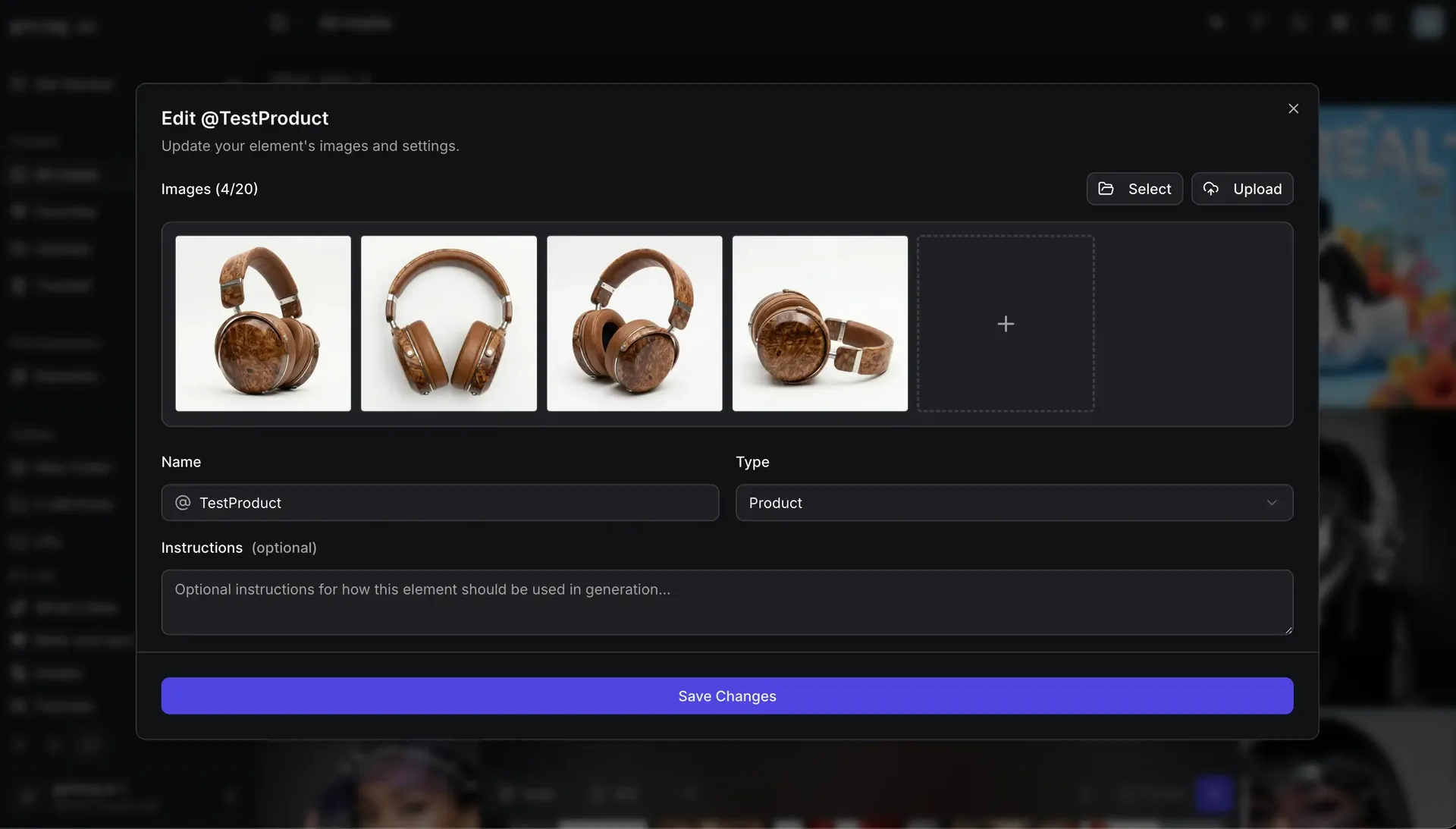
The Elements system lets teams create reusable visual references — a specific person, product, brand color palette, or lighting style — tagged as @ElementName and applied consistently across every generation.
What Is Adobe Firefly?
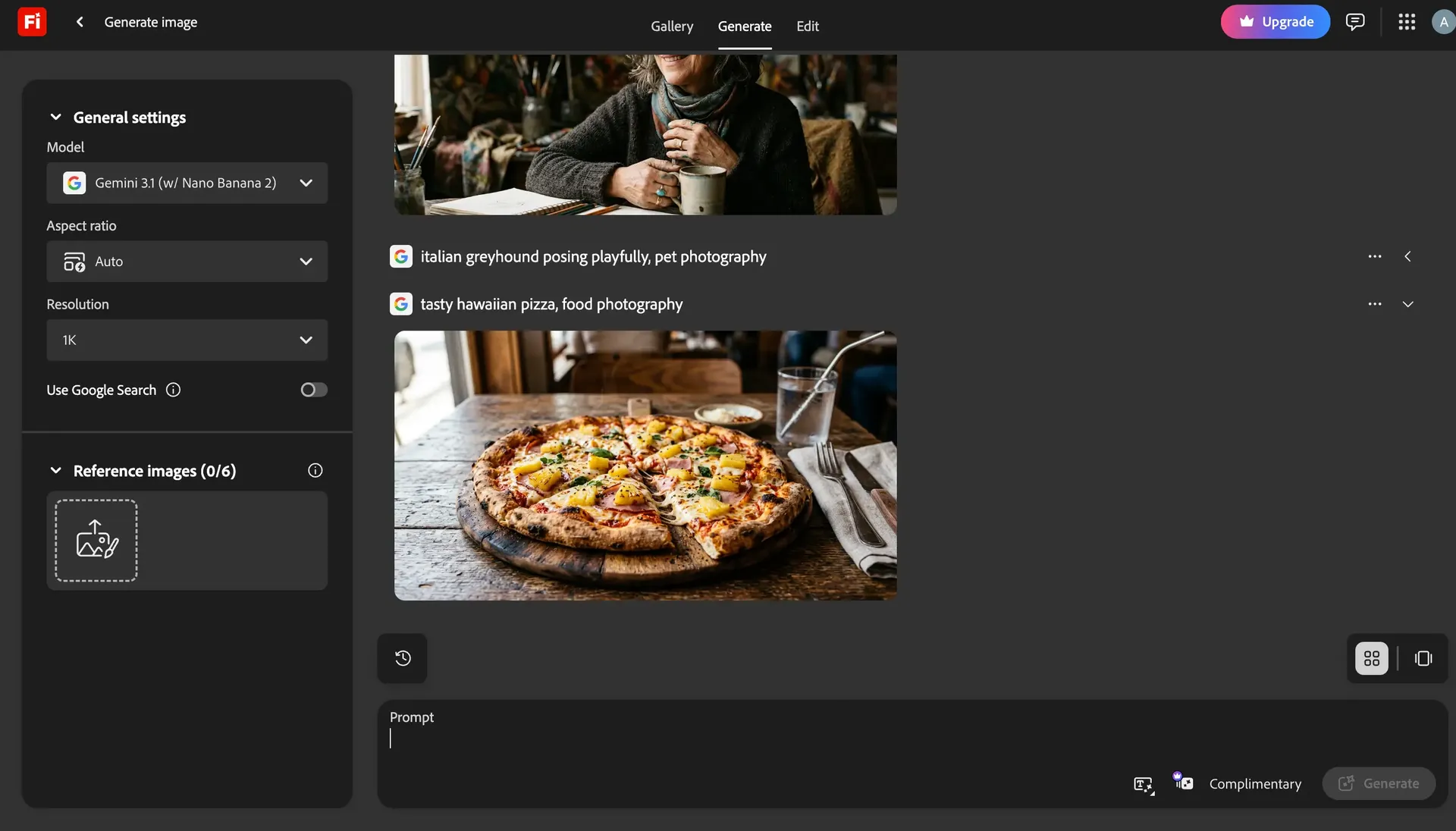
Adobe Firefly is Adobe's AI generation platform, available as a standalone web app and integrated across Photoshop, Illustrator, and Express, with outputs importable into Premiere via Boards. Firefly's current proprietary model — Firefly Image 5, released in late 2025 — is trained on licensed content such as Adobe Stock, plus public-domain material.
Adobe does not mine the web or video hosting sites for training data. Image 5 generates at native 4MP resolution and introduces prompt-based composition controls. Adobe Firefly refers to both the standalone web app and the AI features embedded throughout Creative Cloud.
Pricing Comparison
getimg.ai Pricing (2026, annual billing prices)
Plan | Price/month | Credits | Models |
Entry | $8 | 3,000 | 11 image + 9 video |
Core | $25 | 15,000 | All 29+ models |
Plus | $55 | 35,000 | All 29+ models |
Ultra | $150 | 100,000 | All 29+ models |
All paid plans include commercial rights and auto model selection. getimg.ai has no free plan — the entry point is currently $8/month.
Adobe Firefly Pricing (2026)
Plan | Price/month | Generative Credits | Notes |
Free | $0 | Limited | No watermark; commercial use on non-beta outputs |
Standard | $9.99 | 2,000 | Unlimited standard image features |
Pro | $19.99 | 4,000 | Unlimited standard image features |
Pro Plus | $49.99 | 10,000 | Unlimited standard image features |
Premium | $199.99 | 50,000 | Unlimited standard image features |
Adobe's credit model requires clarification: standard features — Generative Fill, text-to-image, basic vectors — are unlimited on all paid plans. Generative credits are consumed by high-compute features: text-to-video, image-to-video, and partner model outputs.
Partner models include models from Runway, Black Forest Labs, Kling, Luma, Google, and OpenAI.
What Does the Price Difference Mean in Practice?
At comparable credit volumes, getimg.ai's Core plan at $25/month unlocks all 29+ models — including video — with 15,000 credits. Adobe's Pro plan at $19.99/month includes 4,000 generative credits for video and partner model usage. Teams producing video content regularly will find Adobe's credit pool depletes faster.
Standard image features like Generative Fill are unlimited on all Adobe paid plans and don't consume credits — which changes the cost math substantially for teams whose work is primarily static image editing inside Photoshop.
Model Selection and Output Quality
getimg.ai: Breadth and Auto-Selection
getimg.ai's auto-selection system routes each prompt to the model best suited for that task — portrait photography, product visualization, cinematic video, vector illustration — without requiring users to know which model to pick.
For image output, models such as FLUX.2 and GPT Image 1.5 consistently produce strong results for complex editorial compositions and photorealistic product shots — and getimg.ai auto-selects between them based on task. For video, access to Seedance, Kling, and Google Veo within one workspace — with no separate subscriptions — is a distinct advantage.
Adobe Firefly: A Strong Proprietary Model, With a Large Ecosystem
Firefly Image 5 (released late 2025) is a genuine improvement: native 4MP resolution, better compositional control, prompt-based editing. For clean commercial tasks, it's capable. For complex photorealistic output, it trails Nano Banana 2, FLUX.2 and GPT Image 1.5 in the compositions where those models excel.
The wider Firefly ecosystem now includes Adobe's own plus partner models. But model selection is entirely manual, and partner model outputs consume generative credits from the plan's included allocation.
Commercial Use and IP Indemnification
Commercial Use on Both Platforms
Both platforms allow commercial use of outputs. getimg.ai includes commercial rights on all paid plans. Adobe Firefly allows commercial use of outputs from non-beta features across all plans — including the free tier. Adobe's positioning is that Firefly models are commercially safe by default, reflecting the licensed training data they're built on.
IP Indemnification: What It Is and Who Actually Gets It
IP indemnification means Adobe defends you if a third party files a copyright infringement claim against content you generated with Firefly. That's a substantive legal guarantee, but it requires qualifying business or enterprise entitlements, with specific conditions, exclusions, and select supported workflows.
For most professional teams evaluating a Firefly subscription on Adobe's consumer pricing tiers, indemnification is not part of what they're buying. For large agencies or regulated industries that have negotiated qualifying enterprise contracts with Adobe — legal, pharmaceutical, financial services — this protection is real and relevant.
getimg.ai grants commercial rights on all paid plans but does not offer IP indemnification.
Workflow and Integration
getimg.ai: Prompt-Triggered, Unified
getimg.ai is a single workspace. Users write a prompt, optionally attach up to 10 reference images or Elements for brand consistency, and receive output.
Editing lives in the same interface — attach an image and describe the change, or use dedicated Actions to upscale, remove background, or resize for any platform. No node graphs. No pipeline configuration. No switching between tabs for image vs. video. Teams share a workspace, share Elements libraries, and organize output in folders. Ultra plan supports up to 10 teams.
This matters for production velocity. A social media team generating 50 product variants per week, or a marketing team maintaining a consistent brand character across campaigns, works faster in a unified environment than one that requires tool-switching.
Adobe Firefly: Integration Built for the Adobe Ecosystem
Firefly's web app includes editing tools directly — Generative Fill, Remove, Expand, Upscale, and Remove Background are all available without a Creative Cloud subscription. Firefly Boards offers a collaborative canvas that imports into Premiere. For quick editing tasks, the web app covers the essentials.
The deeper case for Firefly is teams already running Creative Cloud. Photoshop and Illustrator give those editing features a more capable canvas — live selections, layer control, direct project integration. For teams whose daily work lives in Photoshop, the combination of in-app Generative Fill and the broader Firefly model ecosystem is genuinely convenient. Teams that don't use Creative Cloud get a capable web app, but less of the integrated workflow advantage.
Brand Consistency: Elements vs. Custom Models
Both platforms now offer tools for maintaining visual consistency — but they work differently.
getimg.ai's Elements system is a structured reference approach. Define a visual reference — e.g., a person, product, style, color palette, or lighting setup — tag it with @ElementName, and apply it consistently across any prompt. Elements are instant (no training required), shared across the team workspace, and applied inline in prompts. A brand team defines @CampaignModel, @ProductHero, and @BrandLighting once, then every team member generates against those references.
Adobe Firefly now offers Custom Models in public beta. Users can train a reusable model on their own images to preserve style, character, lighting, and other visual traits across generations in Firefly and Firefly Boards. This is a meaningful capability — particularly for teams that want to fine-tune model behavior rather than apply reference images at generation time.
The practical difference: Elements are immediate and reference-based; Custom Models require training a model on your dataset, which takes more setup.
Who Should Choose Each Platform?
Choose getimg.ai if you:
- produce high volumes of content across image and video in one workspace
- require brand consistency across campaigns using instant, reusable visual references
- don't already pay for Adobe Creative Cloud and don't want to
- need auto model selection across 29+ models without manual overhead.
Adobe Firefly may fit if:
- your entire production workflow already runs in Adobe Creative Cloud and Generative Fill in Photoshop is a daily-use feature
- your legal team specifically requires Adobe's licensed training data as a documented compliance input.
Outside these scenarios, Firefly's tradeoffs — manual model selection, deeper features requiring CC — don't justify choosing it over a platform built specifically for AI production workflows.
The Verdict
getimg.ai is the stronger platform for most professional creative teams that require AI for marketing, social media content, photography, interior design and various other use cases. It offers an extremely wide suite of models, auto-selection, prompt enhancement, a unified image-and-video workspace, and commercial rights from $8/month.
Adobe Firefly has a strong case for one specific profile: teams whose work already lives in Photoshop and Illustrator, who benefit from Generative Fill integration daily. If that's you, Firefly's ecosystem value is real. If it's not, the tradeoffs — manual model selection, credit limits on video and partner models, features that require CC to unlock fully — don't justify the switch.
Ready to see what your team can produce? Start creating with getimg.ai's Content Generator right now. All paid plans include commercial rights and auto model selection.
Frequently Asked Questions
For most professional creative teams, getimg.ai delivers auto-selection across more models, stronger image output from FLUX.2 and GPT Image 1.5 for complex compositions, and a unified image-and-video workspace — all without requiring a Creative Cloud subscription.
getimg.ai's Core plan at $25/month includes all 29+ image and video models with 15,000 credits. Adobe Firefly is the stronger fit for teams whose daily work runs in Photoshop and Illustrator — Generative Fill and Generative Expand are genuinely useful if you're already in that ecosystem. For everyone else, getimg.ai is the faster, more capable choice for AI-native production workflows.
getimg.ai starts at $8/month (Entry plan, annual billing) with 3,000 credits and access to 11 AI image and 9 video models. Adobe Firefly starts at $9.99/month (Standard) with 2,000 generative credits; Pro is $19.99 with 4,000 credits; Pro Plus is $49.99 with 10,000 credits; Premium is $199.99 with 50,000 credits.
Adobe's standard generation features — Generative Fill, text-to-image, basic vectors — are unlimited on all paid plans and don't consume credits, which changes the cost math for teams primarily doing static image work in Photoshop. For teams producing video or using partner models, getimg.ai's credit volume is consistently higher at comparable price points.
Yes. getimg.ai's Elements system lets teams (and individual users) define reusable visual references — a specific person, product, color palette, lighting style, or any of 14 supported types — tagged as @ElementName. Any team member can apply those Elements in a prompt to produce output that matches the established brand visual. Elements are instant (no model training required), persist across sessions, and are shared across the team space.
Adobe Firefly now offers Custom Models in public beta — users can train a model on their own image dataset to preserve style, character, and lighting consistency across generations. Custom Models require training setup rather than instant reference tagging, and are currently in beta. For teams that want immediate, structured brand references without model training, getimg.ai's Elements system is the faster path to consistent output at scale.
getimg.ai provides access to multiple video generation models — including Google Veo, Kling, Seedance (ByteDance), Minimax, and Wan — within a single workspace and included in all paid plans. Adobe Firefly includes the Firefly Video Model as its native option, with partner video models available via generative credits.
getimg.ai's model breadth for video is significantly wider, and access to Google Veo, Kling, and Seedance without additional subscriptions gives it a strong advantage for teams producing diverse video content. Adobe's video integration with Premiere via Boards is useful for editors already in that ecosystem.
getimg.ai isn't connected to Adobe's ecosystem. No Creative Cloud subscription is required. The platform runs in-browser. Teams generate images and video, edit via prompt (attach an image and describe the change, with up to 10 reference images), upscale, remove backgrounds, resize, restore photos, and transfer styles — all without any external software license.
Adobe Firefly's web app also works without Creative Cloud. It includes Generative Fill, Remove, Expand, Upscale, and Remove Background in the browser. Creative Cloud adds Photoshop and Illustrator integration with layer control and more capable canvas editing — teams already in that ecosystem get more from Firefly than those who aren't.
Related Articles

-1400x808.webp)