Meet Kling O1: The World's First Unified AI Video Model, Editing Included

AI video is amazing, but until now, it’s been a "take it or leave it" deal. If a generated clip was 99% perfect but had one tiny glitch, you usually had to scrap the whole thing and start over. Kling O1 changes that completely. It is the world’s first Unified Multimodal Video Model, and here is why that is a total game changer.
⚡ TL;DR: Meet Kling O1: The First Unified AI Video Model
- The Breakthrough: the world's first Unified Multimodal Model.
- Identity Consistency: solves the AI "shapeshifting" problem by using reference images to lock in characters and props, ensuring they look the same across different shots.
- Audio Note: Kling O1 is a visual specialist (no sound). If you need native AI audio generation, check out Kling 2.6 instead.
What Does "Unified Multimodal" Actually Mean?
Think of traditional AI video creation like an assembly line: one robot builds the car (generation), but if you want to paint it red, you have to move it to a completely different building with a different robot (editing software). It's clunky and disconnected.
A tired office worker sits alone at a long conference table in a glass high rise at night, city lights glowing below. The camera starts far away behind the worker, then glides slowly forward along the table surface, passing scattered documents and a flickering laptop screen, until it reaches a close-up of the worker’s face as they rub their eyes and lean back in the chair.
Kling O1 replaces the assembly line with a single master craftsman.
It utilizes Multi-modal Visual Language (MVL), which means it treats your text, images, and video clips as one single, fluid language. It understands that the word "cat" and the pixels of a cat are the same concept.
Because it speaks every language fluently, it runs on a Unified Architecture. You don't need a pipeline of different tools to generate, mask, and repaint. Whether you are creating a scene from scratch or editing a specific pixel, the same brain is doing the work in the same place.
A figure standing on a rooftop turns slowly toward the camera, coat rippling in the wind as the city skyline stretches out in soft haze behind them. As they pivot, their body breaks apart into hundreds of small black birds that burst upward, swirling around the lens before scattering into the sky. The camera follows the flock with a rising crane movement, catching golden hour light glinting off the rooftops and the fading silhouette of the disintegrating figure.
The Era of "Conversational Editing"
For anyone who has ever spent hours manually masking a subject in After Effects, this feature might actually make you weep tears of joy.
Kling O1 turns complex post-production into a casual chat. Because the model creates and understands the video pixel-by-pixel, you can edit it using natural language.
- Want to change a sunny park to a moody, rain-soaked evening? Just ask.
- Need to delete the random bystanders in the background? Tell Kling O1 to "remove the people behind the main character," and it performs pixel-perfect surgery.
- Trying to swap a t-shirt for a tuxedo? It understands the context of the body and fabric physics.
No rotoscoping, no keyframes. Your prompt is now your editing suite.
This feature is coming soon.
Solved: The "Shapeshifting" Problem
The biggest headache in AI filmmaking has always been consistency. You generate a great character in Shot A, but by Shot B, they look like their second cousin, and by Shot C, they’re a different person entirely.
Kling O1 introduces industrial-grade consistency. By allowing you to upload multiple reference images, the model "locks in" the identity of your characters, props, and settings. It acts like a strict continuity director, ensuring your protagonist looks the same whether they are standing still, running, or viewed from a dramatic low angle.
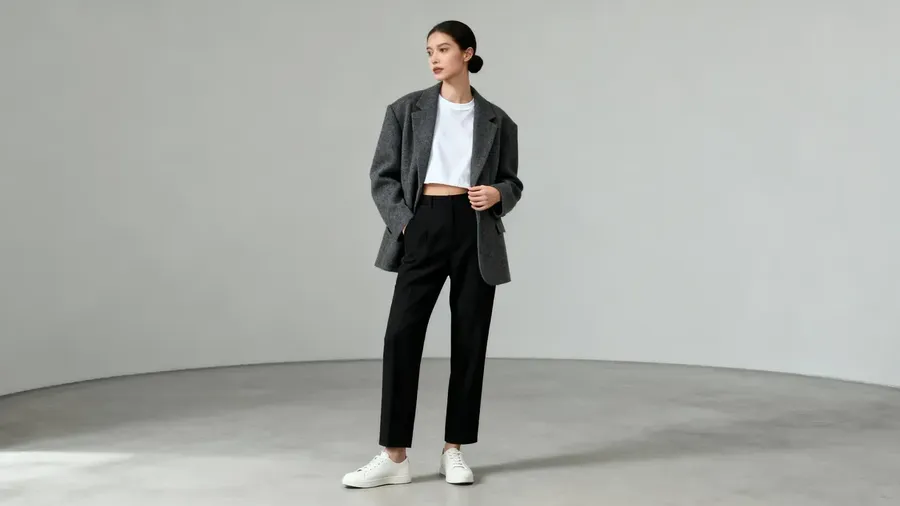
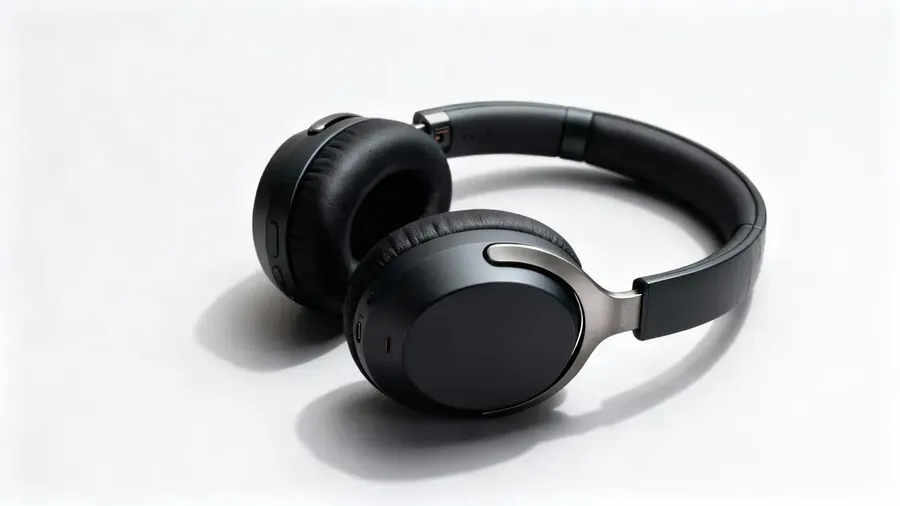
Reference Image 1
Reference Image 2
The woman from the reference image opens a wooden tech box at a wooden table in a well-lit room. She lifts out the same black headphones shown in the reference and turns them slowly in her hands as the camera performs a gentle push-in from a three-quarter angle. She adjusts the headband, tests the hinge, and places the headphones over her ears while natural afternoon light filters across the scene. Clean, realistic product handling and subtle changes in exposure as she moves.
Whether you are creating a digital fashion runway, a narrative film, or a product commercial, the subject remains the subject.
You're in Control
Narrative isn't just about pretty moving pictures; it's about pacing. Kling O1 gives you the reins on duration, supporting generations between 5 and 10 seconds. This allows for everything from quick, punchy cuts to longer, lingering cinematic shots.
A makeup compact lies open on a marble surface, surrounded by dried rose petals. The camera starts close on the textured powder, then pulls back while slowly spinning, revealing the whole arrangement as if it were a still life painting shot with a moving camera.
Furthermore, you have total control over the movement. You can provide a references to dictate the content of the video, or use First and Last Frames to tell the model exactly where a scene should begin and where it needs to land. It bridges the gap between "random generation" and "intentional directing."
One Small Catch (And a Big Solution)
If Kling O1 has a kryptonite, it’s that it is a visual specialist. It has eyes, but no ears. It does not generate native audio.
However, if sound is what you’re after, you are in luck. Kling 2.6 was released roughly around the same time! It is the first Kling model featuring native audio support, and it is a powerhouse in its own right.
If you need your video to roar, talk, or sing, check out our blog post about Kling 2.6 or head straight to the Content Generator to test it out.
How to Speak "Kling O1": A Prompting Guide
Because Kling O1 is a new breed of model, it thrives on structure. To get the best results, try thinking like a screenwriter. Here is the formula for a perfect prompt:
1. The Structure
Combine these four elements in order:
[Detailed description of elements you want to use] + [Interactions/actions] + [Environment/Background] + [Visual style/Lighting]
A person rides in the back seat of a moving car, looking out the window. The camera is positioned outside, tracking alongside the vehicle at the same speed. Reflections of passing buildings sweep across the glass while the subject remains visible through the shifting layers, creating a realistic, visually rich composite of motion and portrait.
2. Editing Prompts
Keep it direct.
- To Add: "Add [object] to the video."
- To Remove: "Remove [object] from the background."
- To Modify: "Change the [subject's] clothes to a red tuxedo."
3. Controlling the Camera
Don’t leave the angle to chance. You can specify "close-up," "wide shot," or "drone view." Even better, Kling O1 accepts Video References. If you have a clip with a camera movement you love, upload it, and Kling O1 can mimic that motion in your new generation.
A person stands in front of a large floor mirror in a dim bedroom. The camera sits slightly off-center, catching reflections at an angle. The person reaches out, and the mirror surface ripples like water. They step forward into their reflection and vanish inside it. The camera moves closer, showing the mirror now still and empty.
Don’t know anything about camera angles and effects? Check out our AI Video Prompt Book!
Stop Hoping, Start Editing
The days of crossing your fingers and hoping the AI gods smile on your random seed number are coming to an end.
Kling O1 gives you the tools to act less like a gambler and more like an editor. The creation feature is live right now in getimg.ai. Go give it a try!
Related Articles