getimg.ai vs Craiyon: Quality, Features & Pricing Comparison (2026)

-900x502.webp)
For professional use, getimg.ai is in a different category entirely. Craiyon made AI image generation accessible to everyone in 2022 — that was genuinely valuable. But its own image models carry a visible quality gap versus modern architectures like FLUX.2 and GPT Image 1.5: a plasticky, artificial sheen that shows on photorealistic work, product shots, and anything requiring compositional precision. There's no teamwork feature, no brand consistency system, and significantly shallower video generation. Craiyon is a consumer on-ramp; getimg.ai is a production platform.
TL;DR getimg.ai vs Craiyon Comparison
- Craiyon builds its own image models (now on v5), but output quality lags visibly behind FLUX.2, GPT Image 1.5, and Nano Banana 2 (available on getimg.ai).
- Craiyon Professional ($20/mo) delivers lower output quality than getimg.ai Entry ($8/mo) — worse results at a higher price.
- Craiyon free tier includes watermarks, wait times, and limited image count; commercial use is allowed but requires attribution on free accounts.
Quick Comparison: getimg.ai vs Craiyon
Feature | getimg.ai | Craiyon |
Starting price | $8/mo (Entry) | $0 (limited, limited features) |
Output quality | The best possible models from all top labs | Craiyon's own models (v5); visible quality gap vs other model families |
Commercial rights | All paid plans, no attribution required | All account types, attribution required on free tier |
Watermarks | No | Yes (free tier) |
Wait times | No | Yes (free tier; priority queue on paid plans) |
Team workspace | Yes, shared Elements, folders, multi-user | No |
Brand consistency tools | Elements system (@references, 15 types) | No |
Video generation | Multiple models (Veo 3.1, Kling 3.0 Pro, Seedance 2.5, and more); longer clips, sound, first and last frame control | Short clips from first frame only; Animate feature on paid plans |
Image editing | Retouch, background removal, upscaling 2×, style transfer, photo restoration, smart resize | Retouch with text commands, background removal, upscaling, image-input editing, style presets |
Reference images per generation | Up to 10 | 1 (edit credits apply) |
Prompt languages | 20+ languages | Not specified |
Auto prompt enhancement | Yes | No |
Merchandise printing | No | Yes (t-shirts, apparel) |
API access | Yes, as a separate product with top-up based system; model selection differs from main app | No public API currently |
What Is getimg.ai?
getimg.ai is an all-in-one AI creative platform built for professional visual production. The platform runs 33+ image and video models — including FLUX.2, GPT Image 1.5, Google Veo 3.1, and Seedance 2.5 — auto-selected per task inside a single workspace. Users describe what they want; the platform handles model routing, prompt enhancement, and output.
-900x514.webp)
All paid plans include commercial rights with no attribution requirement and private outputs. The Elements system gives teams reusable visual references — a specific person, product, style, or color palette — that apply consistently across every generation. Teams, folder organization, and shared workspaces are included from the Core plan upward.
What Is Craiyon?
Craiyon launched as DALL·E mini in 2021, rebranded in 2022, and has since built out its own image models — currently on v5, with v6 in development. It's a consumer-focused AI image generation tool, primarily positioned at personal and casual use.
The platform has expanded from basic text-to-image into a broader feature set: a built-in editor, Retouch with text commands, reference image input, background removal, upscaling, style presets, and video/animation on paid plans. Editing features are gated behind monthly edit credits (100–900 depending on plan).
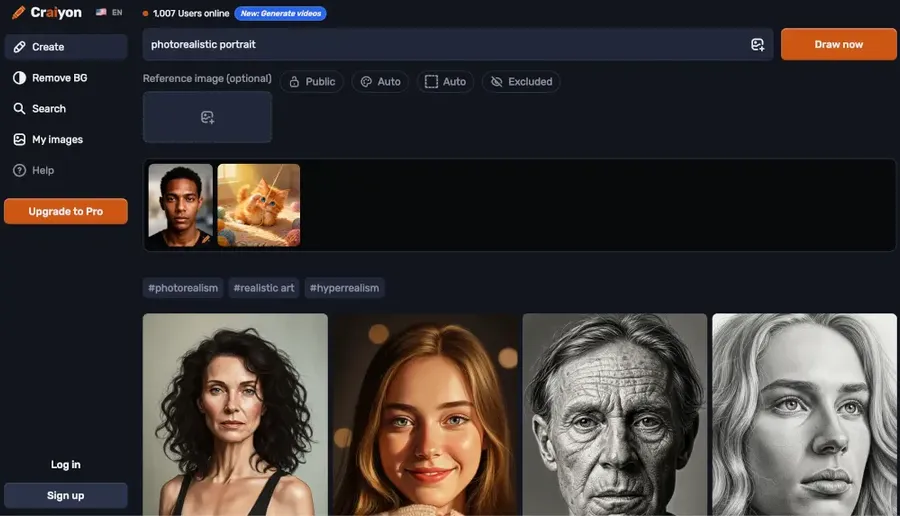
The free tier is limited in image count and functionality, includes watermarks and wait times, and requires attribution on any commercial use. Paid plans start at $10/mo ($120/yr) and remove watermarks and the attribution requirement.
Craiyon's one genuinely distinct feature is direct merchandise integration — generating an image and ordering it printed on a t-shirt or apparel without leaving the platform. It's their only real differentiator. The practical caveat: the output quality from Craiyon's own models means the design you're printing will look noticeably less sharp than what modern platforms produce. Generating on a platform like getimg.ai and ordering through any custom merchandise site separately is more steps — but the end product looks better.
getimg.ai vs Craiyon: The Output Quality Gap
This is where the comparison gets concrete.
As mentioned, Craiyon builds its own image models rather than licensing third-party architectures. The current v5 model represents meaningful progress over the original DALL·E mini — but the output still carries a characteristic quality signature that separates it from platforms running FLUX.2, GPT Image 1.5, or Nano Banana 2: an artificial, plasticky sheen that becomes especially visible on photorealistic work. Skin tones, product surfaces, environmental lighting, and fine material detail tend to look rendered rather than real.


Made with Craiyon v5.
Made with Nano Banana 2.
Photorealism
Craiyon outputs often have a quality floor that makes them look distinctly AI-generated in ways that modern models have largely overcome. Faces can show distortion artifacts. Fine details — hands, product labels, complex textures — are less reliable.
Meanwhile, Nano Banana 2, FLUX.2 and GPT Image 1.5 handle photorealistic product shots for e-commerce, environmental lighting, and human subjects with the fidelity that ad creative and campaign assets require.
Text rendering
Generating images with legible text — a product label, a social post with a headline, a billboard — is often unreliable on Craiyon. Modern models like GPT Image 1.5 render text accurately as part of the image composition. For a marketing team creating mockups or social graphics, this difference affects a wide range of production use cases.
Compositional precision
Complex prompts — specific subject positioning, particular lighting setups, controlled background conditions — produce more variable results on Craiyon than on modern model platforms. Production workflows require predictable output; variability compounds across a campaign.
Style consistency across a batch
If you need ten images that look like they belong to the same campaign, Craiyon's model makes this difficult to maintain without a consistency system. getimg.ai's Elements system makes it structural: define the reference once, tag it in every prompt, and output stays consistent.
None of this dismisses what Craiyon has built. The quality gap is real and observable — not because Craiyon hasn't evolved, but because the best 2026 models have moved faster.
"Free" Has a Real Cost
Craiyon's free tier is available without a credit card, but it's not unlimited. Current Craiyon documentation states that free users have a limited number of images and limited functionality. The free experience also includes:
- Watermarks on downloaded images
- Wait times in the generation queue (priority goes to paid subscribers)
- Attribution required for any commercial use — free users must credit Craiyon.
Commercial use is permitted on all Craiyon account types, including free. The distinction is attribution: free users must credit Craiyon when publishing images; paid subscribers do not. For professional output — client deliverables, paid advertising, branded content — the attribution requirement is a real constraint.
Video Generation: A Meaningful Gap
Both platforms offer video generation. The difference is substantial.
getimg.ai's video generation feature provides access to multiple dedicated video model families — Google Veo, Kling, Seedance (ByteDance), Minimax, Grok Imagine and Wan. You can generate longer clips, produce video with audio, control motion with first frame, last frame, and reference image inputs, and let the platform handle transitions and camera movement automatically.
Craiyon's Animate feature — available on paid plans — generates short clips from a first frame. There's no multi-model access, no sound, no last-frame control, and no extended clip length. For a team that needs video as part of its content production, the capability gap is significant.
Where getimg.ai Is Built for Production Teams
33+ Models, Auto-Selected Per Task
getimg.ai runs 33+ AI models across image and video. The platform auto-selects the most appropriate model for each task. You describe what you want to produce; model routing is handled automatically.
Craiyon runs on its own model. There's no access to third-party architectures and no model selection.
Auto Prompt Enhancement and Multilingual Support
getimg.ai enhances prompts automatically — short, natural-language descriptions produce strong outputs without requiring prompt engineering. The platform supports 20+ languages, so teams working across markets can generate in their native language without a quality penalty.
Craiyon has no equivalent prompt enhancement layer. Teams without prompt-writing experience will get more variable results.
Up to 10 Reference Images Per Generation
getimg.ai accepts up to 10 reference images per generation — useful for brand consistency, style matching, and directing complex compositions without relying on a written prompt alone. Craiyon's reference image input is limited to one reference per generation.
The Elements System: Brand Consistency at Scale
The hardest problem in AI creative production isn't generating a good image once — it's generating 50 images that look like they belong to the same campaign.
getimg.ai's Elements system addresses this directly. You define a visual reference — a person, product, style, color palette, or lighting setup — tag it with @ElementName, and apply it to any prompt. The reference persists across every generation that uses it. A marketing team can define @ProductShot, @BrandModel, and @CampaignLighting once, then generate consistent assets across the entire campaign.
-1920x1093.webp)
Craiyon has no equivalent system.
Teamwork Features
getimg.ai provides a complete creative space for teams, including shared Elements library, uploads, and folder organization.
Craiyon is a single-user tool. There's no team workspace, no shared asset library, and no folder structure. Teams working together on AI-generated assets have to coordinate outside the platform.
Editing Depth
Both platforms offer image editing. The feature sets have overlapped meaningfully as Craiyon has expanded — background removal, upscaling, retouch with text commands, reference image input, and style presets are all available on Craiyon's paid plans.
The getimg.ai editing toolkit goes further: style transfer, photo restoration (colorize, repair damage), smart resize for any platform aspect ratio — all inside the same tab. No tool switching, no re-uploading. The full post-generation workflow happens in one workspace.
getimg.ai vs Craiyon: Pricing Compared
getimg.ai Pricing (yearly billing)
Plan | Monthly Price (When Billed Yearly) | Credits | Key Features |
Entry | $8/mo | 3,000 credits | Private outputs, commercial rights, 11 image models, 9 video models |
Core | $25/mo | 15,000 credits | All 33+ models, teams (up to 2), shared workspace |
Plus | $55/mo | 35,000 credits | All 33+ models, teams (up to 5), high-volume production |
Ultra | $150/mo | 100,000 credits | All 33+ models, teams (up to 10), enterprise-scale output |
Craiyon Pricing (yearly billing)
Plan | Monthly Price (When Billed Yearly) | Edit Credits / mo | Key Features |
Free | $0 | Limited | Watermarks, wait times, attribution required, limited images |
Supporter | $10/mo | 100 | No watermarks, no attribution, priority queue, public images |
Professional | $20/mo | 220 | Private images, priority queue, early access |
Ultra | $70/mo | 900 | Private images, priority queue, early access |
Edit credits are consumed when using image input or retouching. Text-only generation does not use credits. Credits refresh monthly and do not roll over. Craiyon does not currently offer a public API.
The relevant professional comparison is Craiyon Professional ($20/mo) vs. getimg.ai Entry ($8/mo). At that price point, getimg.ai is less expensive and produces significantly higher-quality output, with team spaces, Elements, advanced video, and a deeper editing workflow included.
Craiyon vs getimg.ai: Who Should You Choose?
Craiyon is a narrow fit.
The free tier sounds appealing but comes with limited image count, watermarks, wait times, and an attribution requirement on commercial use — constraints that make even casual use friction-heavy.
Merchandise printing is Craiyon's one distinct feature, though the quality ceiling applies there too: you could generate a sharper design on a modern platform and order it from any custom merchandise site separately, with better results.
The moment quality becomes a requirement, or the output needs to represent a brand, run in a campaign, or be delivered to a client, the quality gap and the absence of team infrastructure are hard blockers.
getimg.ai is the right choice if:
- You're a marketing team, designer, or social media team generating assets for real campaigns
- You need brand consistency across a campaign or content series
- Output quality matters — photorealism, accurate text rendering, precise composition
- You need a shared team workspace with organized, reusable visual references
- You need video alongside images (with sound, multi-model access, and clip length control) without switching platforms
- You want commercial rights included without attribution requirements.
The Bottom Line
Craiyon is a consumer tool with a quality ceiling. Its own models produce output with a visible, plasticky quality gap compared to platforms running FLUX.2, GPT Image 1.5, or Nano Banana 2 — and that shows on every asset that needs to look real. Craiyon Professional at $20/mo delivers worse results than getimg.ai Entry at $8/mo. That's not a marginal difference; it's the reason teams transition.
When production quality, team infrastructure, and commercial use without attribution requirements become the criteria, the platform needs to match them. getimg.ai does — starting at $8/mo, with modern model access, a full editing workflow, team workspace, and commercial rights included from day one.
Start generating production-quality assets with getimg.ai.
Frequently Asked Questions
For professional use cases — marketing campaigns, ad creative, branded content, client deliverables — Craiyon's free tier is not a practical option. The watermarks, wait times, limited image count, and attribution requirement for commercial use are real constraints. Craiyon's paid tiers (Supporter at $10/mo, Professional at $20/mo) remove watermarks, improve priority, and lift the attribution requirement — but don't change the underlying output quality.
The gap between Craiyon's own models and competing models like FLUX.2 or GPT Image 1.5 is visible in photorealism, text rendering accuracy, fine detail, and compositional control. Teams that need campaign-quality assets need a platform built on modern model architectures. getimg.ai Entry at $8/mo is the starting point for that.
Craiyon's free tier costs nothing, but it's limited in image count, includes watermarks, and requires attribution for commercial use. For professional output — no watermarks, no attribution, no wait times, private images — Craiyon's relevant plans are $10–20/mo. getimg.ai Entry starts at $8/mo with 3,000 credits, no watermarks, commercial rights with no attribution requirement, private outputs, and access to 33+ modern image and video models.
At comparable price points, getimg.ai produces substantially higher-quality output with a deeper feature set: team features, Elements, advanced video generation, multilingual prompting, and a full editing workflow. The practical price comparison for professional teams is $8/mo (getimg.ai Entry) vs. $10–20/mo (Craiyon Supporter or Professional) — getimg.ai offers more at a lower cost.
getimg.ai does not offer a free plan. Paid plans start at $8/mo (Entry, billed annually), which includes 3,000 credits, private outputs, commercial rights on all assets with no attribution requirement, and access to 11 image models and 9 video models. Core ($25/mo) and above unlock the full library of 33+ models including FLUX.2, GPT Image 1.5, Google Veo 3.1, and Seedance 2.5.
Craiyon offers a free tier — limited image generation, ad-supported, with watermarks and wait times. If the requirement is zero cost, Craiyon serves that need. If the requirement is production-quality output, the quality difference between the two is significant and visible on the first generation.
Yes — commercial use is permitted on all Craiyon account types, including the free tier. The condition for free users is attribution: images must credit Craiyon when published, using the logos Craiyon provides. Paid subscribers (Supporter and above) are not required to provide attribution.
getimg.ai includes full commercial rights on all paid plans — Entry, Core, Plus, and Ultra — with no attribution requirement and no revenue threshold. For teams producing assets for paid advertising, client deliverables, or product packaging, the practical difference is the attribution requirement on free Craiyon accounts vs. clean commercial rights on any getimg.ai paid plan.
getimg.ai provides access to 33+ AI models. Current image models include FLUX.2, GPT Image 1.5 (OpenAI), Seedream 5.0 Lite, Qwen Image, Z-Image, Nano Banana 2, and Grok Imagine. Video models include Google Veo 3.1, Kling 3.0 Pro, Seedance 1.5 Pro (ByteDance), Minimax 2, and Wan 2.6. The platform auto-selects the most appropriate model per task.
Craiyon builds and runs its own image models — currently on v5, with v6 in development. There is no access to third-party architectures. The practical difference in output — particularly in photorealism, text accuracy, and the absence of the artificial sheen Craiyon's models tend to produce — is the core reason teams move to a platform with modern model access when production quality becomes a requirement.
No. Craiyon states there is no public API at the moment, though they plan to offer one in the future. getimg.ai does offer an API, but it operates as a separate product with top-up based billing system. Not all models available in the main app are available via the API. For teams looking to integrate AI generation into their own workflows or products, it's worth reviewing the API model list separately before building against it.
Related Articles