Gemini Omni: All You Need to Know


Gemini Omni is Google's AI video model that turns a written description, or a starting image with a couple of reference pictures, into a short clip with synchronized sound. It is the point where Gemini's reasoning meets generation: the same model that understands history, science, and how the physical world behaves now uses that understanding to build video. It is available now on getimg.ai.
This article covers where Gemini Omni came from, what it can do, how creators are reacting to it, and how to get good results from it.
What Is Gemini Omni
Gemini Omni generates video from natural language. You describe a scene, an action, and the sound you want, and the model produces a finished clip. You can also start from a single image as the first frame and add up to two reference images to lock in a character, an object, or a look.
What sets it apart from earlier text-to-video models is reasoning. Gemini Omni draws on Gemini's knowledge of the real world, so the clips it makes tend to follow real logic: gravity pulls things down, liquids slosh, a historical scene carries the right details, and a science explainer gets the steps in the right order.
Sound is generated together with the picture, so dialogue, effects, and music land in time with the action rather than being bolted on afterward.
On getimg.ai, Gemini Omni produces clips of 5 or 10 seconds in 16:9 or 9:16, with native audio included.
The backstory: Google's road to Gemini Omni
Gemini Omni did not appear from nowhere. It is the latest step in several years of Google video research and product releases.
The early groundwork came from research projects like Imagen Video and Lumiere, which proved that diffusion models could generate coherent motion rather than a stack of loosely related pictures. Those experiments fed into Veo, Google's first production video model, which arrived in 2024 and could turn a prompt into a short cinematic clip.
Veo 2 followed and sharpened everything: steadier motion, better adherence to the prompt, and a noticeably stronger grasp of physics. Then Veo 3 made the leap that mattered most for everyday creators by generating audio together with the video, so a clip could arrive with dialogue, ambient sound, and music already synced to the picture. Google Veo 3.1 refined that further with reference images and frame control, and it remains one of the strongest video models available on getimg.ai today.
Gemini Omni changes the framing. Instead of a standalone video model, video generation now lives inside Gemini's multimodal family. That means the clip-maker has access to Gemini's reasoning and world knowledge, which is why Gemini Omni handles cause and effect, physical forces, and factual subjects more convincingly than a model trained on pixels alone. It is the same Google lineage that produced the Nano Banana image models, now extended to motion and sound.
What Gemini Omni brings
A better sense of physics
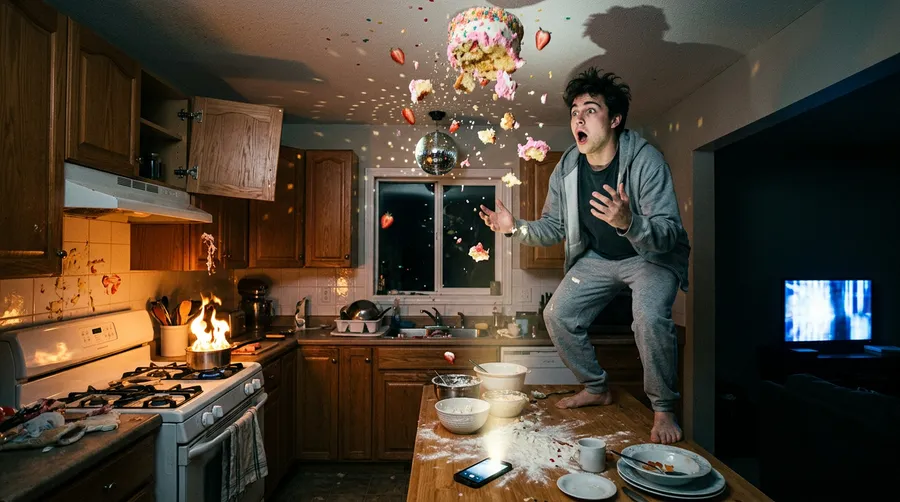
Gemini Omni has an intuitive sense of forces like gravity, momentum, and fluid dynamics, so movement reads more believably than it did in earlier models.
A ball gathers speed downhill, fabric settles, water ripples and pours closer to the way water does. Google frames this as a strength rather than a solved problem: complete physical consistency and very complex motion are still listed as limitations, so the busier the action, the more the prompt has to spell out what happens and in what order.
Gemini's world knowledge
Because it is built on Gemini, the model can ground a scene in real history, biology, math, and narrative logic. Give it a process to walk through or a period to recreate, and it can keep the sequence and the details correct rather than inventing plausible-looking nonsense. That makes it strong for explainers, educational shorts, and any scene that has to be right, not just pretty.
Native, synchronized audio
Every Gemini Omni clip can carry its own sound. You can ask for spoken voiceover, specific sound effects timed to an action, or background music that matches the mood, all generated in step with the picture. You can also steer the other way and ask for realistic ambient sound with no music when you want a grounded, documentary feel.
Text that connects to the action
Gemini Omni is better than most video models at putting words on screen and tying them to what is happening, such as a label appearing for each object in a sequence or words landing one at a time in rhythm with the audio.
Perfectly accurate text is still one of Google's listed challenges, so longer or denser text can come out garbled. Keep on-screen copy short, and generate a couple of variations when the exact wording matters. Used that way it works well for title cards, lower thirds, kinetic typography, and short sizzle reels.
Reference images for consistency
On getimg.ai you can guide a clip with a first frame and up to two reference images. Use the first frame to pin the exact starting shot, and use reference images to carry a specific character, product, or visual style into the video so the result matches what you already have.
How it works on getimg.ai
Capability | What You Get with Gemini Omni on getimg.ai |
Generation Modes | Text-to-video, or image-to-video using a first frame plus up to two reference images |
Clip Length | 5 or 10 seconds |
Aspect Ratios | 16:9 (landscape) and 9:16 (vertical) |
Audio | Native, generated in sync with the video |
You generate it the same way as any other video on getimg.ai: open the Create video generator, describe the scene, add a first frame or reference image if you have one, set your length and aspect ratio, and run it.
What people are saying
Early reception has focused on three things.
The first is world understanding. Creators testing factual and physics-heavy prompts report that Gemini Omni holds cause and effect together better than most video models, which is the part the category still struggles with most. A chain-reaction track or a poured liquid tends to behave the way it should, and an explainer keeps its facts in order, though very complex motion can still wobble.
The second is audio. Sound that arrives already matched to the action, including spoken voiceover and effects timed to a specific moment, removes a whole editing step and is a frequent highlight in hands-on reactions.
The third is benchmark performance. In Google's own evaluations, human raters ran direct side-by-side comparisons across 504 diverse examples, and Gemini Omni rated higher for text to video than models including Seedance 2.0, HappyHorse, and Kling 3.0 Pro.
As always with vendor benchmarks, treat the numbers as a strong signal rather than a final verdict, and judge it on your own prompts.
The Bottom Line
Gemini Omni is Google's most capable video model to date, and its edge is reasoning. By building video on top of Gemini, it produces clips that handle physics more believably, keep their facts straight, and arrive with audio already synced to the action.
On getimg.ai you can use it now for text-to-video or image-to-video with a first frame and up to two reference images, in 5 or 10 second clips at 16:9 or 9:16. For explainers, social shorts, product moments, and any scene that has to feel real, it is one of the strongest options available. Try it now!
Frequently Asked Questions
Gemini Omni is Google's AI video model that generates short video clips with synchronized audio from a text description or from a starting image with reference pictures. It is built on Gemini, so it applies real-world knowledge and physics to what it creates.
Google. It is the latest model in Google's line of video generation work, which includes the earlier Veo models, and it brings video generation into Gemini's multimodal family.
Veo is a dedicated video model. Gemini Omni builds video generation into Gemini itself, which gives it access to Gemini's reasoning and world knowledge. In practice that means a stronger grasp of physics, factual accuracy, and cause and effect, along with native audio generated in sync with the picture.
Yes. Gemini Omni generates sound together with the video, including voiceover, sound effects timed to the action, and background music. You can also ask for realistic ambient sound with no music.
On getimg.ai, Gemini Omni produces clips that are 5 or 10 seconds long.
On getimg.ai, Gemini Omni outputs 16:9 for landscape and 9:16 for vertical formats like Reels, Stories, and TikTok.
Yes. You can set a first frame to control the exact starting shot, and add up to two reference images to keep a character, product, or style consistent in the clip.
It is better at on-screen text than most video models and can connect that text to what is happening on screen, which works well for title cards, lower thirds, and kinetic typography. Perfectly accurate text is still a known challenge, though, so keep wording short and generate a couple of variations when the exact text matters.
Open Create video on getimg.ai, describe the scene and the sound you want, optionally add a first frame or reference image, set the length and aspect ratio, and generate.
Related Articles